Racers who prioritise smooth gameplay
You compare refresh rates, motion clarity and variable refresh rate support, rather than choosing based on screen size alone.


Choose your monitor based on your gaming device, the aspect ratios it supports and the frame rate your kart racing game actually outputs. A fast 16:9 monitor is the simpler choice; ultrawide is mainly worth considering if your PC games support it and you have enough space. More hertz or pixels alone won’t guarantee an advantage, and if you’re considering OLED, check the care guidance and warranty terms.
You compare refresh rates, motion clarity and variable refresh rate support, rather than choosing based on screen size alone.
You want a wider image and can check whether your game supports the format, your PC can output it and you have room for the monitor.
You mainly want a monitor that can handle the right output over HDMI. What matters is what your particular game and console can do, not the highest refresh rate advertised for a monitor.
First check your gaming device and the frame rate the game actually outputs, then consider aspect ratio, placement and the features of the specific monitor.
| Priority | What to check before buying | Who it matters most to |
|---|---|---|
| Smooth motion | Check the refresh rate available through the connection you plan to use, the frame rate the game can actually reach and VRR support. | I care more about smooth visuals during fast changes of direction than an especially wide image; around 27% of consumers prioritise smooth motion. |
| Wide field of view | Check whether the specific game supports 21:9 or 32:9, as well as the screen’s dimensions and your seating position. | If my PC game can output a wide image and there’s enough room in my gaming space, I want more horizontal screen area; around 27% of consumers put a wide image first. |
| Compatibility with your gaming device | Check the gaming device, game mode, resolution, frame rate and suitable HDMI input together. | On a console, I want to use the output supported by my specific kart racing game, rather than pay for monitor specifications it can’t use; around 20% of consumers prioritise console compatibility. |
| OLED care and cover | Read the care guidance and warranty terms for the specific model, and distinguish a voluntary warranty from your statutory consumer rights. | If I’m considering OLED, I want to understand the care involved and what cover is available before buying; around 13% of consumers prioritise durability and care. |
| Space and running costs | Check the monitor’s dimensions, including its stand, against the space available and compare the energy labels of similar displays. | When space is limited, I care more about a suitable fit than extra width; around 13% of consumers prioritise space and energy use. |
A high monitor refresh rate is only useful if the game and device sending the signal can output the corresponding number of frames. Otherwise, you won’t be making full use of the specified refresh rate.
First check the output of the specific game and device, then compare it with the monitor’s connection and refresh rate.
A wider screen won’t automatically change the aspect ratio output by a game. A wider screen and higher resolution also take up more space and can place greater demands on your PC’s graphics output.
Check the aspect ratio supported by the specific game and compare the monitor’s dimensions, including its stand, with the space available.
Static images displayed for long periods can pose a burn-in risk on OLED screens. Manufacturers say protection features help reduce the risk, but they don’t guarantee complete protection.
Follow the care guidance and read the voluntary warranty terms for the specific model separately from your statutory consumer rights.
The TUF Gaming range also includes compact 16:9 monitors. ASUS Germany lists the VG27AQL3A as an example, with a 27-inch screen, 2560 × 1440 pixels and a refresh rate of up to 180 Hz.
LG Germany lists the UltraGear 34GX900A-B as a 34-inch OLED model with 3440 × 1440 pixels, a 21:9 aspect ratio and a 240 Hz refresh rate.
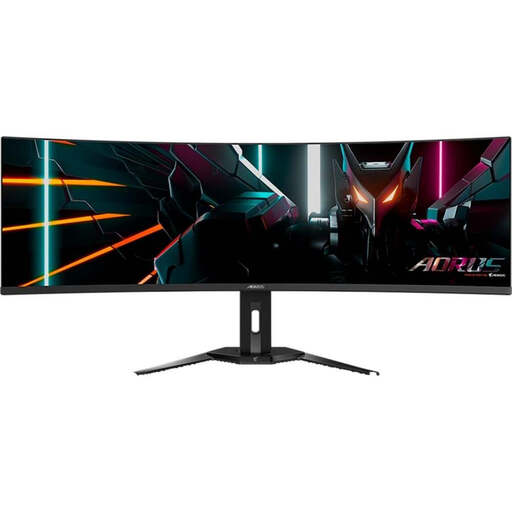
Samsung Germany describes the Odyssey G9 G91F as a 49-inch monitor in 32:9 format with a 144 Hz refresh rate.
MSI Germany lists the MPG 271QRXDE QD-OLED with a resolution of 2560 × 1440 pixels and a 360 Hz refresh rate.
Dell Germany lists the AW3426DW as a 34-inch QD-OLED model in 21:9 format, with 3440 × 1440 pixels and a 280 Hz refresh rate.
The Joybuy products below include fast 16:9 monitors, as well as 21:9 and 32:9 ultrawide models. Check game support for wide formats and care guidance for OLED models.
 No image available
An option for kart racers looking for a fast 16:9 image rather than an ultrawide format.
 No image available
An option if you’re considering a 16:9 OLED model for fast-paced racing and are happy to follow its care guidance.
 No image available
An option for PC players whose kart racing game outputs in 32:9 and who have enough room in their gaming space.
 No image available
An option for racing in a wide format, provided the specific game supports 21:9 and you have room for the monitor.
 No image available
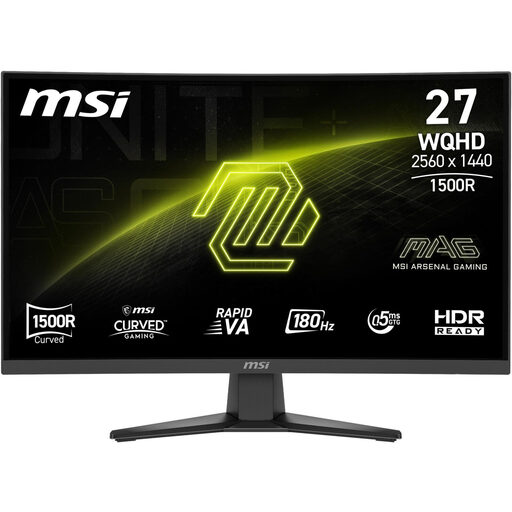
An option for kart racers looking for a fast, curved 16:9 QHD monitor.
No. What matters is the frame rate the specific game outputs on your device. Nintendo gives the Switch 2 a maximum of 60 fps when outputting at 4K; this doesn’t tell you what frame rate a particular kart racing game can achieve.
Before buying, check whether the specific game outputs a wide aspect ratio and whether your PC can handle it. Also measure the space available for the model, including its stand. You’ll only be able to use the extra screen area if the game outputs the right format.
Follow the care guidance for the specific model. MSI lists pixel shifting and panel care as protective features, but static images displayed for long periods still pose a burn-in risk. Manufacturer features don’t guarantee protection against burn-in.
In Germany, consumers who buy online generally have a 14-day right to cancel. If a product is faulty, you have statutory rights against the seller; these are separate from any voluntary manufacturer or retailer warranty.
Compare the published product information and EU energy labels for electronic displays. The European Commission describes a scale from A to G; when comparing, make sure you’re looking at similar displays.