On a small desk, a suitable handheld gamepad is usually the space-saving choice if you want to steer with buttons or a stick. For motion steering, a Joy-Con steering wheel attachment could work, provided you already have the right controller and the game supports this control method. A steering wheel with pedals is only worth considering if it’s compatible with your game and system, and you’ve allowed space for the wheel, pedals and connection.
Who are the different control options for?
Players with limited desk space
If you don’t want to keep space free for a steering wheel and pedals, compare the dimensions of the complete setup with your desk. HORI lists separate dimensions for the wheel and pedals of its Mario Kart Racing Wheel Pro Mini.
Switch players who want to steer by tilting
A Joy-Con steering wheel attachment could suit this way of playing if you already have the right Joy-Con for that generation of attachment. Nintendo notes that the controllers are not included with the corresponding steering wheel sets.
Players using multiple devices or platforms
Before buying, check that the controller, connection and specific game version are compatible. Information from Nintendo, HORI and Logitech G applies to specific products and usage conditions.
What should you check before buying?
Handheld gamepad
A good fit if: you want to steer with buttons or a stick at a small desk and don’t want to set up pedals.
Things to consider: Your platform, game and model need to be compatible; extra features vary by controller.
Joy-Con steering wheel attachment
A good fit if: you want to steer by tilting a compatible Joy-Con and hold the attachment in your hands.
Things to consider: The attachment isn’t a complete controller; you’ll need the right generation and game settings.
Steering wheel with pedals
A good fit if: you specifically want a mounted steering wheel and have room for the wheel, pedals and connections.
Things to consider: The dimensions and connection type may limit how you can set it up on a small desk.
| Priority |
What to check when buying |
Who it matters most to |
| Platform and game |
Check the console or PC, specific game version, full model name and, where applicable, firmware. |
If I switch between devices, I want to know in advance whether the controller and kart racing game will work together. Around 34% of consumers put finding the right platform and game combination first. |
| Space required |
Compare the available desk space, legroom and cable routing with the dimensions of the steering wheel and pedals. |
If my desk is small, I want the controls to leave room for my screen and hands. Around 33% of consumers are most concerned about the space needed. |
| Steering method |
Check the controller’s motion controls and the settings in the specific game. |
If I want to steer by tilting, I need a compatible controller and the corresponding game setting. Around 20% of consumers prioritise this way of steering. |
| Additional parts |
Check what’s included, which controllers you already have and whether you need a dock or any connections. |
If I want to keep using accessories I already own, I want to know whether the attachment is compatible and what else I’ll need. Around 13% of consumers focus on the additional parts required. |
Avoid common buying mistakes
-
Mistaking a steering wheel attachment for a complete controller
Nintendo states that its Joy-Con steering wheel sets are supplied without the corresponding controllers. The attachment won’t work as intended unless you have a compatible Joy-Con or Joy-Con 2.
Before ordering, check what’s included against the controllers you already own.
-
Looking only at the size of the steering wheel
The HORI Mario Kart Racing Wheel Pro Mini needs separate space for the wheel unit and pedals. According to HORI, it connects to the Nintendo Switch dock via USB.
Compare the dimensions of the full setup with your desk space and footwell, and check that you can connect the dock where you plan to use it.
-
Assuming Joy-Con and Joy-Con 2 are interchangeable
Nintendo says the Joy-Con 2 steering wheel is only compatible with Joy-Con 2. The original Joy-Con can be used wirelessly with a Switch 2, but you can’t attach them to the console or charge them there.
Before deciding, check that the controller, attachment and charging option are right for your console generation.
Key brands to consider
Nintendo
Worth considering for handheld controllers and Joy-Con steering wheel attachments designed for specific Switch systems and games.
- Nintendo describes separate steering wheel attachments for Joy-Con and Joy-Con 2, as well as motion controls on the Switch 2 Pro Controller.
- The steering wheel attachments don’t include Joy-Con; the right generation and game settings are essential.
HORI
The Mario Kart Racing Wheel Pro Mini is a steering wheel and pedal option for use with a Nintendo Switch dock.
- HORI lists the external dimensions of the wheel and pedals, as well as the USB connection to the dock.
- According to HORI, the model can’t connect directly to the Switch console and doesn’t have a gyroscope.
Logitech G
The F310 is a wired gamepad option for PC games, provided the specific game supports gamepad input.
- Logitech lists a 1.8 m USB cable, as well as XInput and DirectInput.
- Logitech says DirectInput requires software installation; this doesn’t mean the controller is compatible with Nintendo Switch.
8BitDo
The Ultimate 2C Bluetooth Controller is a handheld controller option for the Switch systems specified by the manufacturer.
- 8BitDo lists six-axis motion controls for this model.
- According to the manufacturer, Switch 2 support requires a firmware update; these specifications don’t guarantee better gaming performance.
PowerA
According to the manufacturer, the Enhanced Wireless Controller Rechargeable is a wireless handheld controller option for the Switch systems listed.
- PowerA lists motion controls and compatibility with Switch 2.
- For this model, PowerA lists no C Button and no support for HD Rumble, IR or amiibo NFC.
Joybuy products for kart racing games on a small desk
This selection includes handheld controllers, a Joy-Con steering wheel attachment and steering wheels for different platforms. For each model, check that your specific kart racing game and system support the controls.
 No image available
Nintendo Switch 2 Joy-Con 2 2-Piece Set (Blue/Light Yellow)
A handheld controller option for Switch 2 if you don’t want to set up a separate steering wheel and pedal unit on a small desk.
Listed as a 2-Piece Set in Blue/Light Yellow; check which control methods the specific game supports.
View at Joybuy
 No image available
EasySMX D10 Wireless Bluetooth Gamepad
A handheld alternative to a mounted steering wheel, provided it’s supported by your specific game and device.
The product title lists PC, Switch, Android and iOS. Check support for your specific platform and game version.
View at Joybuy
 No image available
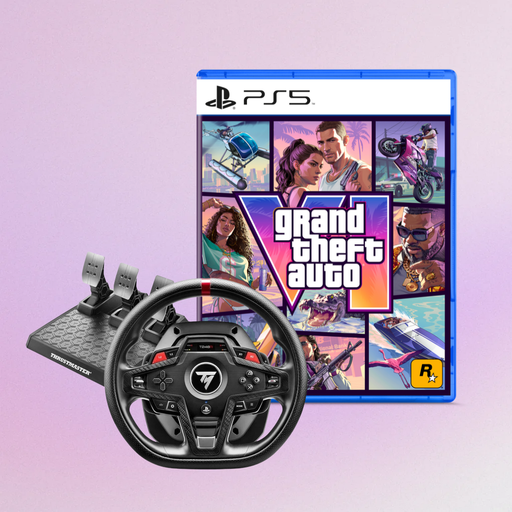
Thrustmaster T248R Racing Wheel (PS5/PS4/PC) + Grand Theft Auto VI PS5 German Edition
A steering wheel option if you want a dedicated setup and your kart racing game supports the model on your system.
The product title lists PS5, PS4 and PC, as well as a Grand Theft Auto VI PS5 German Edition code-in-box bundle. Check that your specific racing game supports the controls.
View at Joybuy
 No image available
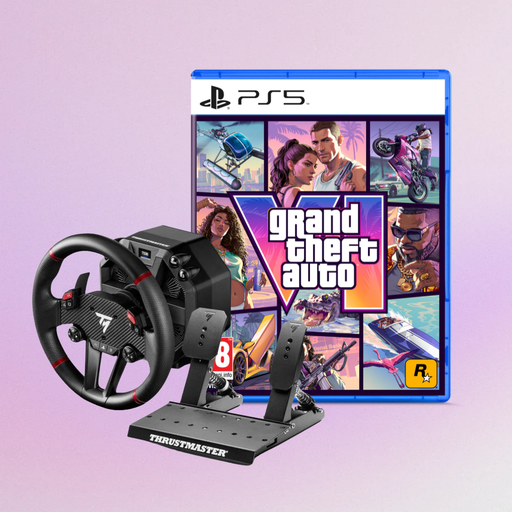
Thrustmaster T598-P Direct Axial Drive Force Feedback Racing Wheel (PS5/PS4/PC) + Grand Theft Auto VI PS5 German Edition
A steering wheel option for a dedicated setup, provided your kart racing game supports the model on your system.
The product title lists PS5, PS4 and PC, as well as a Grand Theft Auto VI PS5 German Edition code-in-box bundle. Before buying, check compatibility with your specific game and platform.
View at Joybuy
 No image available
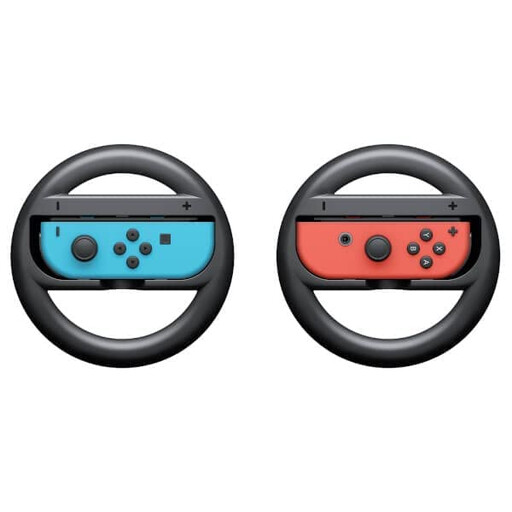
Nintendo Switch Joy-Con Wheel Pair
A handheld attachment for Joy-Con if you want to steer by tilting in a compatible Switch game.
Nintendo notes that the Joy-Con aren’t included with the steering wheel pair. Check that you already have the right generation of controller.
View at Joybuy
Frequently asked questions
Do I need an extra controller for a Joy-Con steering wheel attachment?
Yes, if you don’t already own a compatible controller. Nintendo says the Joy-Con steering wheel pair doesn’t include the original Joy-Con, and the Joy-Con 2 steering wheel set doesn’t include Joy-Con 2. Before buying, check that the attachment and controller are from the same generation.
How do I turn on steering by tilting?
According to Nintendo, you can switch motion steering on or off in Mario Kart 8 Deluxe when choosing your vehicle or during a race. For Mario Kart World, Nintendo says to enable motion controls in the “Settings/Controllers” menu. You’ll need a controller that supports motion controls.
Can I connect the HORI Mario Kart Racing Wheel Pro Mini directly to a Switch?
No. According to HORI, it connects to the Nintendo Switch dock via USB, not directly to the console. Make sure you also have room for the separate pedals.
What are my rights if a controller bought online in Germany is faulty?
The Verbraucherzentrale distinguishes between statutory rights for faulty goods and a voluntary guarantee. It also explains that online purchases generally come with a 14-day right to cancel; the requirements and possible exceptions depend on the specific purchase.


