Choose a wheel and pedal set to suit your kart game and PC; support for multiple monitors needs to be provided and configured separately by the game and graphics setup. PiBoSo confirms support for DirectInput-compatible controllers and triple-monitor setups in Kart Racing Pro, but does not provide pre-configured wheel profiles. NVIDIA treats Surround setup as a separate display configuration task. A set with a desk clamp can make it easier to get started without a separate rig, while Direct Drive and planned upgrades call for careful checks of the mounting, pedals and package contents.
Which wheels are right for you?
Kart sim racers using multiple screens
If you want to race across multiple monitors, check input support in the specific game separately from its graphics settings. PiBoSo confirms support for DirectInput-compatible controllers and triple-monitor setups in Kart Racing Pro; NVIDIA describes Surround as a separate display configuration.
Beginners racing at a desk
If you want to get started without a separate cockpit, a suitable complete set and a secure mounting solution are key. MOZA says the R5 comes with a desk clamp, while Logitech describes the G923 as having integrated desk clamps.
Racers with a rig they can upgrade
If you might want to change your wheel or pedals later, compare the upgrade options available with each specific set. Thrustmaster describes the T300RS GT as having a replaceable wheel rim; Fanatec lists the components of the CSL-DD bundle separately.
What should you look for when buying?
Kart Racing Pro confirms support for DirectInput-compatible controllers and multi-monitor use, but does not provide pre-configured wheel profiles; NVIDIA describes Surround configuration independently of the input device. So check your game and screen setup first, then consider mounting, feedback and pedals.
| Consideration |
What to check before buying |
Who is it most important to? |
| Game and display compatibility |
Supported input type in the specific game and separate multi-monitor configuration. |
If you want to use a particular kart simulator with multiple monitors, check the game’s controls and display output separately. Around 30% of consumers put this compatibility first. |
| Mounting and space |
Clamp range, desk thickness or rig mounting points, and the space required. |
If your desk or rig needs to accommodate the setup, check the clamp and mounting points in advance. Around 24% of consumers make a suitable mounting solution their top consideration. |
| Wheel feedback |
Drive type and game support; treat torque figures as manufacturer specifications. |
If the type and adjustability of the feedback matter to you, check what your kart game actually supports. Around 18% of consumers prioritise suitable wheel feedback. |
| Pedals |
Number, type and included upgrades for the exact set version. |
If you want to choose throttle and brake pedals to suit your driving style, compare the pedals included rather than relying on the brand name alone. Around 17% of consumers put pedal options and upgradeability first. |
| What’s included and upgrade options |
Included base, wheel, pedals and clamp, as well as accessories sold separately. |
If you want to put together your planned setup without unnecessary extras, compare the full package contents. Around 11% of consumers prioritise what’s included and future upgrades. |
Common misconceptions
-
A wheel won’t automatically set up multiple monitors
Wheel controls and multi-monitor output depend on separate features. A wheel’s specifications alone therefore don’t prove that your game supports three screens.
Check input support in the specific game, then configure the display separately through the game and graphics setup.
-
TRUEFORCE or a product label doesn’t mean Direct Drive
Logitech describes the G923 as gear-driven; TRUEFORCE also requires integration by the individual game.
Check the exact model number and drive type against the manufacturer’s specifications, and make sure your kart game supports the feature you want.
-
The MOZA R3 PC and R3 Xbox are different versions
MOZA describes the PC version as including the ES Lite and the Xbox version as including the ESX. You can’t assume they’re the same just because both are called R3.
Check the full bundle name and the included wheel rim for your platform.
-
A monitor mount doesn’t make a cockpit a complete set
A Dardoo cockpit with a triple-monitor mount, as described by Joybuy, is sold without monitors, a wheel or pedals. You may need to buy these separately.
Check the listed package contents against your existing setup before choosing a cockpit.
Key brands to consider
MOZA Racing
The R3 PC and R5 bundles are Direct Drive sets with a desk clamp; the exact version determines the features and platform.
- MOZA specifies a peak torque of 3,9 Nm for the R3 and 5,5 Nm for the R5. These are manufacturer figures.
- The R3 PC version with ES Lite is different from the Xbox version with ESX. MOZA specifies a maximum desk thickness of 50 mm for the R5 clamp.
Logitech G
The G923 is a gear-driven wheel with pedals and integrated desk clamps.
- Logitech describes it as providing force feedback in supported games.
- TRUEFORCE requires integration by the individual game; Logitech describes the G923 as gear-driven, not Direct Drive.
Thrustmaster
The T300RS GT is a belt-driven set with three pedals, compatible with PC and PlayStation.
- Thrustmaster specifies a dual-belt system and includes the T3PAGT pedal set.
- Other wheel rims and T-LCM pedals are sold separately; their suitability for a particular kart game is not guaranteed.
Fanatec
The CSL DD QR2 Ready2Race is a modular PC bundle with a base, wheel, pedals and desk clamp.
- Fanatec lists the individual components included in the 5-Nm bundle version described.
- Features and claims about this set don’t automatically apply to other Fanatec bundles or game profiles.
PXN
The VD6 W AS is described as a PC Direct Drive set with pedals and a clamp.
- PXN specifies 6 Nm of constant torque and 7 Nm of peak torque for this exact bundle.
- The official product page lists this bundle for PC; don’t assume that platform details apply to other versions without checking.
Wheels and sets at Joybuy
This selection includes racing wheels and pedal sets for PC and console simulators. Check the specific platform version and package contents for your kart game.
 No image available
Thrustmaster T598-P Direct Axial Drive, Force Feedback (PS5/PS4/PC)
For PC racing simulators, if you’re looking for a Direct Axial Drive wheel with a detachable rim and Raceline pedals.
The product description requires the base and pedals to be securely mounted to a stable structure.
View at Joybuy
 No image available
Logitech G923 SE, Racing Wheel + Pedals Bundle
For a desk setup with a racing wheel and pedals; the product description specifies integrated desk clamps.
Before buying, check the exact platform version and drive type: Logitech describes the G923 as gear-driven, and TRUEFORCE requires support from the individual game.
View at Joybuy
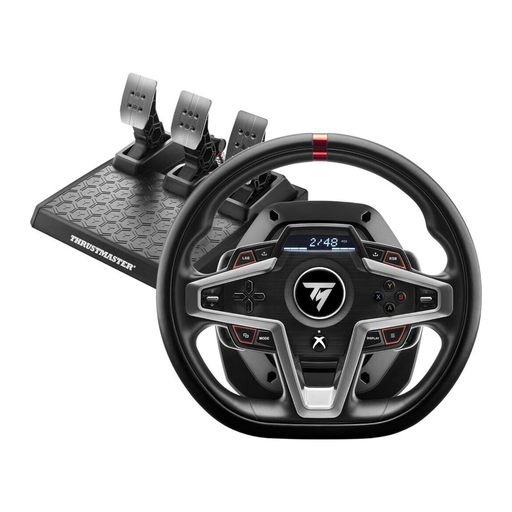 No image available
Thrustmaster T248X Force Feedback (Xbox Series X/S, Xbox One, PC)
For PC racing simulators; the product name also lists Xbox Series X/S and Xbox One.
View at Joybuy
 No image available
Thrustmaster T128-P Force Feedback (PC/PS4/PS5)
For throttle and brake inputs using the included two-pedal T2PM pedal set.
The description specifies a hybrid drive with belt and gear mechanisms. The desk clamp is designed for desks up to 5,5 cm thick.
View at Joybuy
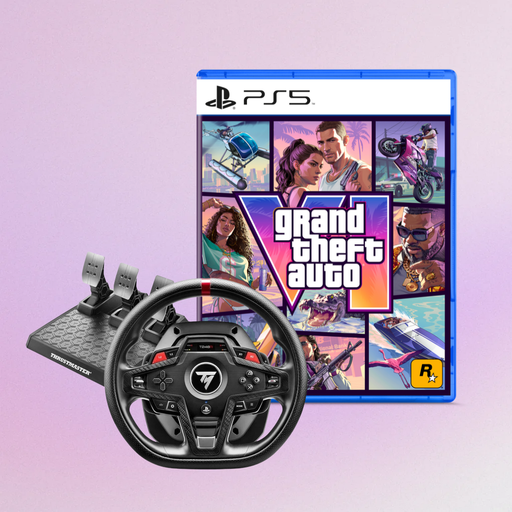 No image available
Thrustmaster T248R Racing Wheel, Black + Grand Theft Auto VI PS5 German Edition (Code in Box)
For PC, PS4 or PS5; the product name also lists a Grand Theft Auto VI PS5 German Edition as a code in a box.
Check that this bundle’s contents suit your planned setup.
View at Joybuy
Frequently asked questions
Do I need a special wheel for three monitors?
No. Multi-monitor support is a feature of the game and graphics setup, not the wheel alone. PiBoSo confirms triple-monitor setups for Kart Racing Pro; NVIDIA handles Surround setup separately from the input device. If you’re using another kart game, check its own support.
How do I set up a wheel for Kart Racing Pro?
PiBoSo confirms support for DirectInput-compatible controllers, but does not provide pre-configured wheel profiles. So check the input type for your specific model and be prepared to configure the controls in the game yourself.
What should I measure for a desk clamp?
Check your desk thickness against the clamp range and make sure the setup is stable. The manufacturer’s support information specifies a maximum desk thickness of 50 mm for the clamp supplied with the MOZA R5; this figure doesn’t automatically apply to other clamps.
Is TRUEFORCE the same as Direct Drive?
No. Logitech describes the G923 as gear-driven; TRUEFORCE is a feature that requires integration by the individual game. Check both the drive type of the specific model and support from your kart simulator.


