Which option is right for you

Mario Kart players with limited space

If you play on Switch or Switch 2 and don’t want to set up a base with pedals, first check which console generation and controllers you have. Nintendo describes the motion controls in Mario Kart World as using a Joy-Con 2; the compatible steering wheel attachment and controller are sold separately.

Kart players with a small desk or cockpit setup

With a steering wheel and pedals, you need to think about more than just desk space: mounting, legroom and cable routing matter too. HORI and MOZA specify different mounting options for their respective models.

PC drivers playing kart simulators

If you want steering feedback in a supported PC game, consider force-feedback sets such as the Thrustmaster T128 or MOZA R3 PC Bundle. Support for the specific game and model variant is key.

What to consider when buying

Joy-Con steering wheel attachment

A good fit if: you play Mario Kart with a compatible Joy-Con and want to keep extra equipment to a minimum.

Keep in mind: The attachment doesn’t include controllers or pedals; original Joy-Con steering wheel attachments aren’t compatible with Joy-Con 2.

Switch steering wheel with pedals

A good fit if: you want to use a separate steering wheel and pedals with a supported Switch game.

Keep in mind: According to HORI, the Pro Mini for Switch 2 is 8.6 inches in diameter and has suction cups; the Pro Deluxe measures 11 inches and also comes with a clamp.

Force feedback on PC

A good fit if: your PC kart game supports the specific steering wheel and you want steering feedback.

Keep in mind: The desk mount and pedals need space; a torque rating alone doesn’t prove compatibility with a kart game.

Priority What to check before buying Who it matters to
Game and platform compatibility Check the game, console generation, controller type and full steering wheel model together. If I play Mario Kart on Switch or Switch 2, I don’t want to accidentally choose accessories for the wrong controller generation. Around 31% of consumers prioritise game and platform compatibility.
Space and mounting Check the desk edge or available floor space, legroom, pedal position and cable routing; if using a clamp, check the maximum desk thickness it supports. In a compact cockpit, I need to know whether the steering wheel and pedals will actually fit and can be mounted securely. Around 31% of consumers put space and mounting first.
Pedals and controls Check what’s included, which controllers you already have and which inputs the game supports. When choosing between a controller attachment and a driving position with pedals, the deciding factor for me is which control setup suits my space. Around 23% of consumers prioritise pedals and controls.
Steering feedback on PC Check support for the specific game, model variant, mounting and space for the pedals. For a PC kart game, I only want to invest in force feedback if the game supports my model and the setup fits my cockpit. Around 15% of consumers prioritise steering feedback.

Common buying mistakes

  • Assuming Switch and Switch 2 steering wheels are the same

    Nintendo distinguishes between accessories for the original Joy-Con and those for Joy-Con 2. HORI also sells separate Pro Mini versions for the two console generations.

    Before buying, check the console generation, controller and full model name together.

  • Measuring only the steering wheel diameter

    A set with pedals also takes up space for the mount, footwell and cables. Suction cups, clamps and desk surfaces each have different requirements.

    Plan for the desk surface and edge, pedal position, legroom and cable routing together; if you’re using a clamp, check the desk specifications.

  • Assuming torque or Direct Drive proves compatibility

    The 3.9 N·m figure quoted by MOZA describes the R3 base’s peak torque, not whether a particular kart game supports it. The PC and Xbox/PC bundles also differ.

    First check that the specific game supports the model variant you’re considering. Only compare torque figures when they’re based on the same measurement method.

Key brands to consider

Nintendo

Joy-Con steering wheel attachments for kart games on the compatible Switch generation, ideal when you have limited space.

  • Nintendo describes using Joy-Con 2 motion controls in Mario Kart World.
  • The Joy-Con 2 steering wheels don’t include controllers or pedals. Original Joy-Con steering wheels don’t work with Joy-Con 2.

HORI

Separate Mario Kart steering wheels with pedals for the original Switch and Switch 2, plus a larger Pro Deluxe version for Switch 2.

  • According to HORI, the Switch 2 Pro Mini is 8.6 inches in diameter and has suction cups; the Pro Deluxe measures 11 inches and can be mounted with suction cups or a clamp.
  • The listed platforms apply to the specific variant named and don’t mean that every HORI model is universally compatible.

Thrustmaster

The T128 PlayStation/PC combines force feedback with a desk mount and a two-pedal set for compatible racing games.

  • Thrustmaster specifies HYBRID DRIVE and the T2PM pedal set for the T128.
  • The stated PC, PS4 and PS5 support doesn’t confirm compatibility with every PC kart game or a Nintendo console.

MOZA Racing

The R3 PC Bundle is a Direct Drive package with pedals and a desk clamp; the Xbox/PC version is a separate variant.

  • MOZA specifies a peak torque of 3.9 N·m for the R3 base and an ES Lite steering wheel for the PC package. According to the manufacturer, the MOZA desk clamp is designed for desks up to 50 mm thick.
  • The Xbox/PC version uses the ESX steering wheel. The torque figure doesn’t prove support for every kart game or compatibility with Switch.

Logitech G

G923 variants for the stated PlayStation/PC or Xbox/PC platforms, offering force feedback for compatible racing games.

  • Logitech G promotes TRUEFORCE as its own technology and specifies 2.3 Nm for the G923 system.
  • The manufacturer’s figure isn’t an independent comparison with other drive systems and doesn’t confirm support for a particular kart game.

Joybuy product selection

This selection includes Joy-Con 2 steering wheel accessories, as well as racing wheels for PC and consoles. Before buying, check that your specific game, platform and chosen model variant are compatible.
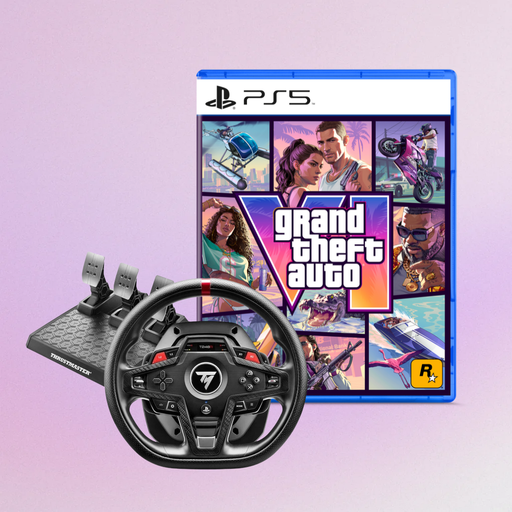
Thrustmaster T248R racing wheel with Grand Theft Auto VI as PS5 German Edition

Thrustmaster T248R Racing Wheel + Grand Theft Auto VI, PS5 German Edition (PS5/PS4/PC)

Could be a good option if you’re looking for a racing wheel for a supported game on PC, PS4 or PS5.

The bundle lists Grand Theft Auto VI as PS5 German Edition, Code in Box.

View at Joybuy
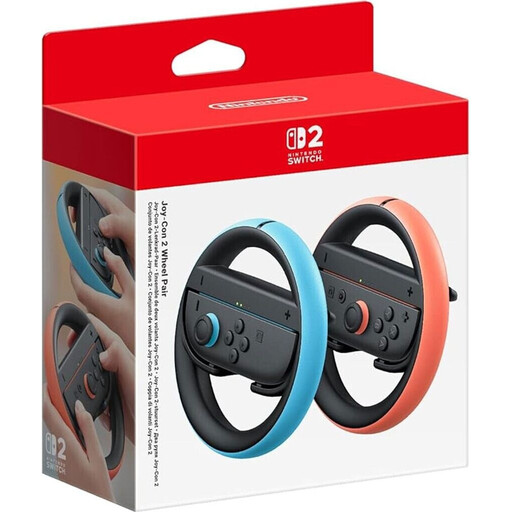
Nintendo Switch 2 Joy-Con 2 steering wheel accessories in light blue and light red

Nintendo Switch 2 Joy-Con 2 Steering Wheel Accessories, Light Blue/Light Red

A space-saving steering wheel attachment for playing a compatible Switch 2 game with Joy-Con 2.

For use with Joy-Con 2 controllers only; controllers aren’t included.

View at Joybuy
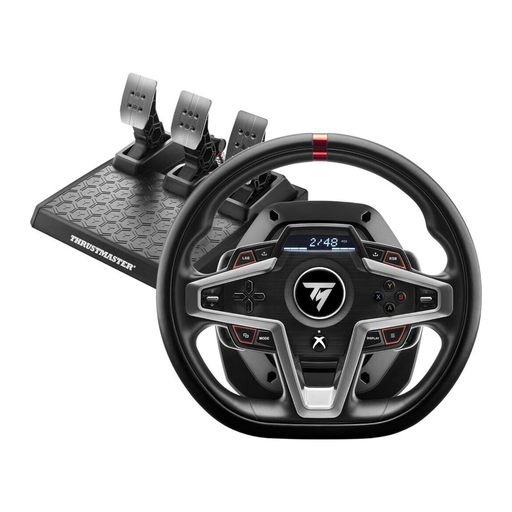
Thrustmaster T248X racing wheel with force feedback for Xbox and PC

Thrustmaster T248X Racing Wheel with Force Feedback (Xbox/PC)

Could be suitable for a supported PC kart game if you want force feedback.

The model name lists Xbox and PC; check that the specific game supports it.

View at Joybuy

Logitech G923 SE Racing Wheel and Pedals Bundle

Logitech G923 SE Racing Wheel + Pedals Bundle (PlayStation/Xbox/PC/Mac)

Could be suitable for a supported PC racing game if you’re looking for a steering wheel with pedals.

The model name lists PlayStation, Xbox, PC and Mac. Make sure you have room for the desk mount and pedal set.

View at Joybuy

Thrustmaster T598-P Direct Axial Drive Force Feedback Racing Wheel

Thrustmaster T598-P Direct Axial Drive Force Feedback Racing Wheel (PS5/PS4/PC)

Could be suitable for a supported PC kart game if you want to use force feedback and a pedal set.

The model name lists PS5, PS4 and PC. Allow space to mount it to a rig or desk, as well as room for the pedals.

View at Joybuy

Frequently asked questions

Will a steering wheel attachment for the original Joy-Con also work with Joy-Con 2?

No. Nintendo states that the original Joy-Con steering wheel isn’t compatible with Joy-Con 2. There’s a separate two-piece steering wheel set for Joy-Con 2, but it doesn’t include controllers.

How do I turn on motion controls in Mario Kart World?

Nintendo’s game settings include a “Motion Controls” option that you can switch on or off. For the setup described, use a Joy-Con 2 with the compatible steering wheel attachment.

Can I use a force-feedback steering wheel without a racing seat?

You may be able to use one on a suitable desk: Thrustmaster specifies a quick-release desk mount for the T128, while the MOZA R3 PC Bundle comes with a desk clamp. Check the mounting requirements and allow room for the pedals; MOZA states that its desk clamp fits desks up to 50 mm thick.

Who pays the return postage for a faulty steering wheel bought online from a German retailer?

According to Your Europe, the European Union’s consumer portal, the retailer pays the return postage for faulty goods. If you change your mind and cancel within the standard 14-day period, you may have to pay the return postage yourself, provided the seller has informed you of this and doesn’t choose to cover it.

What should I check for the safety of an electric steering wheel?

The German Federal Network Agency lists correct CE marking, product traceability and accurate manufacturer details among the checks carried out as part of market surveillance. So check the markings and manufacturer information on the specific product.