For development and keyboard testing, choose a layout that gives you direct, reliable access to the navigation and function keys you need. Customisable keys can make recurring tasks easier. A split design is worth considering if hand position matters to you during long typing sessions, though it may take time to get used to. No keyboard can make the website itself accessible: the World Wide Web Consortium recommends making functionality available via the keyboard and ensuring users can move away from interactive elements.
Which keyboard is right for you?
Developers who test keyboard accessibility
If you test search, filters and contact forms without a mouse, your keyboard layout should support the testing steps you’re familiar with. The World Wide Web Consortium emphasises keyboard accessibility and the ability to move away from interactive elements.
Developers with lots of repetitive tasks
If you regularly switch between your editor, browser and tests, customisable commands can bring recurring tasks together. The functions you can assign depend on the model and how it’s configured.
Heavy typists at a fixed workstation
During long sessions, you could consider a split keyboard layout if you’d like to try a different hand position. This doesn’t guarantee any health benefits; your workstation and how it’s set up also play a part.
What should you look for when choosing?
First, check whether you can access the keys you need directly for your tasks. Then compare customisation options, design and connectivity.
| Buying priority |
What to check before buying |
Who is it important to? |
| Accessing navigation and testing keys |
Layout and accessibility of the keys and key combinations you need |
If I repeatedly test interactive elements and focus behaviour, I want to reach important keys without awkward layers. Around 33% of consumers say reliable navigation testing is their top priority. |
| Customising development commands |
The software you need and how the keys can be mapped once set up |
If you group recurring commands in your editor and browser, check that the customisation suits your working environment. Around 27% of consumers say customisable commands are their top priority. |
| Hand position during long sessions |
Hand position, desk space and the layout of frequently used keys |
If I spend long periods typing at a desk, I want to try a comfortable hand position without losing sight of how easily I can reach important keys. Around 20% of consumers prioritise hand position. |
| German layout and connectivity |
Full variant name, key layout and connection type |
If you want to work with a German layout and a suitable connection, check the exact version against your computer. Around 20% of consumers put layout and connectivity first. |
Avoid common buying mistakes
-
Assuming compact means direct access
According to the manufacturer, the Dygma Raise 2 puts keys such as the arrow and function keys on layers rather than providing them as dedicated keys in the same way. This may mean changing how you carry out frequent tests.
Work through your usual tests and check whether you can reliably access the keys you need using the designated layers.
Allow time to get familiar with the layers and set them up to suit your tasks.
-
Assuming the layout and receiver from the model name
Different versions of the same model can vary in their country-specific layout and wireless receiver. Logitech lists Bluetooth and a USB receiver for the standard ERGO K860; according to its own guide, the ERGO K860 for Business uses Logi Bolt.
Before buying, compare the exact model variant, physical key layout and receiver you need.
-
Relying on an ergonomic design instead of setting up your workstation properly
A split keyboard alone doesn’t guarantee any health benefits. The Federal Institute for Occupational Safety and Health (BAuA) addresses display-screen work as part of workstation design and within the scope of ASR A6.
Consider the keyboard, workstation set-up and working conditions together, rather than assuming a benefit based on the manufacturer’s description.
Key keyboard brands at a glance
Logitech
The ERGO K860 and MX Keys S cater to different needs: a full-size split design and customisable commands, respectively.
- Logitech lists Bluetooth and a USB receiver for the standard ERGO K860, and Smart Actions with Logi Options+ for the MX Keys S.
- Smart Actions require the app mentioned above. The ERGO K860 for Business with Logi Bolt isn’t automatically the same version as the standard ERGO K860.
Keychron
The K10 Pro is worth considering if you’re looking for a mechanical keyboard with QMK/VIA and a German ISO variant.
- Keychron says you can customise keys and macros via VIA.
- Check the specific ISO version: not every keyboard from the brand has this feature.
CHERRY
The KC 6000 SLIM is a low-profile, full-size model with scissor-switch keys and dedicated function keys.
- CHERRY gives the product number JK-1600DE-2 for the German version.
- The manufacturer lists Windows and USB-A as requirements, and says the keyboard has no backlighting. Check the country-specific layout of the exact variant.
Dygma
The Raise 2 is designed for users who want to make deliberate use of detachable halves and configurable keyboard layers.
- According to the manufacturer, arrow, function and number-pad keys, among others, are available through layers.
- German ISO is listed on the configuration page as an additional keycap set. Check this option separately from the standard version.
Perixx
The PERIBOARD-535II is a wired mechanical alternative with a single-piece split design.
- Perixx lists USB-A, programmable keys and a selectable German QWERTZ option.
- The product page also describes a standard US layout and other layouts with a minimum order quantity. Check whether the German version is available to buy individually.
Keyboards at Joybuy
This selection includes keyboards with a German layout or customisable keys, with compact and full-size designs for development and testing.
 No image available
Razer Ornata V3 Tenkeyless, German layout
An option if you’re looking for a compact German layout and customisable keys for recurring testing tasks.
Tenkeyless design, USB connection and programmable keys. The description mentions Razer Synapse for key customisation and a detachable wrist rest.
View at Joybuy
 No image available
Akko MOD68-HE Tri-Mode Wireless
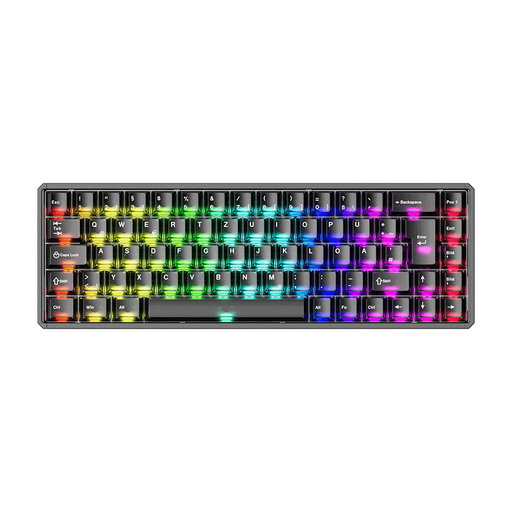
This version could suit you if you’re looking for a customisable German layout and a choice of connection types.
The description lists ISO-DE, key remapping and macros, plus Bluetooth, 2.4 GHz wireless and USB-C. It specifies magnetic switches; mechanical switches aren’t supported.
View at Joybuy
 No image available
Akko 3084B Plus, 75% ISO-DE
A more compact choice if a German layout and configurable inputs are important to you.
The product name specifies a 75% ISO-DE layout. The description lists Bluetooth, 2.4 GHz wireless and USB-C, as well as macros and hot-swap support.
View at Joybuy
 No image available
Akko 5087S V1 TKL, ISO-DE QWERTZ
This wired TKL version is an option if you prefer a German layout and macros.
The description lists macros and hot-swap support. Compatible operating systems include Windows, macOS, iOS and Android.
View at Joybuy
 No image available
CHERRY MX 2.0S, German QWERTZ full-size
If you’re looking for a German full-size layout with function keys you can access directly, this version has the layout to suit.
The description lists 110 keys, USB-A and dedicated multimedia, calculator and browser function keys. The keyboard is wired.
View at Joybuy
Frequently asked questions
Will a particular keyboard automatically make an animal rehoming directory keyboard-accessible?
No. Test the website itself to check whether its functions are available via the keyboard and whether you can move focus away from interactive elements. Hardware specifications don’t demonstrate that the website has these features; the World Wide Web Consortium covers both requirements in its WCAG guidance.
What should I test after setting up a programmable keyboard?
Test your new key mappings again in the programmes you use for development and testing. Logitech specifies Logi Options+ for Smart Actions on the MX Keys S; according to the manufacturer, the Dygma Raise 2 puts keys such as the arrow and function keys on layers.
What should I check before buying a split keyboard?
Check which options and accessories come with the specific version. Dygma lists wireless connectivity and tenting as optional extras; Logitech says AAA batteries are included with the ERGO K860. Also compare the connection you need and whether the set-up will work for your workstation.
Do BITV 2.0 or the BFSG automatically apply to every animal rehoming directory?
No, you can’t determine that from the directory’s subject matter alone. The Federal Government’s Accessibility Centre describes BITV 2.0 as applying to federal public bodies. The BFSG covers certain services in electronic commerce, among other things; its definition refers to an individual request from a consumer in connection with a consumer contract. Whether the specific organisation and rehoming service fall within its scope depends on the circumstances. The BFSG has been in force since 28 June 2025.


