What to look for in a student room
For this workspace, weigh up noise and key layout first, then consider desk space, connectivity and hand position.
| Criterion |
What to look for |
Who is it important to? |
| Typing noise |
Compare the keystrokes of the specific variant; a manufacturer’s description is no substitute for a consistent sound test. |
If I’m typing for long periods in a shared room, I want to disturb others as little as possible. Around 25% of consumers put typing noise first. |
| Symbols and navigation |
Check the physical layout against your operating system’s keyboard settings, and look at the position of frequently used special characters and navigation keys. |
If you often write code examples and use shortcuts when documenting, you need your usual characters to be easy to reach. Around 25% of consumers prioritise key layout and navigation. |
| Desk space |
Check the dimensions and whether you really need a number pad; a split layout can also take up a lot of room. |
If my laptop, mouse and papers all need to fit on a small desk, I’d weigh up the space required against a familiar key layout. Around 20% of consumers prioritise desk space. |
| Hand position |
Allow space to position your keyboard and mouse flexibly, and factor in a period of adjustment for split models. |
During long writing sessions, I’d give hand position more weight than extra features. Around 15% of consumers put this aspect first. |
| Connectivity and switching between devices |
Check whether it uses USB, Bluetooth or a wireless receiver, as well as its battery and charging requirements. Don’t assume features from a business variant apply to other models. |
If I switch between my laptop and another device, or want to keep my desk cable-free, the right connection matters. Around 15% of consumers prioritise switching between devices. |
Joybuy products
The models below include compact and foldable keyboards, as well as full-size wireless options. Compare their layouts, connections and space requirements with your workspace.
 No image available
Inateck Foldable Mini Keyboard N0153BK, QWERTZ
A possible option if you’re looking for a foldable mini keyboard with a touchpad that works with multiple devices.
Three Bluetooth channels; QWERTZ layout. The product title says it’s compatible with iPadOS, Android and Windows.
View at Joybuy
 No image available
Foldable Bluetooth Keyboard with Wireless Mouse
This foldable option may suit you if you’re looking for a compact keyboard with a mouse and the ability to switch between devices.
The title mentions quiet scissor-switch keys, three connection modes and connectivity with up to three devices. USB-C charging; the title says it’s compatible with Windows, Android and iOS.
View at Joybuy
 No image available
CHERRY MX-LP 2.1 Wireless Gaming Keyboard, 65 %, deutsches QWERTZ
Could suit a small desk if you’re looking for a 65% layout with German QWERTZ key mapping.
The title mentions MX Speed low-profile switches, RGB and tri-mode connectivity via 2.4 GHz, Bluetooth or USB-C. Colour: white.
View at Joybuy
 No image available
Ticktype DP104 Tri-Mode Wireless Mechanical Keyboard, 108 Keys, US Layout
May be worth considering if you need a full-size wireless keyboard with a number pad. Check that the stated US layout matches the key mapping you want.
The title mentions 108 keys, silent tactile switches, tri-mode connectivity and an 8000 mAh battery.
View at Joybuy
 No image available
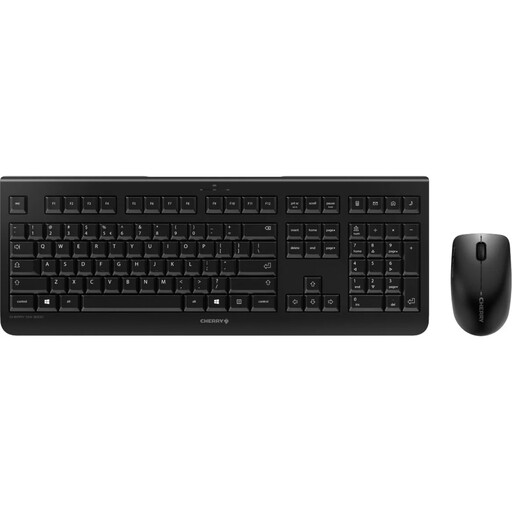
CHERRY DW 3000 Wireless Keyboard and Mouse Set, EU Layout
Could suit you if you’re looking for a full-size wireless keyboard with a number pad and mouse; check the stated key layout before buying.
The title mentions a 2.4 GHz connection, an EU layout and low-profile keys described as quiet. The layout is listed as EU (QWERTY).
View at Joybuy
Frequently asked questions
Do I need a mechanical keyboard for API documentation?
No. Start by checking that the key layout suits you, navigation is easy and the noise level works for your surroundings. Programmable keys can be useful if you often set up your own shortcuts; with mechanical models, the choice of switch can affect the sound.
What should I check first when setting up my keyboard?
Match the physical layout to the setting selected in your operating system, then test it with the characters you use most often. Also check that USB, Bluetooth or a wireless receiver is compatible with your computer. You only need to set up macros if they’ll genuinely help you.
Does Germany’s workplace regulation apply to my private student desk?
Not simply because you’re working at a student desk. The ASR A6 regulation from the Federal Institute for Occupational Safety and Health applies to workplaces and teleworking locations, and excludes use in private homes outside such workplaces. Its advice on ergonomic set-up may still be useful.
What are my rights when buying online in Germany?
For online consumer purchases, you generally have 14 days from receiving the goods to cancel, although exceptions and the specific contract terms should be taken into account. If goods are faulty, you have statutory rights against the seller, generally for at least two years. A voluntary manufacturer’s guarantee is an additional benefit and does not replace these rights.
How should I position my keyboard and mouse on a small desk?
Leave enough room to position the keyboard and mouse comfortably in relation to each other. The Federal Institute for Occupational Safety and Health recommends enough desk space for flexible positioning and support for your hands and arms; choosing a particular keyboard alone won’t determine the right workstation set-up.


