For desktop app testing, start by checking which keys you actually need and where they are on the keyboard. For example, if you need a numeric keypad, a full-size keyboard with a USB connection could be suitable. If space is limited or you need to be considerate of your flatmates, a compact model or a keyboard described by the manufacturer as quiet may be a better fit. For Bluetooth, split layouts and special key functions, check the specific variant and its compatibility. Manufacturer claims about noise levels are not a like-for-like sound test.
Which keyboard features matter to you?
App testers who rely on specific keyboard shortcuts
If your testing requires function keys, arrow keys or a numeric keypad, check the layout and connection of the exact variant before choosing a keyboard type. Logitech lists a numeric keypad on the K120, while CHERRY specifies that the KC 6000 SLIM is a full-size USB-A keyboard.
Testers sharing a room
If other people are within earshot, the feel and sound of the keys may matter. CHERRY describes the STREAM KEYBOARD as quiet, but this manufacturer claim is not an independent comparison with other models.
Testers short on desk space
If you need room for a mouse and monitor as well as your keyboard, weigh up a compact format against the keys you need. The Federal Institute for Occupational Safety and Health recommends having enough desk space to position your keyboard and mouse flexibly.
What should you look for when buying?
| What to consider |
What to check before buying |
Who is this especially important for? |
| Keys you need |
Check the function keys, arrow keys, numeric keypad and layout on the exact variant. If you need to press several keys at once, check the rollover specification. CHERRY does not list N-key rollover or anti-ghosting for the KC 6000 SLIM. |
If I need to reproduce specific test inputs exactly, I compare my list of required keys with the layout. Around 36% of consumers put the keys they need first. |
| Typing noise |
Check the type of keys and the manufacturer’s claims for the specific model. Descriptions such as “quiet” are not a comparable measurement across different models. |
If I’m typing in a shared room, I want to disturb others as little as possible without mistaking a marketing claim for a comparison test. Around 29% of consumers prioritise being considerate of their flatmates. |
| Space requirements |
Weigh up the space available and the keys you need. If you’re considering Bluetooth, also check compatibility with your test device. |
If my desk is short on space, I want to fit my keyboard and mouse comfortably while still being able to reach the keys I need. Around 21% of consumers put available space first. |
| Hand position |
Consider the space available, the layout and how the keyboard feels to type on. A split layout may take time to get used to. |
If I’m planning longer typing sessions, I consider my hand position and whether I’m happy to get used to a different layout. Around 14% of consumers prioritise this. |
Common buying mistakes
-
Choosing a keyboard just because it’s described as “compact”
A small format won’t help much if it’s missing keys or a suitable layout required for your app test.
Compare the keys needed for your specific test with the layout of the variant you’re considering.
-
Assuming “quiet” means a measured comparison between models
CHERRY and Logitech describe certain keys as quiet, but this does not provide a shared, independent comparison of their noise levels.
If possible, assess how the keyboard sounds in the room where you’ll actually be using it.
-
Assuming every variant in a model range will suit your needs
Split layouts may take time to get used to, and keyboard ranges can include models with different layouts and specifications.
Measure your available desk space and check the layout and specification of the exact model.
A guide to the brands
CHERRY
The KC 6000 SLIM is a low-profile, full-size USB-A keyboard. The STREAM KEYBOARD is a wired range that CHERRY describes as quiet.
- CHERRY lists a German layout and the part number JK-1600DE-2 for the KC 6000 SLIM.
- According to CHERRY’s data sheet, the KC 6000 SLIM does not offer N-key rollover or anti-ghosting. CHERRY’s description of the STREAM KEYBOARD as quiet is a manufacturer claim, not an independent comparison.
Logitech
The K120 is a wired, full-size model, while the Pebble Keys 2 K380s is a compact Bluetooth keyboard designed for switching between devices.
- Logitech lists USB plug-and-play and a numeric keypad for the K120. For the K380s, the manufacturer describes Easy-Switch for moving between three devices.
- Check the layout and the keys required for your test on the specific model. Claims about quiet keys come from the manufacturer and are not an independent comparison of noise levels.
Perixx
The wired PERIBOARD-512 B is a split keyboard that can be selected with a German QWERTZ layout.
- Perixx lists USB-A, a numeric keypad and dimensions of 485 × 236 × 44 mm.
- Perixx notes that it can take time to get used to the split layout. An ergonomic design does not prove an individual medical benefit.
Keychron
The K8-Pro-ISO collection is aimed at users who want to customise keys or use mechanical switches.
- Keychron lists QMK/VIA, hot-swappable switches and several ISO country versions.
- The shop page we viewed showed a UK ISO variant. Check that you’re choosing the specific DE ISO version and switch type you need; “K8 Pro” alone doesn’t specify either.
Keyboards at Joybuy
The Joybuy products below include compact Bluetooth keyboards, as well as wired and wireless models for different testing needs. Before buying, check that the layout and keys on the specific version are compatible with your test device.
 No image available
Inateck Bluetooth keyboard, QWERTZ
An ultra-slim Bluetooth keyboard for a compact workspace, provided the layout suits your test inputs.
QWERTZ; Bluetooth; according to the product title, designed for iPad, Windows, Android and iOS.
View at Joybuy
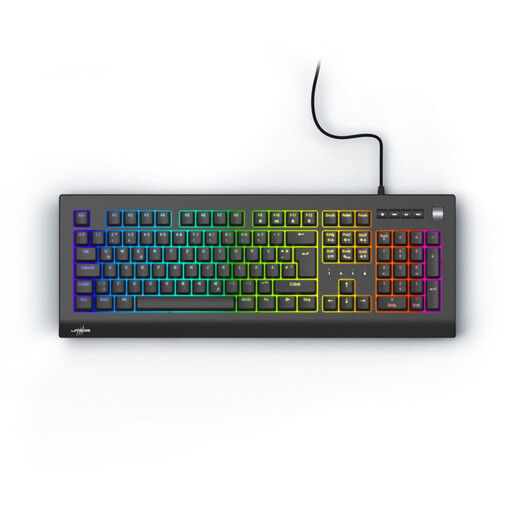 No image available
Exodus 600, Red Switches, QWERTZ DE
A mechanical keyboard with a German QWERTZ layout, if this key arrangement suits your desktop app test.
Mechanical keyboard; Red Switches; QWERTZ DE; black.
View at Joybuy
 No image available
CHERRY MX-LP 2.1 Wireless, German QWERTZ
The compact layout may suit you if you want to save space and this version has the keys your test requires.
65% layout; German QWERTZ; low-profile MX Speed switches; connects via 2.4 GHz, Bluetooth or USB-C; white.
View at Joybuy
 No image available
AJAZZ AK35I V4, German QWERTZ
The full-size German QWERTZ layout could be a good fit if your test requires this key arrangement.
Tri-mode: Bluetooth, 2.4G and USB-C; gasket mount; 10,000-mAh battery; 1.14-inch TFT colour display; hot-swappable switches.
View at Joybuy
 No image available
Logitech MX Mechanical Wireless, German QWERTZ
A wireless option if German QWERTZ and switching between devices suit your testing needs.
Tactile Quiet switches; Bluetooth and Logi Bolt; Smart Backlighting. “Tactile Quiet” is a product name, not an independent comparison of noise levels.
View at Joybuy
Frequently asked questions
Is a compact keyboard suitable for every app test?
Only if its layout covers every input in your test plan. Before choosing a compact model, check the function keys, arrow keys, numeric keypad and layout of the specific variant.
Do I need to set anything up to use a USB keyboard?
Logitech describes the K120 as USB plug-and-play, with no downloads required. You’ll need a compatible USB port; whether your app test requires any additional settings depends on the specific test process.
Can I rely on a keyboard described as quiet to make very little noise?
A manufacturer description such as “quiet” is not an independent comparison. If typing noise matters in your student room, check the type of keys and, if possible, try them in a similar environment.
What should I look for in a split layout?
Check that the keyboard fits on your desk and consider whether you’re happy to get used to the key arrangement. Perixx notes that the PERIBOARD-512 B may take time to get used to.
What should I know about returns or problems after buying online?
According to the consumer advice centre, consumers generally have 14 days from receiving goods ordered online to notify the retailer that they wish to cancel their order (as at 5 August 2026). Before ordering, check the cancellation information and return options for the specific offer.


