
Lieferung heute & morgen

Qualitätsgarantie

Willkommens-Angebote freischalten: KOSTENLOSE Lieferung | Bis zu 80 % RABATT | Kostenlose 30-Tage-JoyPlus-Testphase
App herunterladen
A keyboard is often bought based on its colour, lighting or a striking product promise. In everyday use, however, other factors determine whether it remains suitable: the layout, connection, noise level and suitability for your personal workspace. An RGB keyboard may look appealing, but could be unsuitable for a quiet office. A wireless keyboard frees up space on your desk, but requires batteries or regular charging.
As a Joybuy Product Recommendation Officer, I therefore assess the available information according to practical criteria. This helps you avoid common purchasing mistakes before adding a new keyboard to your basket.
The term “QWERTY” does not automatically describe a German QWERTZ keyboard. With a US layout, among other differences, the Y and Z keys are swapped; umlauts and special characters may also be missing or accessible only via key combinations. If you regularly write in German, look specifically for “DE”, “German” or “QWERTZ”.
Some models in the selection, by contrast, are listed with a US layout. This may suit programmers or users with an international keyboard layout, but it is not automatically the right choice for a standard German layout.
A quiet keyboard reduces typing noise, but still produces an audible sound. Scissor mechanisms and membrane keys are often more discreet in an office than many mechanical switches. Mechanical keyboards can also be quieter with suitable switches and dampening, but they will generally still be noticeable during intensive typing.
Bluetooth, 2.4 GHz wireless and USB cables each have different characteristics. A Bluetooth keyboard is often suitable for laptops, tablets and multiple devices. A 2.4 GHz connection usually requires a USB receiver. A USB keyboard works without wireless pairing and, in wired models, does not require a battery. Before buying, check which ports are available on your computer and whether you need a USB-A or USB-C connection.
A full-size model with a number pad is practical for spreadsheets, accounting and data entry. Compact 75% models, on the other hand, save space while generally retaining function keys, arrow keys and important navigation keys. For example, the AJAZZ AK820 has an 82-key layout in the German QWERTZ format, making it more compact than a full-size office keyboard.
Special keys, volume controls and the position of the function layer are also important when making your choice. A rotary dial can simplify media control, but it does not replace a number pad.
With a mechanical keyboard, you should consider the switch type and actuation characteristics:
The term “hot-swap” does not mean that every switch can be installed. According to the product details, the AJAZZ AK820 supports compatible 3-pin switches. Before carrying out any later modifications, make sure that the socket and switch standards match.
A wired keyboard provides a consistent connection and does not need charging. For gaming models, a detachable USB-C cable, full N-key rollover and low latency are relevant specifications. A wireless keyboard, by contrast, should be assessed based on its battery type, charging port, wireless standard and number of supported devices.
If you switch between a work computer, notebook and tablet, a multi-device keyboard could be useful. Check whether switching is carried out via dedicated keys and whether Windows, macOS, Linux or mobile operating systems are actually supported.
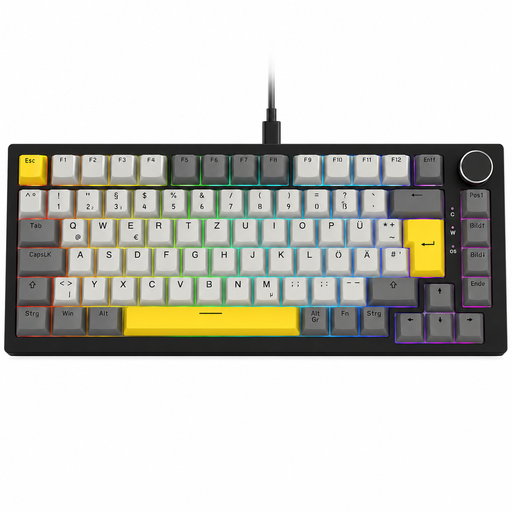
Why this product suits the profile: This compact mechanical keyboard combines a German QWERTZ layout with a USB-C connection, volume dial and RGB lighting. It is suitable for gaming, working from home and everyday typing.
The clearly specified QWERTZ layout prevents confusion with US models. Wired use avoids battery and pairing issues.
82 keys, hot-swap support for compatible 3-pin switches, a gasket-mounted design and a detachable USB-C cable.

Why this product suits the profile: This keyboard is designed for users who want to combine mechanical feedback and low-profile keys with the ability to switch between several devices.
Bluetooth and Logi Bolt provide two specified connection options. The German QWERTZ layout is clearly stated.
Tactile Quiet Low-Profile mechanics, an aluminium top plate, backlighting and Easy-Switch for up to three devices.
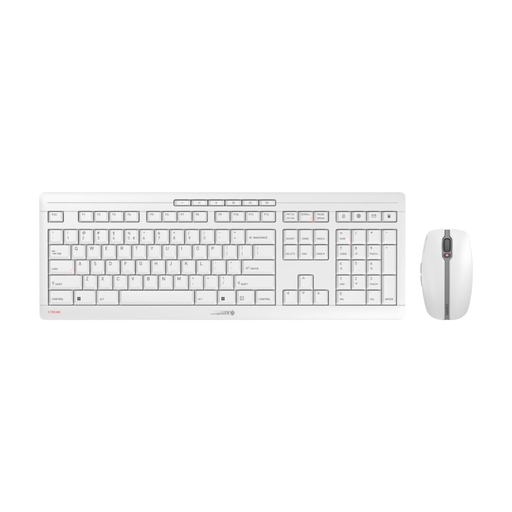
Why this product suits the profile: This keyboard and mouse set is designed for office work, working from home and long typing sessions. The combination of low-profile scissor keys and rechargeable devices reduces cables and battery changes in everyday use.
The product details explicitly state the 2.4 GHz connection, USB-C charging and quiet SX scissor mechanism. However, the layout of this version is listed as EU QWERTY and should be checked before purchase.
Rechargeable NiMH batteries, a six-button mouse, switchable DPI levels and an integrated metal plate for a stable base.
We have put together a complete, regularly updated list of products that fully meet these strict selection criteria and the safety regulations applicable in the EU.
For a German office, a QWERTZ keyboard with quiet scissor or membrane keys is often a good choice. A number pad is useful if you regularly enter figures. In shared spaces, you should also consider the noise level.
That depends on the switch and your personal preference. Linear switches provide smooth, consistent actuation, while tactile switches offer more feedback. A hot-swap keyboard gives you the option of replacing compatible switches later. Before buying, check the key height, layout and volume.
USB is suitable for a consistent, straightforward connection. 2.4 GHz wireless usually works via a USB receiver and is well suited to desktop PCs. Bluetooth is practical for laptops, tablets and multiple devices. The deciding factors are the available ports, the range you need and the power supply.