What to look for when choosing a keyboard
Start by thinking about the type of entry you repeat most often. Then compare the layout and desk space, and only consider programmable features once you’ve checked the keyboard commands supported by your cataloguing software.
| Priority |
What to check before buying |
Who this matters most to |
| Number pad and German layout |
Check the DE/QWERTZ layout, model variant and space for the number pad; make sure the key layout includes the special characters you need. |
If I often enter object numbers and measurements, I want to enter figures directly using a separate number pad. Around 33% of consumers put number entry first. |
| Programmable keys |
Test your cataloguing software’s keyboard commands and check which keys can be programmed on the operating system you use. |
If I repeat the same supported steps across several catalogue fields, I want to see whether it makes sense to assign them to keys. Around 27% of consumers prioritise repetitive tasks. |
| Keyboard shape for long periods of typing |
Check your hand position, the width of the layout and whether you still need a number pad. |
If I write lengthy descriptions, I want to find a keyboard layout that feels comfortable to type on. Around 20% of consumers prioritise longer writing sessions. |
| Desk space and connection |
Measure the available desk space and check whether USB-A, Bluetooth or a receiver will work with your devices. |
If my keyboard, notes and ceramic pieces share the same workspace, or I switch between devices, I want to choose a suitable size and connection. Around 20% of consumers prioritise these workspace requirements. |
Keyboards at Joybuy
This selection includes keyboards for typing in German, entering numbers and switching between devices. Check that the model variant and connection suit your workspace.
 No image available
Inateck KB01003G Bluetooth keyboard, QWERTZ
The product description lists three Bluetooth connections and switching between connected devices.
It also mentions a slim design and shortcut keys for media, brightness, screenshots and muting.
Check that the layout and shortcut key functions suit your devices and tasks.
Joybuy
 No image available
Inateck N0158BK foldable Bluetooth keyboard with number pad
The product description lists a full-size QWERTZ layout with a separate number pad and three Bluetooth channels.
The foldable design is described as coming with a protective cover and carry case. Before buying, check that the format suits your mobile or fixed workstation.
Joybuy
 No image available
QWERTZ keyboard and mouse set with number pad
According to the product details, the set is designed for full-size number entry and includes a wireless mouse.
Connections listed include Bluetooth and a 2.4 GHz receiver; the keys are described as quiet scissor keys.
Check that the connection and layout are compatible with your computer.
Joybuy
 No image available
AJAZZ AK35I V4, German QWERTZ
The product description lists a German full-size layout with a number pad.
Connections listed include Bluetooth, 2.4 GHz and USB-C. Check which connection suits your workspace.
The product title also mentions a TFT screen.
Joybuy
 No image available
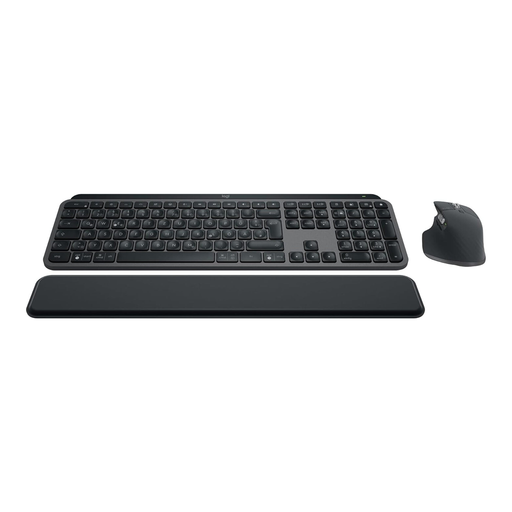
Logitech MX Keys S Combo with MX Master 3S, German QWERTZ
According to the product title, the set includes the MX Keys S and MX Master 3S. The product description lists a German QWERTZ layout and full-size format.
For repetitive tasks, Smart Actions via Logi Options+ are listed. Check that your cataloguing software supports the keyboard commands you need.
Connections listed include Bluetooth and Logi Bolt; the description mentions switching between several devices.
Joybuy
Frequently asked questions
Can a macro key automatically fill in a custom catalogue field?
Not on its own. First check which keyboard commands your cataloguing software supports in the relevant field, then test an appropriate key assignment. Logitech describes Smart Actions, while Keychron offers key mapping and macros; neither automatically guarantees compatibility with an unspecified cataloguing application.
How should I clean a keyboard after working near ceramics and dust?
Switch off the keyboard or disconnect it from the power supply, and follow the care instructions for the specific model. Logitech recommends gently cleaning the exterior of its devices and warns against letting liquid get inside.
Who should I contact if the keyboard develops a fault after purchase?
The retailer, not the manufacturer, is generally responsible for your statutory rights if the product is faulty. The consumer advice centre explains that consumer purchases are generally covered by a two-year period; this is separate from any additional manufacturer’s warranty. Online purchases are also generally covered by a 14-day right to cancel from the day you receive the goods, subject to the relevant conditions.
Where should I take an old keyboard in Germany?
Take electrical waste to an authorised collection point, such as a local council recycling centre. The Federal Environment Ministry also lists retailer take-back schemes, subject to the applicable legal requirements; check in advance which collection point will accept your keyboard.


