Which buying criteria matter most?
First decide whether quick access to shortcuts and numbers or more desk space matters more to you. Then consider whether you need a particular key layout or the ability to switch between several devices for your day-to-day work.
| What you need |
What to look for |
Who will find this most important |
| Access to shortcuts and numbers |
Check for a number pad, arrow and function keys, and any requirements for programmable keys. |
If I enter lots of measurements and use the same commands repeatedly, I want the right keys close at hand. Around 33% of consumers prioritise direct access to commands and numbers. |
| Key layout for long sessions |
Consider the keyboard’s position and wrist rest in relation to your workspace; if you’re considering a split layout, decide whether it suits you. |
When I’m typing for long periods, I want to be able to position the keyboard in front of me so its layout suits my workspace. Around 25% of consumers prioritise the key layout when working for longer periods. |
| Clear desk space |
Measure the space available for your keyboard and mouse, then weigh it up against your need for dedicated number keys. |
If there’s little room in front of my screens, I can do without an integrated number pad, as long as my number-entry needs allow it. Around 25% of consumers prioritise desk space over a number pad. |
| Switching between devices |
Count the computers and tablets you actually use; check the connections and switching options on the specific model. |
If I really do work across several computers or tablets, I want to be able to switch between them. Around 17% of consumers prioritise switching between devices. |
Keyboards for different workspaces
This selection includes compact models as well as full-size and split keyboards. Compare number entry, available desk space and the connection you need with the way you work.
 No image available
Inateck Bluetooth Keyboard KB01003G, QWERTZ
Worth considering if you’re looking for a QWERTZ layout and connections to multiple devices.
The product name lists three Bluetooth connections and compatibility with Windows, iPadOS, Android and iOS.
View at Joybuy
 No image available
Inateck Foldable Mini Keyboard N0153BK, QWERTZ
Its foldable design could suit you if you’re looking for a compact keyboard to use in different places.
The product name lists three Bluetooth channels, a touchpad and compatibility with Windows, iPadOS and Android.
View at Joybuy
 No image available
Redragon RS68, 65%, 68 keys
Its compact design could be a good fit if you want to save desk space.
The product name lists Bluetooth, 2.4 GHz wireless and wired operation, as well as hot-swappable switches and a detachable wrist rest.
View at Joybuy
 No image available
Logitech ERGO K860, QWERTZ
The split layout and integrated number pad could suit you if you enter measurements frequently and want to try a split keyboard.
The product title lists Bluetooth, a USB receiver and a wrist rest. Logitech lists an integrated number pad; F.A.Z. Kaufkompass cited the lack of backlighting and wired operation as drawbacks.
View at Joybuy
 No image available
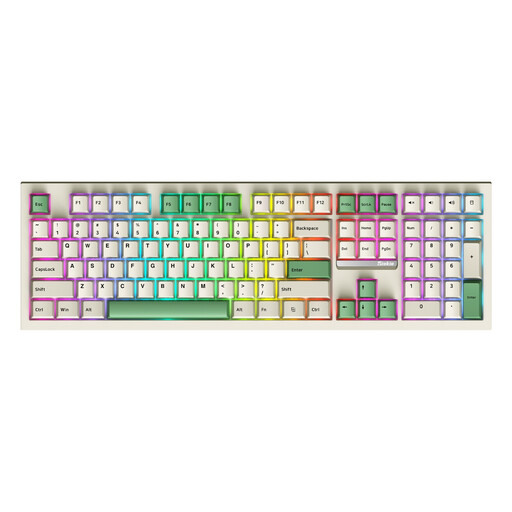
Siukie PL108W, 108 keys, Creamy Linear Switch
The full-size layout with number pad could suit you if you want to enter numbers directly and have enough desk space.
The product title lists Bluetooth, 2.4 GHz wireless and wired operation, hot-swappable switches and RGB backlighting.
View at Joybuy
Frequently asked questions about choosing a keyboard
Do I need a multi-device keyboard for two screens?
No, not just because you have two screens. Multi-device functionality is useful if you actually switch between different computers or tablets; connection channels select devices, not screens.
How can I check whether I can set up my charting shortcuts?
Check that the keys and software on the specific model support the commands you need. Keychron describes configuring the layout and macros on the K10 Pro through Launcher and specifies a wired connection for using it; Logitech describes customising the MX Keys S through Logi Options+. Also check compatibility with your operating system and charting software.
What should I bear in mind when cleaning a keyboard?
Avoid harsh cleaning products and take care not to let any liquid get inside the keyboard. This is Bitkom’s advice for cleaning computer keyboards.
Are you required to buy a particular keyboard for two screens in Germany?
ASR A6 does not impose a general requirement for private buyers to use a particular model. The Federal Institute for Occupational Safety and Health sets out requirements for the screen-based workstations covered by the regulation; it does not apply to screen use in private settings outside workplaces or teleworking arrangements. If your workstation is covered, discuss its setup with your employer.
What happens if the keyboard develops a fault after purchase?
If a consumer purchase is faulty, you have statutory rights against the seller; the German Federal Government says these generally last for two years. The Verbraucherzentrale explains that, following the 2026 change, choosing a repair instead of a replacement can extend the statutory warranty period, subject to legal conditions.


