When editing a children’s story, easy-to-reach navigation and editing keys, along with a suitable German keyboard layout, are particularly important. If you write for long periods, you could try a split design; if space is limited or you use several devices, a compact or wireless model may be worth considering. Typing feel, getting used to the keyboard and compatibility are all personal considerations.
Which keyboards suit different writers
Writers who edit their stories often
If you regularly return to marked passages, easy-to-reach navigation and editing keys can make your workflow more efficient. The DGUV describes compact keyboards without a number pad as a possible option if you only need to enter numbers occasionally.
Frequent typists who value comfort
If you spend a long time writing at your computer, you can compare different designs and hand positions without expecting a keyboard to have a medical effect. The DGUV notes that intensive computer use can be associated with discomfort in the hands, arms, shoulders or neck.
Writers who use several devices
If you work on drafts and notes across different devices, check that switching between them, the operating system and the key layout suit the way you work. Logitech and Keychron describe multi-device features on certain models.
What to look for when buying
| What you need |
What to check before buying |
Who it matters to |
| Navigation and editing |
Check the exact key layout, arrow keys and the functions you need, such as Home, End or Delete. |
If you want to move quickly between your draft and marked passages while editing, pay particular attention to the key layout. Around 36% of consumers prioritise navigation and text editing. |
| Comfort during long writing sessions |
Compare the design, wrist support and space available; bear in mind that it may take time to get used to a split keyboard layout. |
If you write for long periods and want to try a different hand position, weigh up the design and how it feels to type on. Around 29% of consumers prioritise typing comfort. |
| A quiet keyboard and space for notes |
Consider whether you need a number pad, and check the specific key variant rather than relying on the word ‘quiet’ alone. |
If you want space to keep notes beside your keyboard or write in a shared workspace, consider how much room it takes up and how the keys feel to press. Around 21% of consumers prioritise quiet operation and desk space. |
| Switching devices and key layout |
Check the specific QWERTZ or DE-ISO variant, operating system compatibility and available connections. |
If you work on drafts and notes across several devices, you’ll need a connection and key layout that suit each one. Around 14% of consumers prioritise being able to switch between devices. |
Avoiding common buying mistakes
-
Assuming a compact keyboard has the right key layout
A smaller case doesn’t necessarily mean the arrow, editing and special-character keys are in the right places for the way you edit text. Layouts can also differ by language.
Compare the product image and exact variant name with the functions you use when writing and editing.
-
Thinking an ergonomic design will solve discomfort
A split keyboard may feel different to type on and can take time to get used to. A particular design does not guarantee that it will prevent or treat discomfort.
Consider the keyboard, other input devices and your workspace together. If possible, try out the layout; if you’re experiencing discomfort, an individual assessment may be helpful.
-
Confusing a guarantee with your statutory rights
Statutory rights relating to faulty goods are generally enforceable against the seller. A voluntary guarantee may have its own terms and does not replace your statutory rights.
Keep your proof of purchase and check the guarantee terms separately from your statutory rights. The Verbraucherzentrale clearly distinguishes between statutory rights and guarantees.
Keyboard brands to consider
CHERRY
The STREAM KEYBOARD TKL is a compact, wired option without a number pad. The KC 4500 ERGO is a wired alternative with a curved key field.
- CHERRY describes the STREAM KEYBOARD TKL as having the main key field of the STREAM variant without a number pad.
- Check whether you’ll miss having a number pad, and whether the connection and key layout suit your workspace.
Logitech
The ERGO K860 is a split keyboard with a wrist rest and adjustable height. The MX Keys S features backlit keys and customisable actions.
- Logitech says the ERGO K860 has an adjustable height; with supported software, you can assign recurring actions to the MX Keys S.
- Customisable actions require compatible software and support for the function you want. A split layout may take some getting used to.
Perixx
The PERIBOARD-512 is a split, wired keyboard; Perixx lists a German QWERTZ variant with a USB-A cable.
- This model gives you the option to try a different key layout.
- Perixx notes that you’ll need time to get used to it. Claims about preventing discomfort are not independent evidence of effectiveness.
Keychron
The K3 Max is a compact mechanical keyboard with customisable layouts and a choice of connection types.
- Keychron lists DE-ISO as an available variant, along with Bluetooth, 2.4 GHz and wired connections.
- Check the layout and switch variant on the specific listing; a product page showing several layouts won’t necessarily have your preferred option selected by default.
Joybuy keyboards for writing and editing
The Joybuy keyboards below are suitable for writing in German and a range of approaches to editing text. Compare the key layout, connections and features you actually need for each model.
 No image available
Logitech K120, wired keyboard, German QWERTZ
A good option if you prefer a full-size keyboard with a familiar key layout and German keys.
Wired USB connection, plug and play, and a spill-resistant design, according to the product name.
View at Joybuy
 No image available
Logitech ERGO K860, split keyboard, QWERTZ
Could be a good fit if you’d like to try a split key layout during longer writing sessions.
Logitech lists a wrist rest and adjustable height; the product title mentions Bluetooth and a USB receiver. Check that the design suits your workspace.
View at Joybuy
 No image available
AJAZZ AK35I V4, mechanical keyboard, German QWERTZ, tri-mode
A possible choice if you’re comparing German layouts and the connection options listed in the product name.
The product name lists Bluetooth, 2.4 GHz wireless and USB-C, as well as hot-swappable switches. Check the specific variant and its compatibility with your devices.
View at Joybuy
 No image available
Logitech MX Mechanical, backlit, German QWERTZ
Could suit writers looking for a mechanical keyboard with a German layout and wireless connectivity.
The product title lists quiet tactile switches, Smart Backlighting, Bluetooth and Logi Bolt. According to the product information, you can switch between up to three devices.
View at Joybuy
 No image available
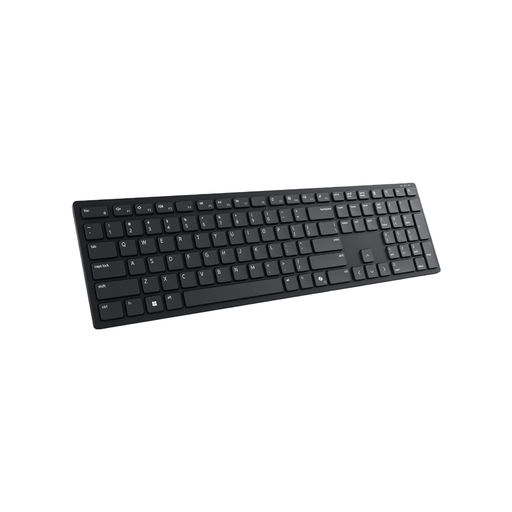
DELL Premier Collaboration Keyboard KB900-DE
Could be useful for writers who want to customise recurring key actions to suit their workflow.
According to the product description, you’ll need Dell Peripheral Manager to customise the programmable keys. Check that the software and the functions you want are compatible with your device.
View at Joybuy
Frequently asked questions
Do I need a number pad for editing notes?
Not necessarily. If you mainly edit text and only enter a few numbers, the DGUV says a compact keyboard without a number pad could also be an option. Instead, check that the navigation keys suit the way you write.
What should I check before connecting a new keyboard?
Check the specific key layout and the connections available on your device. If a model comes in several layouts or offers different connection options, make sure you select the variant you actually want.
Is a split keyboard automatically more comfortable for long writing sessions?
No, it depends on how it feels to type on and the way you work. A split layout may take some getting used to, so try it out if possible and consider your overall workspace setup too.
Is a manufacturer’s guarantee the same as your statutory rights?
No. Statutory rights relating to faulty goods are generally enforceable against the seller, while a manufacturer’s guarantee is an additional voluntary promise with its own terms. Check who the seller is and what guarantee terms may apply.


