If you want to control your keyboard and cursor from the sofa using as few devices as possible, a keyboard with a touchpad could be a good fit. If you often make precise mouse movements, a separate mouse with a stable surface is the better option. If you need plenty of shortcuts or a number pad, compare the layout and where you’ll be playing. Ubisoft lists a keyboard and mouse as supported input devices for Anno 1800 on PC; check support for your specific game and platform version.
Who are the different options suited to?
Players without a separate mouse
For anyone who wants to control a TV-connected PC from the sofa using a keyboard and cursor in one device. Logitech describes the K400 Plus as a keyboard with an integrated touchpad for use with a PC connected to a TV. Check whether the touchpad suits the actions you need to perform in your game.
Players with a separate mouse
For anyone who prefers to use a separate mouse for placing items and navigating, and needs a suitable surface to use it on. Corsair describes the K63 Wireless Gaming Lapboard as a mouse surface for the compatible K63 Wireless keyboard.
Players who use lots of shortcuts or number keys
For anyone who wants easy access to function, arrow or number keys, and has a suitable surface for their keyboard and mouse. ASUS ROG describes the Strix Scope II 96 Wireless as having function and number keys; Keychron lists the K10 Max as having a full-size layout.
What should you look for when buying?
Keyboard with touchpad
A good fit if: You want to control as few devices as possible from the sofa and would rather not use a separate mouse. Logitech describes the K400 Plus as suitable for controlling a PC connected to a TV.
Worth considering: Check whether the touchpad can handle the cursor actions you use most in your game; there’s no published gaming performance testing for management simulations.
Lapboard with a separate mouse
A good fit if: You often navigate with your own mouse on the sofa and need a surface to use it on. Corsair describes the K63 Wireless Gaming Lapboard as having a mousepad area.
Worth considering: Corsair says it’s designed for the compatible K63 Wireless keyboard; the keyboard and wireless mouse are sold separately.
Keyboard with plenty of easy-to-reach keys
A good fit if: You mostly play at a desk and value shortcuts or number keys more than using your keyboard on your lap. ASUS ROG lists function and number keys on the Strix Scope II 96 Wireless; Keychron describes the K10 Max as having a full-size layout.
Worth considering: You’ll need a separate mouse to control the cursor. If you play on the sofa, you’ll also need a suitable surface.
Ubisoft lists a keyboard and mouse as supported input devices for Anno 1800 on PC. The keys and connections that work for your game depend on the specific game and device version.
| What you need |
What to look for when buying |
Who is it important for? |
| Controlling the keyboard and cursor together |
Integrated touchpad, support for your game and the USB port needed for the receiver; check how well it handles frequent placing and dragging actions in your game. |
If I want to navigate from the sofa without an extra mouse, touchpad control is particularly important to me. Around 27% of consumers put one-device control first. |
| Room for a separate mouse |
Check the mousepad area, weight and dimensions, as well as the lapboard’s stated keyboard compatibility. Corsair lists the compatible K63 Wireless keyboard for the K63 Lapboard; the keyboard and mouse are sold separately. |
If I often use a separate mouse while building, I need a stable surface for it. Around 27% of consumers prioritise a separate mouse with a suitable surface. |
| Shortcuts and keyboard layout |
Check the key combinations you need, function and arrow keys, number pad, and the specific DE-ISO or QWERTZ version. Ubisoft lists Ctrl+Q as the default shortcut for the statistics overview in Anno 1800 on PC. |
If I use shortcuts often or enter numbers, I want easy access to the keys I need. Around 20% of consumers put shortcuts and layout first. |
| Connection to your gaming device |
Check your gaming platform and its input support; also make sure a USB receiver, Bluetooth or a cable will work with your device. Keychron lists 2.4 GHz wireless, Bluetooth and wired modes for the K10 Max. |
If I want to connect the keyboard to my existing PC or another gaming platform, the connection needs to be compatible. Around 13% of consumers prioritise connecting to their gaming device. |
| Noise and feel |
Compare switch options and the manufacturer’s information on dampening; this doesn’t replace an independent noise comparison. If possible, try the typing feel in your own gaming setup. |
If I play in a shared living space, I want a typing sound that suits my surroundings. Around 13% of consumers put noise and feel first. |
Avoiding common buying mistakes
-
Assuming a lapboard is a complete keyboard and mouse set
Corsair lists the compatible K63 Wireless keyboard and a wireless mouse as sold separately. The lapboard is designed for the K63 Wireless.
Before buying, check exactly what’s included and the stated keyboard compatibility.
-
Choosing a compact layout just to free up space for your mouse
If you use shortcuts or number keys often, having easy access to them may matter more than saving space. The shortcuts you need depend on the game.
Make a note of the shortcuts you use most and compare them with the specific layout. Ubisoft lists Ctrl+Q as the default shortcut for the statistics overview in Anno 1800 on PC.
-
Assuming similar model names have the same layout
Keychron says the K10 Max is available in different ISO layouts; ASUS ROG notes that the keycap material may vary by region.
Check the full model number, the specific DE-ISO or QWERTZ version, and what’s included with the particular offer.
Brands to consider
Logitech
The K400 Plus is designed for controlling a TV-connected PC with a keyboard and touchpad; Logitech G also offers gaming keyboards.
- Logitech describes the K400 Plus as suitable for controlling a PC connected to a TV from the sofa.
- This doesn’t prove gaming performance or that the touchpad will be sufficient for every management simulation.
Corsair
The K63 Wireless Lapboard is designed to be used with a compatible K63 Wireless keyboard and separate mouse; the K65 Plus Wireless is a standalone compact keyboard.
- Corsair describes the lapboard as having a mousepad area. The manufacturer lists a 75% layout and dampening for the K65 Plus Wireless.
- According to Corsair, the K63 keyboard and a wireless mouse are sold separately. The K65 Plus Wireless is not listed as a compatible keyboard for the K63 Lapboard.
ASUS ROG
The ROG Strix Scope II 96 Wireless is aimed at anyone who wants function and number keys in a more compact layout than a full-size keyboard.
- ASUS lists three connection options and hot-swappable switches for this model.
- The model isn’t listed as having an integrated touchpad or lapboard; ASUS says the keycap material may vary by region.
Keychron
The K10 Max is worth considering if you’re looking for a full-size layout and customisable key assignments.
- Keychron lists 2.4 GHz wireless, Bluetooth and wired modes for the K10 Max; DE-ISO is one of the available layout options.
- Check the layout version and availability separately for the specific offer.
GravaStar
The Mercury K1 Lite is a range of compact keyboards; the manufacturer’s specifications for the Crystal Aurora version apply to that model.
- GravaStar describes the Crystal Aurora version as having a 75% layout and three connection options.
- Don’t assume these features apply to every Mercury K1 Lite version unless they’re confirmed.
Joybuy products at a glance
This selection of Joybuy products includes gaming keyboards with different layouts and connection options. Above all, compare the keys you need, the specific German or US layout version, and the connection that suits your gaming device.
 No image available
Razer Ornata V3 Tenkeyless, German Layout
An option if a tenkeyless layout and German layout suit your gaming setup and the keys you need.
Listed as a gaming keyboard; the product name specifies a tenkeyless format and German layout.
View at Joybuy
 No image available
Akko 3084B Plus Tri-Mode, 75 %, ISO-DE, V3 Pro Cream Blue Switch
An option if you’re looking for a compact layout with a German ISO-DE version and several connection options.
The product name lists Bluetooth, 2.4 GHz wireless and USB-C wired modes, as well as hot-swappable switches.
View at Joybuy
 No image available
Akko 5087S V1 TKL, wired, ISO-DE QWERTZ, Cream Yellow Switches
An option if you’re looking for a TKL format with a wired connection and German QWERTZ layout.
The product name lists an ISO-DE QWERTZ layout and RGB lighting.
View at Joybuy
 No image available
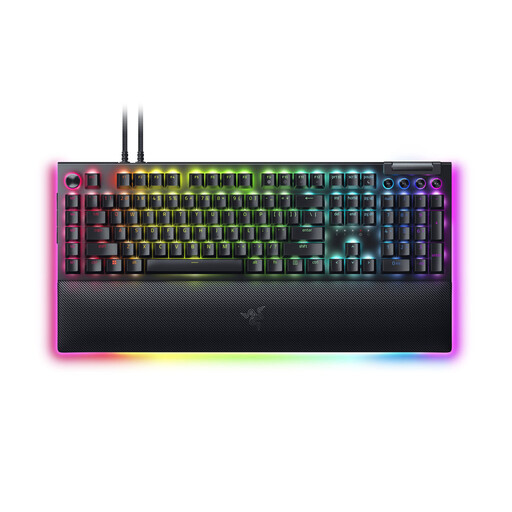
Razer BlackWidow V4 Pro, Green Switch, US-QWERTY
An option if you specifically want a US QWERTY layout and it suits the way you type and the keys you need.
The product name lists Green Switch and US QWERTY; this isn’t the German QWERTZ version.
View at Joybuy
 No image available
Ticktype DP104 Custom, Full-Size, 108 keys, US layout
An option if you’re looking for a full-size layout with 108 keys and a US layout suits you.
The product name lists a US layout and hot-swappable switches.
View at Joybuy
Frequently asked questions
Can I assume a PC keyboard will work with every console version of a management simulation?
No. Ubisoft lists a keyboard and mouse for Anno 1800 on PC, and the respective controllers for PlayStation 5 and Xbox Series X|S. Before buying, check input support for your specific game and platform.
How do I connect a wireless keyboard to a TV-connected PC?
Your screen doesn’t determine which keyboard connection you need. Logitech’s setup guide distinguishes between connecting a USB receiver to the computer and using a direct Bluetooth connection. Check which connections your specific keyboard model and PC support.
What else do I need for the Corsair K63 Lapboard?
Corsair says the compatible K63 Wireless keyboard and a wireless mouse are sold separately. Check what’s included with the specific offer and whether its stated keyboard compatibility matches the one you’ve chosen.
Does a wireless keyboard sold in Germany need to carry a CE mark?
Radio products covered by the relevant EU harmonisation legislation and placed on the EU market must carry a CE mark. The mark is the manufacturer’s declaration of conformity; it doesn’t indicate how well the keyboard performs in a game.
How should I dispose of old batteries from a keyboard?
In Germany, old batteries must not be put in household waste. The Federal Ministry for the Environment says that used portable batteries can be returned free of charge to retailers or municipal collection points. Remove batteries that can be taken out of the device before disposing of it.


