Choose a keyboard to suit the way you work: for frequent coding and testing shortcuts, layout and programmability matter; for long writing sessions, positioning is key; and for entering lots of measurements or product codes, a numeric keypad can be useful. Compact, quiet and split keyboards each address different space and usability needs, but they all involve trade-offs. A keyboard won’t run automated tests for you.
Which keyboard features matter for different users
Users who rely on coding and testing shortcuts
If you regularly write code and test cases, check that the key layout, navigation and commands work with your editor. Programmable keys can be useful, but you’ll need to check the specific model and operating system configuration. Keychron and Dygma describe these features for certain models.
People who type for long periods and need desk space
During long writing sessions, consider whether a more compact keyboard would leave more room for your mouse, or whether a split keyboard would be easier to position. The German Social Accident Insurance (DGUV) considers the design of the entire computer workstation relevant.
People entering sewing pattern data
If you enter lots of measurements, sizes or numerical codes, consider whether a dedicated numeric keypad is worth the extra desk space. According to the manufacturer, the Logitech ERGO K860 combines a split keyboard with an integrated numeric keypad; a TKL model has no separate number pad.
What to look for when choosing a keyboard
First decide whether you mainly need programmable shortcuts, a keyboard for long writing sessions, more desk space or a convenient way to enter lots of numbers. Then you can compare layouts, designs and the keys you need.
| What you need |
What to check before buying |
Who it matters most to |
| Coding shortcuts and test commands |
Check the DE-ISO version, layers, macros and required software for the exact model. |
If you use the same commands regularly in your editor, you’ll want them to be easy to reach on the layout you choose. Around 33% of consumers prioritise coding and testing shortcuts. |
| Hand position during long writing sessions |
Consider positioning, wrist support, tilt and how long it may take to get used to the keyboard. |
During long writing sessions, you’ll want to arrange your keyboard and mouse to suit your workspace. Around 25% of consumers prioritise hand position. |
| Desk space and typing noise |
Check the keyboard’s shape and whether it has a numeric keypad. Don’t treat the manufacturer’s noise claims as a direct comparison between models. |
If desk space is limited or you’re looking for quiet keys, the keyboard’s design can make all the difference. Around 25% of consumers prioritise desk space and typing noise. |
| Entering lots of numbers |
Think about how often you enter long strings of numbers and check whether the model has a separate numeric keypad. |
If you enter lots of measurements, sizes or codes, you’ll want to do so easily without necessarily choosing a wider keyboard. Around 17% of consumers prioritise number entry. |
Avoiding common buying mistakes
-
Choosing a small keyboard based only on the space it saves
A TKL model such as the CHERRY STREAM KEYBOARD TKL has no separate numeric keypad. This may be inconvenient if your day-to-day work involves lots of measurements and numerical codes.
Base your choice on the number sequences you actually enter, not just the width of the keyboard.
-
Assuming a split layout will feel familiar straight away
The Dygma Raise 2, which was tested, has no dedicated arrow or F keys. Layers and macros offer a different way of working from a conventional full-size keyboard.
Before buying, check that you can access your most-used editor and testing shortcuts on the exact layout.
-
Treating ergonomic claims as a guarantee against discomfort
Manufacturers describe the features of their models, while the German Social Accident Insurance (DGUV) considers the design and use of the entire computer workstation.
Consider keyboard position, mouse space and your work surface together. Don’t take a product description as a guarantee of health benefits.
Relevant brands and product ranges
CHERRY
The STREAM range features low-profile scissor keys; the TKL version does away with the numeric keypad.
- CHERRY lists SX scissor technology and quiet typing for these models.
- The TKL version is wired and has no numeric keypad. The manufacturer’s claims about the typing feel are not independent evidence of faster typing.
Keychron
The Q1 Max is a configurable mechanical option which, according to Keychron, is also available with a DE-ISO layout.
- Keychron lists QMK/VIA, Bluetooth and 2.4 GHz wireless connectivity for the Q1 Max.
- The layout and switches depend on the specific version. Check the model you’re choosing rather than assuming the same specifications apply to other Keychron keyboards.
Logitech
According to the manufacturer, the ERGO K860 combines a permanently split keyboard with an integrated numeric keypad.
- F.A.Z. Kaufkompass rates the typing feel of the ERGO K860 positively.
- F.A.Z. Kaufkompass notes that this model has no backlit keys and cannot be used with a cable. The manufacturer’s ergonomic claims are no guarantee against discomfort.
Dygma
The Raise 2 has a split design and lets you customise key assignments.
- Dygma lists layers, macros and an adjustable tenting feature.
- Wireless connectivity and tenting are configuration choices. An independent test notes that the Raise 2 has no dedicated arrow or F keys.
Perixx
The PERIBOARD-535II is a wired split keyboard with low-profile mechanical switches.
- Perixx confirms that this model has a USB-A cable and low-profile mechanical switches.
- Compare the exact key layout and connection with your needs. These listed features do not, on their own, prove a general performance advantage.
Joybuy keyboards for coding and data entry
The selection ranges from compact models, some with programmable keys, to keyboards with a numeric keypad for frequently entering measurements and numerical codes.
 No image available
Akko 3084B Plus, 75%, ISO-DE, Tri-Mode, Black & Gold
The 75% format with an ISO-DE layout is worth considering if you type in German and want a more compact keyboard.
The title lists V3 Pro Cream Blue switches, hot-swap capability and Bluetooth, 2.4 GHz and USB-C connection options. VIA compatibility is mentioned in the product description.
Joybuy
 No image available
Wired keyboard with numeric keypad, QWERTY
The separate numeric keypad is useful for entering measurements and numbers frequently.
The product description lists a full QWERTY keyboard, function keys, navigation keys and wired plug-and-play connectivity.
Joybuy
 No image available
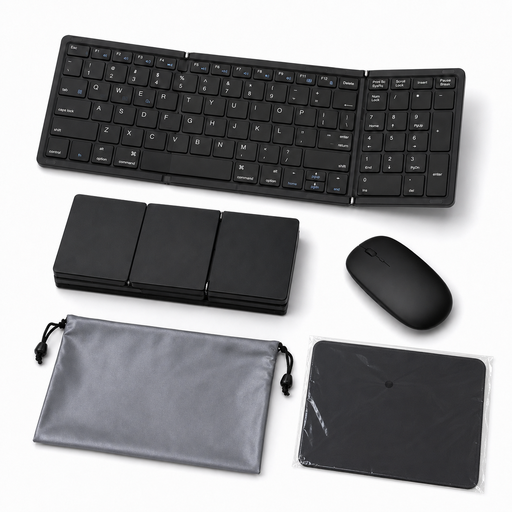
Foldable Bluetooth keyboard with numeric keypad, 81 keys, QWERTY
The integrated numeric keypad can be useful for entering numbers on the go or when working with a laptop.
The product details list Bluetooth 5.1, connections with up to three devices and a USB-C rechargeable battery. The set also includes a mouse pad and a case.
Joybuy
 No image available
Ticktype EVO75 Custom, ISO-DE, Tri-Mode, Creamy Rye
ISO-DE and the stated VIA compatibility are useful if you want to customise a compact keyboard for typing in German.
The product name specifies a 75% layout and hot-swap capability. The product description lists software for macros and key assignments.
Joybuy
 No image available
Logitech K120, wired, German QWERTZ
The German QWERTZ layout and separate numeric keypad are useful for a fixed workstation where you regularly enter numbers.
The product details list 104 keys, USB plug-and-play connectivity and a spill-resistant design.
Joybuy
Frequently asked questions about choosing a keyboard
Will a programmable keyboard make automated testing faster?
Not automatically. According to the respective manufacturers, programmable keys can be assigned shortcuts or macros, but they don’t run tests. Whether they make your workflow easier depends on the commands you use and how you set up the keyboard.
How should I set up a split keyboard for long writing sessions?
Position both halves of the keyboard alongside your mouse and the rest of your workspace. The German Social Accident Insurance (DGUV) treats ergonomics as a matter of the entire computer workstation. With a new layout, you should also allow for the time it may take to get used to frequently used commands.
What should I check about EU compliance when buying a wireless keyboard?
Radio equipment is covered by the EU regulatory framework for radio equipment. The European Commission explains that the required CE marking represents the manufacturer’s declaration that the product meets the relevant regulations; it is not a central EU approval. Check the marking and product information for the specific model. This does not amount to a blanket confirmation that a particular listing is compliant.
What rights do I have when buying a keyboard online in Germany?
For a standard online distance purchase, you generally have a 14-day right to cancel from the date of delivery; exceptions and possible return costs should be taken into account. For faulty goods, you have at least two years of statutory consumer rights against the seller from the date you receive them. This is separate from any voluntary manufacturer’s guarantee.
How should I dispose of an old keyboard in Germany?
Don’t put an old keyboard in your household rubbish. Use an appropriate collection or take-back point instead. The German Environment Agency lists recycling centres and suitable retailer take-back points, among other options. Remove any batteries and dispose of them separately before handing the keyboard in.


