What should you look for when buying?
First, think about how often you enter numbers. A number pad can be useful if you regularly enter data, while a compact layout leaves more space beside the keyboard if you only enter numbers occasionally.
| Consideration |
What to check when buying |
Who is it important to? |
| Typing noise in a student room |
Check the switch or key variant, and look for reliable audio samples or test results for that exact variant. |
If I’m typing in a shared room, I want to disturb others as little as possible, so I pay attention to how noisy the specific variant is; around 33% of consumers prioritise this. |
| Fast numerical entry |
Check for an integrated number pad, editing keys and the layout of the specific variant. |
If I regularly enter or correct numbers, I want to be able to use the number pad straight away; around 27% of consumers prioritise this. |
| Room for a mouse and study materials |
Check the variant’s dimensions, key layout and the connections you need. |
If I mainly review data and rarely enter long strings of numbers, I want to keep space beside the keyboard for a mouse or documents; around 20% of consumers prioritise this need for space. |
| Hand position during longer typing sessions |
Consider the shape, width, angle and wrist rest, along with the desk space available. |
If I’m writing or working with data for long periods, I want to choose a keyboard that suits my hand position and workspace; around 20% of consumers prioritise this. |
Joybuy products for data entry
The following Joybuy listings are mainly full-size keyboards for data entry; the Ticktype is listed with a US layout.
 No image available
2.4 GHz QWERTZ keyboard and mouse set
If you regularly enter numbers, the listing specifies a full-size keyboard with a number pad and QWERTZ layout.
The title also mentions a detachable wrist rest, quiet keys and a mouse with three DPI settings. The noise claim isn’t based on a comparative measurement.
Joybuy
 No image available
Logitech K120, wired, German QWERTZ
If you regularly enter numbers and prefer a wired keyboard, the listing specifies a German QWERTZ full-size layout with a number pad.
The product title also mentions USB plug-and-play and a spill-resistant design.
Joybuy
 No image available
AJAZZ AK35I V4, German QWERTZ, tri-mode
If you’re looking for a full-size keyboard with a German QWERTZ layout and several connection options, the listing specifies Bluetooth, 2.4 GHz wireless and USB-C.
The title also lists a mechanical keyboard, hot-swappable switches, a 1.14-inch TFT screen and a 10000mAh battery. For the wireless version, check the compliance and charging information that applies to the specific listing.
Joybuy
 No image available
Logitech K280e, German QWERTZ
If you’d like a wrist rest for longer typing sessions, the product description lists this feature for the wired office keyboard.
The listing also specifies German QWERTZ, a USB connection and single-colour key backlighting.
Joybuy
 No image available
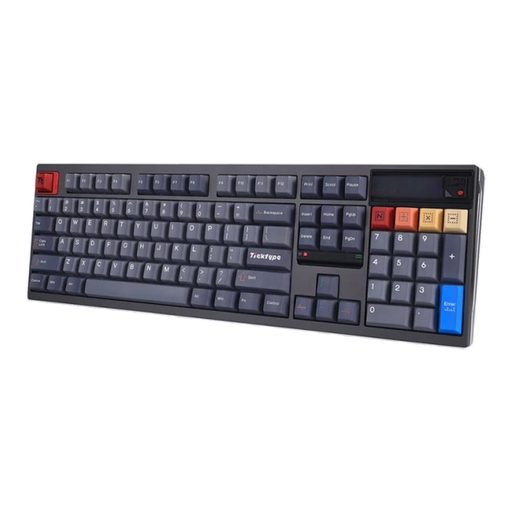
Ticktype DP104, 108 keys, US layout
If you’re looking for a full-size keyboard with 108 keys, the title specifies a US layout. This is an important point if you’ll be typing in German.
The listing also mentions Bluetooth, 2.4 GHz wireless and USB-C, as well as hot-swappable switches. The description “Silent Tactile” isn’t evidence of a comparative noise test.
Joybuy
Frequently asked questions about choosing a keyboard
Do I definitely need a number pad for working with datasets?
No, not if you only enter a few numbers. If you regularly enter numerical data, a full-size keyboard with a number pad may suit you. DGUV Information 215-410 lists a compact layout without a numerical section as a possible choice if you enter few numbers or mainly use a mouse.
How can I judge how noisy a keyboard is?
Check the exact switch or key variant, and look for audio samples or test results for that specific model. A manufacturer’s description such as “quiet” is no substitute for a comparative noise test; different switch variants are documented for the CHERRY KC 200 MX, for example.
Is USB-C compulsory on every keyboard in Germany?
No. Since 28 December 2024, EU rules on a common charging port have covered certain wireless keyboards newly placed on the EU market, provided they can be recharged by cable. A keyboard that only uses a USB cable therefore doesn’t need an additional charging port.
Can I return a keyboard bought online if I don’t like how it feels to type on?
For online consumer purchases in Germany, you generally have 14 days from receiving the goods to withdraw from the purchase; you need to notify the retailer. Verbraucherzentrale explains this rule and recommends checking the terms of your specific purchase. The right to withdraw is separate from any claims relating to a fault.
What should I check before buying a wireless keyboard?
Check the connection type and whether the specific keyboard uses replaceable batteries or a rechargeable battery. Wireless keyboards placed on the German market must meet the relevant requirements of the EU Radio Equipment Directive; USB-C charging rules apply only to covered wireless keyboards that can be recharged by cable.


