Diagram-makers with a small desk
If you often switch between your keyboard and mouse while arranging and labelling diagrams, clear desk space matters. Consider whether you can manage without a separate number pad.


When desk space is limited and you move the mouse frequently, a compact keyboard or TKL model can be a good choice, provided it retains the shortcuts, arrow keys and function keys you need. If you enter lots of numbers, weigh up the space saved against losing a separate number pad. The layout, connection and device compatibility must suit the specific version.
If you often switch between your keyboard and mouse while arranging and labelling diagrams, clear desk space matters. Consider whether you can manage without a separate number pad.
If other people in the room are studying or working, keyboard noise may matter when you’re adding labels for long periods. CHERRY describes its SX scissor keys as quiet; this is not a comparative noise measurement.
If you regularly enter commands or measurements, check the shortcuts you need and whether you might need a number pad against the layout of the specific keyboard.
First, measure the space available, then make a note of your most-used software shortcuts and number entries. This will help you weigh the space saved by a compact layout against the keys you need.
| Consideration | What to check before buying | Who is this important for? |
|---|---|---|
| Space for your keyboard and mouse | Measure the desk space available; check that the arrow, function and editing keys remain accessible with a more compact layout. | If my desk is cramped and I need room for my mouse and papers, every centimetre counts. Around 29% of consumers say space requirements are their top priority. |
| Quieter key presses | Compare the key mechanism and the specific version; treat the manufacturer's claims about noise as descriptions, not measurements. | If I’m typing labels for a long time within earshot of others, I want to keep disruption to a minimum. Around 22% of consumers put quiet key presses first. |
| Accessible software shortcuts | Make a note of the commands you use most and check them against the key layout, function layer and any customisation software. | For recurring diagram commands, I want to be able to reach the keys I need directly or assign them to suit my needs. Around 21% of consumers prioritise access to shortcuts. |
| Keyboard layout for longer sessions | Consider your desk width and preferred typing position; allow space for a split layout and time to get used to it. | If I work for long stretches, I want to be able to arrange my keyboard to suit my workspace. Around 14% of consumers prioritise their typing position. |
| Entering lots of numerical values | Think about your own workflow and how often you really need a separate number pad. | If I often enter numbers for diagrams, I want dedicated number keys. Around 14% of consumers prioritise a number pad. |
TKL models don’t have a separate number pad. Even more compact layouts may place other keys differently or make them available through a function layer.
Before choosing a layout, compare the shortcuts, arrow keys and number entry options you use in your diagramming software with the specific key layout.
If you later find you do need a number pad, a separate add-on will take up more desk space.
Versions with similar names can have different layouts. For example, the CHERRY STREAM KEYBOARD TKL is listed with a US layout and a euro symbol, while the layout of the Keychron K3 Pro depends on the version you choose.
Check the full layout details for the specific version, especially if you often use special characters and shortcuts.
An unfamiliar layout may take some getting used to in your workflow.
An offer with a similar model name may also include a mouse, receiver or cable, making it a different bundle.
Compare the full model name and the listed contents before treating the versions as identical.
Extra items in a bundle may go unused if you’re only looking for a keyboard.
The STREAM KEYBOARD TKL is a wired, more space-saving alternative to the larger STREAM KEYBOARD.
The MX Keys Mini is a compact wireless option, while the ERGO K860 has a full-size split layout with an integrated number pad.
The K3 Pro is a compact mechanical model for users who want to customise their keys.
The Joybuy models below include compact and TKL keyboards. Pay particular attention to the layout, number pad and connection, and check that they suit your diagramming software and workspace.
 No image available
The foldable design with an integrated touchpad is worth considering if you have limited desk space and don’t want to use a separate mouse.
QWERTZ layout; three Bluetooth channels; the product name states compatibility with iPadOS, Android and Windows.
 No image available
The compact 75% layout without a separate number pad is a good fit if you want to save space and switch between several devices.
Bluetooth, 2.4 GHz wireless and USB-C; connects to up to four devices. The listed layout is QWERTY (UK English). CHERRY describes the SX scissor keys as quiet; this is not a comparable measurement.
 No image available
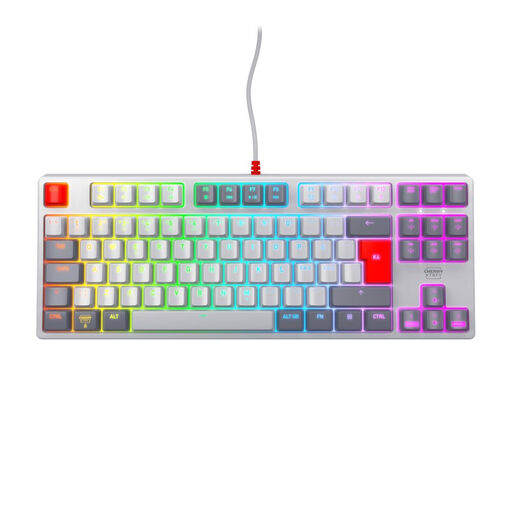
The wired TKL design leaves out the separate number pad, helping to free up space beside the keyboard.
USB connection and six multimedia hotkeys; US layout with euro symbol. CHERRY describes the SX scissor keys as quiet, but does not provide a comparable measurement.
 No image available
The TKL format is worth considering if you can manage without a separate number pad and are looking for a wired keyboard.
MX2A Red linear switches; USB connection; Pan-Nordic QWERTY layout.
 No image available
The compact 65% format with a German layout is an option if you want to save desk space and the altered key arrangement works with your shortcuts.
German QWERTZ layout; low-profile MX Speed switches; connects via Bluetooth, 2.4 GHz or USB-C.
Check the commands for your specific application before choosing a particularly small layout. Inkscape notes that some default shortcuts may not be available with non-US layouts; most, but not all, can be customised.
First, check that your laptop and keyboard use the same connection or support a compatible wireless connection. According to the German Federal Institute for Occupational Safety and Health, an external keyboard can help you position the screen and input devices separately. This is one way to set up your workspace, not a general requirement when buying a keyboard.
Follow the instructions for your specific model when cleaning it. The German Environment Agency notes that electrical waste must not be put in household rubbish in Germany; use the designated return or collection points.
No. When you buy faulty goods from a trader in the EU, you generally have statutory consumer rights for at least two years from receipt; these are separate from a manufacturer's warranty. Online orders also generally come with a 14-day right to cancel from receipt, although conditions and exceptions apply. This information is explained by the European Union's Your Europe website and Germany's Verbraucherzentrale consumer advice service.