What to consider when choosing
First decide which software and keys you use regularly. Then check how the layout, size and typing environment fit your desk.
| What matters |
What to check before buying |
Who it matters most to |
| Room for the mouse and mapping work |
Dimensions and key layout of the specific version; clear space for moving the mouse. |
If you want to leave room for a mouse beside the keyboard on a small desk, a compact design is a priority. This is the main concern for around 33 % of consumers. |
| Controlling views in Blender |
The view shortcuts you use and whether number pad emulation suits your workflow. |
If you often control Blender views using number pad keys, you’ll want direct access to the functions you need. Around 25 % of consumers prioritise this direct control. |
| Key noise in a shared room |
The switch type of the specific version and, if possible, a sound test in similar conditions. |
If others are in the room, quieter keystrokes may matter more than extra features. Around 25 % of consumers put this concern first. |
| Hand position during longer sessions |
The width and key layout of the specific model on your own desk. |
When you spend longer periods typing, it’s important that the layout suits the way you hold your hands and leaves enough room. Around 17 % of consumers say this fit is their main concern. |
Joybuy keyboards for smaller spaces
The following Joybuy listings include compact keyboards for workspaces with limited room, including TKL, 65% and mini versions. Check that each keyboard’s layout and keys suit your software.
 No image available
Inateck N0153BK foldable mini keyboard with touchpad, QWERTZ
A compact option if you have limited space at your desk and don’t want to use a separate mouse.
QWERTZ layout, touchpad and three Bluetooth channels; the product name lists compatibility with iPadOS, Android and Windows.
Joybuy
 No image available
CHERRY STREAM KEYBOARD TKL, US layout with euro symbol
The TKL layout leaves out the number pad, making it an option if you need more room to move your mouse beside the keyboard.
Wired USB connection, SX scissor technology, six multimedia hotkeys and a US layout with euro symbol. CHERRY describes the keystrokes as quiet.
Joybuy
 No image available
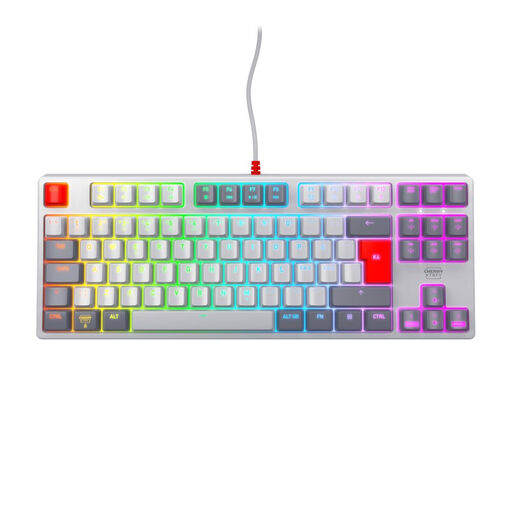
CHERRY XTRFY K4V2 TKL, MX2A Red, Pan-Nordic
The TKL format is an option if you’re looking for a compact keyboard that leaves more room for mouse movement.
Wired USB connection, MX2A Red linear switches and Pan-Nordic QWERTY layout.
Joybuy
 No image available
Redragon RS68, 65%, 68 keys
The compact design may suit you if desk space is limited and you’d like to use a detachable palm rest.
Mechanical keyboard with 68 keys, hot-swappable switches and a detachable palm rest. The product name lists Bluetooth, 2.4 GHz and wired operation.
Joybuy
 No image available
Redragon M68, magnetic switches, US layout
A compact option if you’re considering a 65% layout with magnetic switches.
68 keys, metal top plate and US layout; the product name specifies an 8,000 Hz polling rate.
Joybuy
Frequently asked questions
Do I need a number pad for QGIS?
No, QGIS documentation does not state that a number pad is generally required. You can configure keyboard shortcuts, so check the shortcuts you use in your own workflow before choosing a layout.
How can I use Blender without a number pad?
You can enable “Emulate Numpad” in Blender’s input settings. This makes the regular number row take on number pad functions; according to Blender, its previous functions may no longer be available in certain workflows.
What should I check before setting up a wireless keyboard?
Check which connection types the specific model version supports and whether your computer is compatible with Bluetooth or the receiver you need. Lenovo’s documentation lists Bluetooth and a USB wireless receiver for the ThinkPad TrackPoint Keyboard II; don’t assume a model has these features based on the brand name alone.
What are my rights when buying online from a trader?
According to consumer information from the European Union, you generally have a 14-day right to cancel an ordinary online purchase, starting from delivery; exceptions and rules on return costs apply. For faulty goods, you have a minimum statutory guarantee of two years against the seller. An additional warranty does not replace these rights.
Are there any specific product rules for wireless keyboards in Germany?
The EU Radio Equipment Directive applies to radio equipment placed on the market in the EU, with requirements covering areas such as safety and electromagnetic compatibility. The European Union describes CE marking as the manufacturer’s indication that the applicable EU requirements have been met. It is not an independent quality mark and does not establish that a specific version for sale here complies.


