Considerate artists
You paint alongside other people and want to keep typing noise to a minimum. Compare noise claims for the specific model, rather than assuming they apply to an entire switch type.


A compact keyboard is a sensible starting point for painting at a shared desk, leaving room for your stylus, tablet or mouse. A wired TKL model keeps the main typing area but leaves out the number pad; a small Bluetooth keyboard is easier to put away and can make switching between devices simpler. Manufacturer claims about quiet key action aren’t a direct comparison of noise levels. With programmable models, check the exact key mapping, version and layout.
You paint alongside other people and want to keep typing noise to a minimum. Compare noise claims for the specific model, rather than assuming they apply to an entire switch type.
You need room for your stylus, tablet or mouse alongside your keyboard, while keeping your most-used commands within easy reach.
You regularly use keyboard commands while painting and want to tailor the key mappings to the software you actually use.
| Consideration | What to check before buying | Who it matters to |
|---|---|---|
| Quiet key action | Check the key action on the specific version. A manufacturer’s claim that it is ‘quiet’ is no substitute for comparing keyboards under the same conditions. | If I paint alongside other people, I want repeated keystrokes to be as unobtrusive as possible. That’s why around 31% of consumers put quiet key action first. |
| Room for art supplies | Compare the keyboard’s footprint and layout, especially the arrow and function keys. Consider whether you need a number pad. | If I need room for a stylus, tablet or mouse beside my keyboard, a compact layout that keeps my frequently used keys within reach matters most. Around 31% of consumers prioritise having clear desk space. |
| Shortcuts within easy reach | Make a note of the commands you use most often. Then check whether the existing keys are enough or whether the keyboard and software support customisable key mappings. | If I use the same commands repeatedly while painting, I want to reach them without awkward workarounds. Around 23% of consumers prioritise shortcuts that are customisable or easy to reach. |
| Putting it away and switching devices | Check the connections on the specific model and make sure they suit your devices. Wireless operation isn’t necessary if the keyboard stays with the same computer. | If I want to put my keyboard away after painting or switch between my own devices, a portable format with the right connection is important. Around 15% of consumers put this need first. |
One researched version of the CHERRY STREAM KEYBOARD TKL is explicitly labelled as having a US layout with a euro symbol. It is therefore not automatically a DE-ISO/QWERTZ version.
Check the layout and full version details on the relevant product page, especially if you prefer DE-ISO/QWERTZ.
A different layout may take some getting used to.
The documented CHERRY TKL model leaves out the number pad while keeping the main typing area. The Keychron K3 Max has a 75% layout with a different key arrangement.
Before buying, compare the positions of the keys you use most rather than relying on the size label alone.
Manufacturers describe certain models as quiet, but these claims don’t compare keyboard noise levels under the same conditions.
If being considerate of others is important, check the key action on the specific version. Don’t rank keyboards based only on their switch type or a manufacturer’s claim.
The STREAM KEYBOARD TKL is a wired option with a small footprint that keeps the main typing area but leaves out the number pad.
The Pebble Keys 2 K380s combines a portable design with the ability to switch between devices. The larger MX Keys S is an alternative if you want more keyboard space and programmable keys.
The K3 Max is a compact, mechanical 75% option for anyone who wants to set up their own key mappings.
The Joybuy products below include compact keyboards, some of them foldable or wireless, as well as a wired TKL model. Check that the layout, connections and key arrangement suit your painting space and the shortcuts you actually use.
 Image unavailable
Its foldable mini design and built-in touchpad make this a good option if you want a keyboard that’s easy to set up or put away.
QWERTZ layout; three Bluetooth channels; touchpad; listed in the product name as compatible with iPadOS, Android and Windows. The name also mentions an AI function.
 Image unavailable
The foldable design is worth considering if you want to put your keyboard away after painting.
The product description lists scissor keys, three connection modes, switching between up to three devices and USB-C charging. Compatible systems listed include Windows, Android and iOS.
 Image unavailable
The compact design, without a number pad, could suit you if you want to leave room for other tools.
The product description lists a 75% format, SX scissor keys, a carry case and the ability to switch between up to four devices. The layout is listed as UK English.
 Image unavailable
The TKL format could suit you if you don’t need a number pad but want to keep the main typing area.
Wired USB connection; six multimedia hotkeys; SX scissor keys. The version on offer is explicitly listed as having an English US layout with a euro symbol.
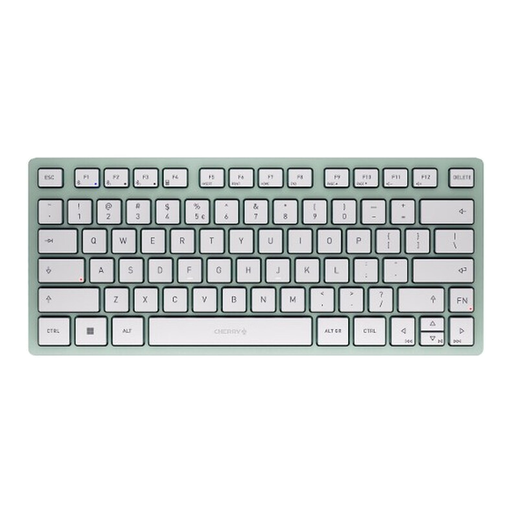 Image unavailable
The compact Bluetooth design is an option if you want a small keyboard for your painting space that you can take with you when needed.
The product name lists switching between three devices and a US layout; the product description specifies a US QWERTY layout.
No, programmable keys aren’t essential for everyone. Start by checking the commands available in your painting software. Adobe Photoshop, for example, lets you customise keyboard shortcuts. If you want to set up additional mappings directly on the keyboard, Keychron documents this option for the K3 Max with QMK/VIA.
Arrange your keyboard and other input devices so that your most-used keys are within reach and you still have room to paint. Workplace health and safety requirements may apply at a permanent desk-based workstation; the fact that a desk is shared doesn’t, on its own, tell you whether they apply.
Follow the instructions for your specific model. Logitech recommends switching off and unplugging its devices before cleaning them. That doesn’t mean every keyboard is washable.
No. The Verbraucherzentrale distinguishes between your statutory rights against the seller and a voluntary warranty. If something goes wrong, check your statutory rights as well as the terms of any warranty that may be offered.
No. According to the Federal Environment Ministry, waste electrical and electronic equipment must be taken to an authorised collection point or an authorised take-back provider. Retailers’ take-back obligations depend on the conditions set out in the Electrical and Electronic Equipment Act.