Choose a keyboard based first on the device you use to edit your slides and the space available at your seat. A lightweight standalone keyboard is easy to carry, but it may not hold your device upright. A foldable model with a touchpad combines typing and pointer control, but takes up more room when unfolded. Before you buy, check the layout, operating system support and the features available in your presentation app.
Which keyboards suit different users?
Travellers with limited space
If you edit slide text on the go, your keyboard and device need to fit into a limited space. Deutsche Bahn points out that fixed or fold-down tables are available at many, but not all, ICE seats. So, compare the dimensions when packed as well as when unfolded.
People working across multiple devices
If you start working on a laptop and then continue on a tablet, for example, device compatibility and the ability to switch between devices are essential. Check which operating systems the specific keyboard version supports and how many connections it offers.
Slide designers who don’t use a separate mouse
If you often select or move slide objects, an integrated touchpad can take the place of a separate mouse. Whether it lets you use the features you need also depends on your device and presentation app.
What should you look for when buying?
Lightweight standalone Bluetooth keyboard
A good choice if: keeping weight to a minimum is your priority and you already have a secure way to prop up your device. Logitech lists the Keys-To-Go 2 keyboard as weighing 222 g.
Bear in mind: it has no built-in stand; COMPUTER BILD also lists the lack of backlit keys as a drawback.
Compact keyboard for multiple devices
A good choice if: you want to switch between compatible devices and prefer a slim keyboard without a folding hinge. CHERRY lists three Bluetooth channels for the KW 7100 MINI BT; the KW 9200 MINI also offers wireless and wired connections.
Bear in mind: you may need to carry the receiver and cable for the KW 9200 MINI. According to the German manufacturer’s product listing, the KW 7100 MINI BT has limitations with Android and Chrome OS.
Foldable keyboard with touchpad
A good choice if: you want to work with slide objects without using a separate mouse. According to the manufacturer, the German ProtoArc XK01 TP combines a keyboard and touchpad.
Bear in mind: ProtoArc lists the XK01 TP as measuring 215,5 × 119,7 mm when folded and 386,4 × 119,7 mm when unfolded. Check the space available on your table and whether your device supports the touchpad.
Keyboard case for a specific tablet
A good choice if: you already use a particular tablet and want a keyboard and stand in one. A case will only be suitable if it’s designed for your exact tablet model.
Bear in mind: cases are made for specific tablet models, so don’t assume one will fit another device without checking.
| Buying priority |
What to check |
Who is it important to? |
| Space when travelling and at your seat |
Check the packed and in-use dimensions separately; a table isn’t available at every seat. |
If I need to fit my keyboard and screen into a small space, the size when unfolded matters too. Around 28% of consumers put space when travelling and at their seat first. |
| Device and layout compatibility |
Check the exact version against your device, operating system and preferred German layout. |
If I work across multiple devices or need German key labels, I want to check they’re compatible beforehand. Around 22% of consumers focus on device and layout compatibility. |
| Typing and slide shortcuts |
Check the key layout and test the shortcuts you need in the app you use. |
When writing slide text and using app shortcuts regularly, I want the right key layout. Around 22% of consumers prioritise typing and slide shortcuts. |
| Pointer control without a mouse |
Check whether the touchpad works with your device and the presentation tasks you need to do. |
If I want to select and move slide objects without a separate mouse, an integrated touchpad matters to me. Around 17% of consumers make pointer control their main priority. |
| Power and maintenance |
Check the battery type, charging options and what’s included with the specific version. |
If I don’t want to rely on finding a spare socket while travelling, I want to know how the keyboard charges or what batteries it uses. Around 11% of consumers put power and maintenance first. |
Common buying mistakes
-
Looking only at the folded dimensions
A foldable keyboard can take up considerably more table space when unfolded. Deutsche Bahn points out that tables aren’t available at every ICE seat.
Before you buy, compare its unfolded dimensions with the space your screen and keyboard will need at your seat.
If the table is too small, your planned setup may be awkward or impossible to use.
-
Assuming Bluetooth pairing means full app compatibility
Being able to connect a keyboard doesn’t automatically mean you can use the slide shortcuts you need in your app.
Check support for your specific device and test the features you need in the presentation app you use.
-
Assuming every standalone keyboard holds your tablet upright
A standalone keyboard doesn’t necessarily come with a built-in stand. COMPUTER BILD lists the need for a separate stand as a drawback of the Keys-To-Go 2.
Before you buy, consider how you’ll keep your screen secure at your seat. A keyboard case will only work with the exact tablet model it’s designed for.
Depending on your device setup, you may also need a suitable holder or a case with a stand.
Key brands at a glance
Logitech
The Keys-To-Go 2 is a lightweight standalone keyboard for tablets, with a cover. It’s distinct from the heavier Pebble Keys 2 K380s.
- Logitech lists the Keys-To-Go 2 as weighing 222 g and supporting several operating systems, subject to the minimum versions specified for each.
- On 26 June 2026, COMPUTER BILD ranked the Keys-To-Go 2 seventh in its tablet keyboard test. It praised its low weight and ability to switch between devices, but noted the lack of backlighting and the need for a separate stand. This assessment applies to this model, not to all Logitech keyboards.
CHERRY
The KW 7100 MINI BT is a compact Bluetooth keyboard with three channels; the KW 9200 MINI offers additional connection options.
- CHERRY describes both model ranges as having scissor keys and being designed for easy transport. For the KW 9200 MINI, the manufacturer also lists 2,4-GHz wireless and a wired connection.
- The German manufacturer’s product listing notes limitations with Android and Chrome OS for the KW 7100 MINI BT. Check support for your specific device.
ProtoArc
The German XK01 TP combines a tri-fold keyboard with a touchpad.
- ProtoArc lists the keyboard as weighing 297 g, with folded dimensions of 215,5 × 119,7 mm.
- Unfolded, it measures 386,4 × 119,7 mm. Check both the table space at your seat and whether your device supports the touchpad.
Samsung
The Smart Keyboard Trio 500 is designed for switching between compatible devices. The separately described Smart Keyboard EJ-B7800BBEGDE has special features designed for Galaxy devices.
- Samsung says the Trio 500 can connect to up to three devices.
- The Galaxy-specific shortcut keys on the EJ-B7800BBEGDE aren’t a feature of the Trio 500. Samsung lists the EJ-B7800BBEGDE as weighing 218 g, including its coin-cell batteries.
Trust
According to Trust, the compact Lyra offers two Bluetooth connections and one connection via a USB receiver.
- Trust describes it as having low-profile scissor keys and a rechargeable battery.
- The specific Lyra version described has the designation “US”. If you need a German layout, check the layout listed for the exact version.
Keyboards at Joybuy
The Joybuy products below include foldable keyboards, compact models for multiple devices and versions with an integrated touchpad for editing slides on the go.
 No image available
Inateck N0153BK foldable mini keyboard with touchpad, QWERTZ
The integrated touchpad could be useful if you need pointer control without a separate mouse.
Foldable; QWERTZ layout; Bluetooth 5.3; connects to up to three devices; 228 g.
Support for iPadOS, Android and Windows is listed in the product name; check compatibility with your specific device before buying.
View at Joybuy
 No image available
Inateck KB01105 tablet keyboard with touchpad, QWERTZ
The touchpad complements the keyboard when you need pointer control to edit slides.
QWERTZ layout; 228 g; 5 mm thick; connects to up to three devices.
The product description lists iPad, Android and Windows devices; check compatibility with your specific model.
View at Joybuy
 No image available
UNIQ Forio foldable Bluetooth keyboard, Green/Braided Green
Its foldable design and listed weight could make it a handy option to take on a train journey.
175 g; 167 × 105 × 13 mm when folded.
Compatibility is listed for iOS, Windows, macOS and Android. Before buying, check that your device and preferred presentation app are supported.
View at Joybuy
 No image available
CHERRY KW 9200 MINI, UK English QWERTY layout
Multiple connection options can be handy if you switch between devices.
75% form factor; scissor keys; four connection channels; rechargeable battery; carry case.
The listed layout is UK English QWERTY, which differs from the German layout.
View at Joybuy
 No image available
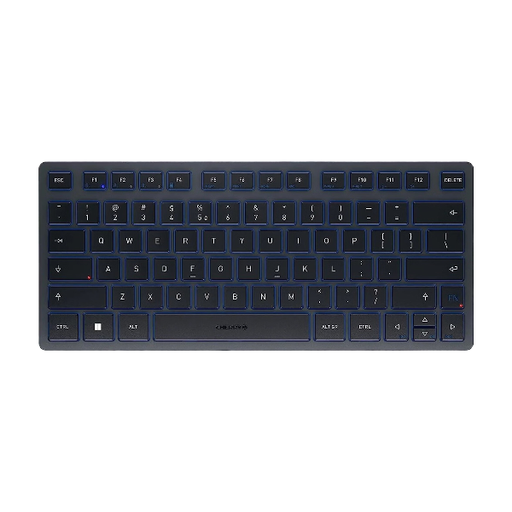
CHERRY KW 7100 MINI BT, US International QWERTY layout
Three Bluetooth channels are useful for switching between devices, provided they’re supported.
Compact TKL format; scissor keys; carry case; connects to up to three devices.
The version described has a US International QWERTY layout, not a German layout.
View at Joybuy
Frequently asked questions
Do I need a specific keyboard to use PowerPoint on a tablet?
Check both the connection with your tablet and the features available in your version of PowerPoint. Microsoft documents support for external keyboards with PowerPoint on Android; only the listed keyboard shortcuts are supported there. Check other platforms and keyboard layouts separately.
How do I set up a multi-device keyboard before travelling?
Pair the keyboard with each device you plan to use before you set off, then test switching between them in your presentation app. For the Smart Keyboard Trio 500, Samsung describes selecting a Bluetooth channel, confirming the PIN displayed on screen and switching with F7, F8 or F9. Other models may be set up differently.
Can I count on having a socket right by my ICE seat?
Not every seat has its own socket. Deutsche Bahn says there’s one socket per pair of seats in second class on ICE trains, and one per seat on selected train series. Plan your power supply around your specific journey and keyboard.


