Which buying criteria matter when writing across two screens?
First, check whether the monitors are connected to one computer or several. Then compare the layout, desk space and connection options with the way you work.
| Buying criterion |
What to check before buying |
Who is it important to? |
| Hand position |
Compare the split or familiar keyboard layout, as well as the full dimensions, including any fixed wrist rest. |
For long writing sessions, I want to find a keyboard layout that lets me position my hands comfortably. Around 33% of consumers prioritise hand position when writing. |
| Layout and text navigation |
Check the German layout of the specific variant and the position of frequently used keys. |
When writing in German, I want to be able to reach special characters and frequently used navigation keys in a way that suits my workflow. Around 27% of consumers prioritise a familiar keyboard layout and text navigation. |
| Available desk space |
Compare the keyboard’s width and depth with the space you need for your mouse and documents. |
When I need to see my text and sources at the same time, I still need room for my mouse and documents beside the keyboard. Around 20% of consumers say limited desk space is their main concern. |
| Switching between devices |
First check how many computers you use, then check the switching function and connection options of the specific variant. |
If I really do write on two computers, I want to switch between them without the hassle of unplugging and reconnecting. Around 13% of consumers prioritise switching between devices. |
| Connection and power |
Check the connection and power supply for the variant; consider statutory consumer rights separately from any voluntary extras. |
For a permanent writing setup, I want to know whether a wired or wireless connection will work with my computer and workspace. Around 7% of consumers prioritise easy connection and day-to-day use. |
Suitable products at Joybuy
The Joybuy products below are aimed mainly at writing setups where a compact keyboard is a good fit. Layouts, connections and device-switching features vary by model.
 No image available
Inateck Foldable Mini Keyboard with touchpad
The foldable mini design with an integrated touchpad could be a good fit if there’s little room on your desk for a separate mouse.
QWERTZ layout; three Bluetooth channels; listed in the product title as compatible with iPadOS, Android and Windows.
View at Joybuy
 No image available
Akko 3084B Plus, 75% layout, ISO-DE
The compact design could suit a desk with limited space; check that the key layout works for the way you write.
Mechanical keyboard with ISO-DE layout; Bluetooth, 2.4 GHz and USB-C; hot-swappable. The product title lists V3 Pro Cream Blue Switches.
View at Joybuy
 No image available
Akko 5087S V1 TKL, ISO-DE QWERTZ
The TKL design could be an option if you’re looking for a compact mechanical keyboard with a German layout.
Wired; ISO-DE QWERTZ layout; hot-swappable sockets. The product title lists Akko V3 Pro Cream Yellow Switches.
View at Joybuy
 No image available
Wireless keyboard with LCD display and rotary dial
If you use several devices, this model could appeal to writers looking for a QWERTZ layout and a choice of connection options.
QWERTZ layout; 4x Bluetooth, 2.4G and USB-C; 2000 mAh battery; backlighting.
View at Joybuy
 No image available
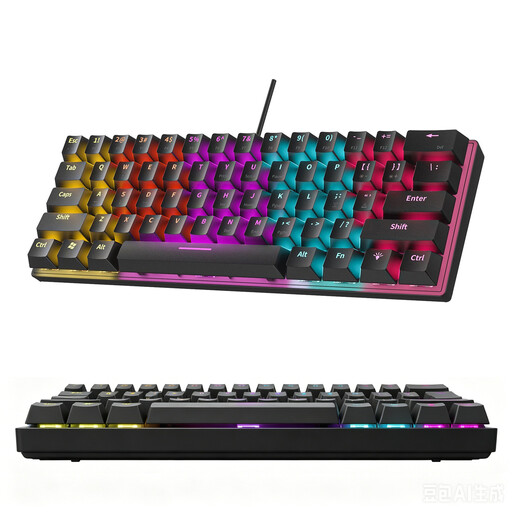
KINSI 60% keyboard with 61 keys
The compact design can free up desk space, but it changes the key layout. For German-language writing, it’s also worth noting that the product information says this variant doesn’t have a German layout.
60% layout with 61 keys; RGB lighting; double-shot keycaps.
View at Joybuy
Frequently asked questions
Do I need a keyboard for two devices because I have two screens?
No, not if both screens are connected to the same computer. A switching function is only useful if you want to use the keyboard with separate computers or other devices; Logitech describes Easy-Switch as a way to switch between devices.
How can I check whether a keyboard will fit on my desk alongside two screens?
Measure the usable space for your keyboard, mouse and documents. Compare it with the full dimensions of the variant you’ve chosen, including any fixed wrist rest. For example, CHERRY lists the KC 4500 ERGO as measuring 456 × 217 mm.
How do I connect and clean the keyboard?
First, check the connection on the specific variant: the CHERRY KC 4500 ERGO needs USB-A, while Logitech describes Easy-Switch as device pairing for compatible models. Logitech recommends unplugging wired keyboards and switching off wireless devices before cleaning its products. Bitkom advises avoiding harsh cleaning products and letting liquid get inside; also follow the instructions for your model.
What are the rules on cancellation and faults when buying online in Germany?
When consumers buy online from a business, they generally have a 14-day right to cancel; exceptions and the terms of the specific purchase should be checked. Your Europe states that goods bought in the EU come with at least two years of statutory legal protection from the date they are received. This is separate from a voluntary manufacturer’s guarantee or additional protection.
Do workplace regulations apply to my private essay-writing setup?
Not simply because it has two screens. The Federal Institute for Occupational Safety and Health explicitly states that activities in private homes outside a teleworking workstation are not covered by the scope of ASR A6. The position may be different for a workstation set up for an employee or for teleworking; ergonomic guidance can still be useful as a reference.


