Co-ordinating work on a shared computer
If several people use the same computer, the keyboard needs to support its connection type. Check USB, Bluetooth and the rules for wireless receivers before choosing a model.


First, check which connections are available and permitted on the shared computer. Then choose a layout and design that suit the invitations, lists and budget figures you work with, as well as the desk space available. A wired keyboard suits a fixed computer with a compatible port, while wireless models are only practical if Bluetooth or the required receiver is supported and permitted at your workstation. Split keyboards can take some getting used to, and you should follow the cleaning instructions for the specific model.
If several people use the same computer, the keyboard needs to support its connection type. Check USB, Bluetooth and the rules for wireless receivers before choosing a model.
For invitations, guest lists and budget spreadsheets, consider whether a German layout and a number pad are worth the extra desk space.
If you do a lot of typing at a shared workstation, you can weigh up the key layout and hand position. A split layout is one option, but it takes some getting used to and needs to suit everyone else who uses the desk, too.
First check how the keyboard will connect to the shared computer. Then make sure the layout, size and care requirements suit the tasks you do at the desk.
| What matters | What to check before buying | Who it matters most to |
|---|---|---|
| Connection at your workstation | Check which USB ports are available, and clarify the rules for Bluetooth and receivers on the computer you plan to use. | If you first need to find out whether you’re allowed to connect a keyboard to the shared computer at all, the connection type is crucial. Around 31% of consumers prioritise finding a compatible connection. |
| Layout for lists and budgets | Check for a German keyboard layout and the number, arrow and navigation keys you need. | If you write invitations and enter lots of guest-list or budget figures, weigh up the benefits of a number pad against the extra desk space it takes up. Around 25% of consumers prioritise this layout for typing and entering figures. |
| Quiet operation and desk space | Check the dimensions and the keys you need. A keyboard described as quiet doesn’t have a standardised noise rating. | If you need room for paperwork or a mouse, or other people work at the desk, choosing the right size matters. Around 19% of consumers prioritise a quiet or space-saving workspace. |
| Cleaning when shared | Check the care instructions for the exact model and find out whether it can be switched off or unplugged before cleaning. | If you share the keyboard with different people, you’ll want a cleaning routine that’s practical for everyday use. Around 13% of consumers prioritise easy care. |
| Hand position during longer writing sessions | Check the layout and dimensions, and consider whether everyone who’ll use it can work comfortably with the key arrangement. | A different layout may be worth considering for longer writing sessions, provided there’s enough room and everyone sharing the keyboard can use it. Around 12% of consumers prioritise a different hand position. |
Bluetooth and a USB receiver are different ways to connect. The shared computer must support and permit the connection you choose.
Check both options before buying. Depending on the model, you may need a compatible receiver; Logitech says a Logi Bolt receiver is included with the Signature K650.
A receiver that isn’t compatible with the computer or keyboard could mean extra time spent checking or sourcing the right one.
CHERRY says the KC 6000 SLIM is 440 mm long. At a shared desk, it may compete with paperwork and a mouse for space.
Think about how often you enter figures, and measure the available space before choosing a full-size keyboard.
A larger case takes up more desk space, leaving less room for other work essentials.
Logitech describes the Signature K650 as spill-resistant. That doesn’t mean it’s approved for use with any cleaning or disinfecting products.
Follow the care instructions for the specific model. Before cleaning, disconnect or switch off the keyboard as directed by the manufacturer.
Perixx notes that the split keyboard on the PERIBOARD-512 B differs from a conventional layout and may take some getting used to.
Ask the people who’ll actually use the desk, and check that there’s enough room for the keyboard and wrist rest.
A different, unfamiliar key layout can take time to get used to.
The KC 1000 and KC 6000 SLIM are wired office keyboards, while the KW 9200 MINI offers a compact design for use with several devices.
The Signature K650 is a wireless office keyboard with a wrist rest and two connection options specified by the manufacturer.
The German-layout KB216 is a wired keyboard for a fixed PC workstation, with QWERTZ key markings and a number pad.
The PERIBOARD-512 B is a wired, split keyboard. A German QWERTZ version is listed as an available option.
Rapoo describes the E9700M as a slim, rechargeable keyboard for use with several devices.
This selection includes compact or foldable keyboards, as well as wireless models and sets to suit different space and connection requirements. Before buying, check that the layout and connection type work with the shared computer.
 No image available
If desk space is limited and the computer supports switching between devices, the foldable design could be a good option.
Listed features include QWERTZ, an integrated touchpad, three Bluetooth channels and compatibility with iPadOS, Android and Windows.
 No image available
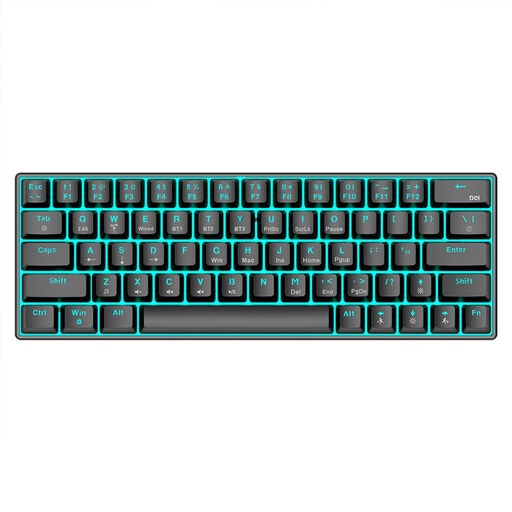
The compact 63-key design may suit a small workspace. Check that it has the number and navigation keys you need for planning.
The product name lists Bluetooth 5.0, 2.4 GHz and a USB cable as connection options, as well as RGB lighting and a 1450 mAh battery.
 No image available
If quiet keys and switching between devices matter to you, the listed features may suit this setup. Check that wireless connections are permitted on the shared computer.
The product name lists scissor-switch keys, three connection modes, connections to up to three devices and USB-C charging. Compatible systems listed include Windows, Android and iOS.
 No image available
This model may be worth considering if you need to type in German and want a choice of connection options. Check that its connection types comply with your workplace rules.
Listed features include QWERTZ, an LCD display, a rotary dial, four Bluetooth connections, 2.4 GHz, USB-C and a 2000 mAh battery.
 No image available
A full-size keyboard with a number pad can be useful for lists and budget figures, as long as the keyboard and wrist rest fit on the shared workspace.
The product name lists QWERTZ, a numeric keypad, quiet keys, a detachable wrist rest and a 2.4 GHz USB connection. Compatible systems listed include Windows and Mac.
No. First check whether Bluetooth is supported and permitted on the computer, or whether you’re allowed to use a compatible USB receiver. Logitech lists Bluetooth Low Energy and an included Logi Bolt receiver for the Signature K650, but that doesn’t confirm that either connection is permitted at your specific workstation.
Follow the instructions for the specific model. Logitech recommends unplugging a wired keyboard before cleaning and switching off a wireless one. Spill resistance alone doesn’t mean that any cleaning or disinfecting products are suitable.
According to the Verbraucherzentrale, consumers generally have 14 days from receiving the goods to withdraw from a contract made online. Check the terms of your specific purchase; the right to withdraw is separate from claims relating to faulty goods.
If the shared workstation falls within the scope of the workplace regulations, ASR A6 sets out requirements for screen-based work. The Federal Institute for Occupational Safety and Health describes its scope as covering fixed screen equipment in workplaces. Without knowing the details of a particular workstation, this doesn’t establish a blanket requirement to use a specific keyboard model.