Frequent number entry
If you regularly correct figures or codes in spreadsheets, check for a number pad, arrow and function keys, and the German layout of the exact model. Microsoft Support provides documentation on keyboard shortcuts in Excel.


For frequent number entry when cleaning survey data, a keyboard with a number pad and easy-to-reach navigation and function keys is a sensible starting point. If you spend long periods typing, a split or more compact design may matter more; for switching between devices or custom key mappings, look for suitable connectivity and software. Before buying, check the exact German layout, the keys you need and compatibility with your computer.
If you regularly correct figures or codes in spreadsheets, check for a number pad, arrow and function keys, and the German layout of the exact model. Microsoft Support provides documentation on keyboard shortcuts in Excel.
If you work at a desk at home for long periods, a comfortable hand position and enough space for your keyboard and mouse are important. The German Federal Institute for Occupational Safety and Health offers guidance on positioning your keyboard and mouse at your workstation.
If you work across several devices or want to customise frequently used keyboard shortcuts, check that the connection, operating system and required software suit the way you work. Logitech and Keychron describe different customisation options for specific models.
A good fit if: you work at a fixed workstation, enter numbers frequently and prefer a familiar layout.
Consider: a number pad and full set of keys take up more space; make sure the cable and USB connection are suitable.
A good fit if: you want to try a different hand position during long typing sessions without giving up a number pad.
Consider: the unfamiliar layout may take some getting used to. The F.A.Z. Kaufkompass also notes that the ERGO K860 lacks wired operation and key backlighting, and has a hard-to-clean gap.
A good fit if: you switch between devices or want to customise repeated input steps using supported software.
Consider: the receiver, operating system and software must suit the exact model; check the layout and connections too.
A good fit if: you want to set up your own key mappings and are looking for a mechanical keyboard.
Consider: layouts and switches vary between models; customisation alone does not prove that data cleaning will be improved.
A good fit if: you have limited desk space and only occasionally enter long strings of numbers.
Consider: check whether it has a number pad, arrow and function keys, or whether these are only available through secondary key functions.
| Priority | What to check before buying | Who this matters most to |
|---|---|---|
| Working with numbers and spreadsheets | German layout, number pad, and the arrow and function keys you need. | If I enter numbers or codes often, I want to reach them directly and navigate to specific spreadsheet cells. Around 36 % of consumers say this is their main priority when choosing a keyboard. |
| Hand position during extended use | Keyboard shape and space for a mouse and wrist rest. | During long sessions, I want to position my keyboard and mouse so that my hands can rest comfortably. About 29 % of consumers put this need first when choosing a keyboard. |
| Repeated tasks and switching between devices | Compatibility with the operating system, software and connection. | If I use several devices or want to customise repeated tasks, I need features that fit my workflow. Around 21 % of consumers prioritise customisable workflows or switching between devices. |
| Desk space and typing noise | Dimensions, keys included and the specific switch type. | If space is limited or typing noise matters, I want to find the right size and model. About 14 % of consumers focus mainly on space requirements or typing noise. |
Models in the same product range can have different key layouts. If there is no number pad, entering numbers may be less convenient.
Check the photos and specifications for the exact model to confirm it has a number pad, arrow and function keys.
Shape and features vary between models, and the layout of your whole workstation matters too. A particular design does not guarantee an individual health benefit.
Compare the dimensions and key positions, and take your desk, mouse position and wrist rest into account.
A different key layout may take some getting used to.
Connectivity and customisation options depend on the specific model, version and operating system.
Before ordering, check the product code, German layout, receiver and any software requirements.
The wired STREAM KEYBOARD is a traditional office option. Other models in the STREAM range may have different connection options.
The MX Keys S offers slim wireless typing with customisable keys, while the ERGO K860 has a split design and a number pad. They take different approaches.
The K5 Max is aimed at buyers looking for a mechanical full-size keyboard with a DE-ISO option and configurable keys.
The PERIBOARD range includes different ergonomic designs and connection types, including the wired mechanical PERIBOARD-535II.
This selection includes keyboards for frequent number entry, changing workflows and different space and connectivity requirements. For each model, check that the layout, keys and connection suit your workstation.
 No image available
The number pad mentioned in the product name may be useful for frequent number entry; check that the foldable design suits your workstation.
Bluetooth 5.3; QWERTZ; adjustable device stand. According to the product name, it is suitable for tablets, smartphones, laptops and PCs running Windows, iOS or Android.
 No image available
This model may suit you if you want an ISO-DE layout and several connection options; check that the more compact layout includes the keys you need.
Bluetooth, 2.4 GHz wireless and USB-C; hot-swappable switches, according to the product name.
 No image available
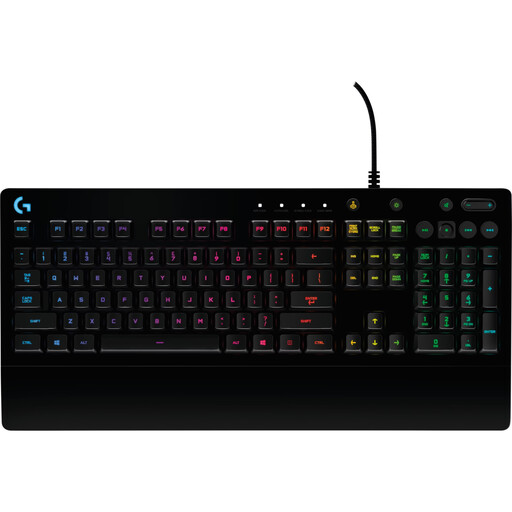
This keyboard could be an option for a fixed desk setup. Before buying, check the layout and keys you actually need against the exact model.
 No image available
If you are looking for a wireless keyboard with a number pad, check that the stated connection works with your devices.
4 Bluetooth connections, 2.4 GHz connection and USB-C; 2,000 mAh battery and backlighting, according to the product name.
 No image available
The number pad is useful for frequent number entry; also consider whether the mouse included suits your workstation.
Full-size; 2.4 GHz connection via USB receiver; low-profile keys, according to the product name. Listed as suitable for Windows and Mac.
Not necessarily. If you often enter numbers or codes directly, compare a model with a number pad against a more compact design, and check that it has the keys your spreadsheet software requires. Microsoft Support documents Excel keyboard shortcuts separately for each platform.
Position your keyboard and mouse so there is enough room for your hands and the mouse is easy to reach. For flexible working, the German Federal Institute for Occupational Safety and Health recommends placing the keyboard 10 to 15 cm from the edge of the desk; check whether this works with your desk space and posture.
Check that your device supports the stated Bluetooth connection or the right USB receiver, and factor in the need to recharge or replace the battery. The German Environment Agency says that used batteries and rechargeable batteries must not be put in household waste.
The requirements mentioned do not create a general obligation for private individuals to buy one. The Workplace Ordinance and ASR A6 apply within their respective scope to workplaces and suitably equipped teleworking workstations; if your employer provides your workstation, the relevant requirements should be considered separately.
For a fault, the seller is generally responsible for the statutory warranty; this is separate from any voluntary manufacturer’s guarantee. For a standard online purchase by a consumer, you will usually also have a 14-day right to cancel, subject to statutory exceptions.