If you’re short on luggage space, a folding or ultra-slim Bluetooth keyboard could be a good fit. For longer typing sessions, a compact keyboard may need more desk space. A keyboard case is worth considering if you have a tablet it’s specifically designed to support and want to prop up the screen and keyboard together. Before buying, check your exact device model, the German keyboard layout and how much room the complete setup will take up at your seat.
Which keyboard is right for you?
Commuters with limited luggage space
If you take your keyboard with you regularly and have little room at your seat, consider both its packed size and how much space it needs when you’re typing. Deutsche Bahn says fixed or fold-down tables are available at many, but not all, ICE seats.
Learners using several devices
If you switch between your phone, tablet and laptop when writing flashcards, check that the keyboard works with your devices and can switch between the connections you need. Logitech and CHERRY describe multi-device and connection options for the models mentioned here.
Learners who use one tablet
If you always use the same tablet and want to set up the screen and keyboard together, a compatible keyboard case could be a good option. Apple and Samsung specify particular tablet models, so check the exact model name and software requirements.
What should you look for when buying?
Deutsche Bahn says tables are available at many, but not all, ICE seats. So think about more than just how easy the keyboard is to carry: you’ll also need room for the keyboard and a clear view of the screen.
| Buying criterion |
What to look for |
Who is it important to? |
| Packed size and space required |
Check the dimensions when unfolded and allow room for the screen. |
If I’m travelling with little luggage, the keyboard needs to fit in my bag and sit beside the screen at my seat. Around 29% of consumers rank packed size and usable desk space as their top priorities. |
| Device compatibility |
Check the device model, operating system and supported connection type. |
If I switch between my phone, tablet and laptop, the keyboard needs to connect to my devices. Around 24% of consumers put compatibility with their existing device first. |
| Typing and keyboard layout |
Check the physical QWERTZ layout of the specific version and the arrangement of the keys. |
If I write lots of German flashcard text, I want a familiar keyboard layout. Around 18% of consumers prioritise typing feel and a German keyboard layout. |
| Screen positioning |
Check whether you’ll need a separate stand and how much space the setup takes up. |
If I want a clear view of the screen while typing, the keyboard and device need to sit securely together. Around 18% of consumers put a stable screen position first. |
| Power supply |
Compare the type of power supply and how often you’ll need to charge or replace batteries. |
If I want to use the keyboard reliably while travelling, I need to know whether it needs charging or spare batteries. Around 11% of consumers put the power supply first. |
Common buying and usage mistakes
-
Choosing a tablet case based only on screen size
Keyboard cases are often designed for specific tablet models. The Apple Folio mentioned here also requires iPadOS 18.3 or later.
Compare your tablet’s full model name and software requirements with the exact version of the case.
-
Confusing packed size with the space needed for typing
A separate keyboard needs to sit unfolded beside the screen. Deutsche Bahn says tables are available at many, but not all, ICE seats.
Try setting up the keyboard and screen together on a surface the size of your usual train table.
With a separate keyboard, you may also need a stand for the screen.
-
Overlooking the layout of the specific version
The language of a product page doesn’t automatically confirm that every version on offer has a German QWERTZ layout.
Check the variant description for the physical keyboard layout, especially if you write in German.
-
Assuming battery-powered means rechargeable
The keyboards reviewed differ in whether they run on coin-cell batteries or a rechargeable battery.
Before travelling, check the charge or battery level and find out how much effort it takes to replace the battery in the exact model.
For the Logitech Keys-To-Go 2 battery replacement, Logitech specifies two CR2032 coin-cell batteries and a T5 screwdriver.
Key brands and product ranges
Logitech
The Keys-To-Go 2 Universal is a separate, slim Bluetooth keyboard for several operating systems specified by the manufacturer.
- Logitech says it has an integrated keyboard cover.
- It isn’t a tablet case with a screen stand. Logitech says replacing the batteries requires two CR2032 coin-cell batteries and a T5 screwdriver.
CHERRY
The KW 9200 MINI is a compact, separate keyboard for anyone who wants to switch between devices and connection types.
- CHERRY specifies two Bluetooth channels, 2.4 GHz wireless, a wired connection, a rechargeable battery and a carry case.
- You’ll need to prop up the screen separately when using it with a phone or tablet, which takes up extra space.
Inateck
The folding Nomad-Ergo N0131 is a QWERTZ option when luggage space is tight.
- Inateck describes it as having a split keyboard that folds in two.
- Make sure the key arrangement suits your typing style. If weight is a deciding factor, check the weight of the specific model first.
Apple
The Magic Keyboard Folio is designed specifically for the iPad (A16).
- Apple specifies a detachable keyboard and an adjustable stand.
- The version mentioned requires iPadOS 18.3 or later; the information provided doesn’t confirm compatibility with other iPads.
Samsung
The Book Cover Keyboard Slim EF-DX620BBGGDE is a QWERTZ case designed specifically for the Galaxy Tab S10 FE+.
- Samsung specifies a POGO connector and magnetic attachment.
- The stated compatibility is for the Galaxy Tab S10 FE+; you’ll need to check which accessory version is right for other Galaxy tablets.
Joybuy products for studying with flashcards on the train
This selection includes separate folding keyboards and iPad keyboard cases designed for specific models. The key question is whether you prioritise a compact packed size or a combined screen-and-keyboard setup.
 No image available
Inateck N0153BK folding mini keyboard with touchpad, QWERTZ
This separate folding keyboard could be a good option if you’re considering packed size and use with several devices; you’ll need to set up the screen beside it.
The product name specifies QWERTZ, a touchpad and three Bluetooth channels, as well as compatibility with iPadOS, Android and Windows.
Joybuy
 No image available
Inateck N0158BK folding QWERTZ keyboard with mouse
This folding keyboard and mouse set is an option if you’re looking for a portable setup with a device stand and QWERTZ layout.
The product name specifies Bluetooth 5.3, an adjustable stand and a carry case. Compatible devices listed include tablets, phones and laptops.
Joybuy
 No image available
Folding Bluetooth keyboard with wireless mouse
This folding keyboard and mouse set is designed for use on the go; as a separate keyboard, it needs space beside the screen.
The product details specify scissor keys, USB-C charging and three connection types. Connections to up to three devices and compatibility with Windows, Android and iOS are also listed.
Joybuy
 No image available
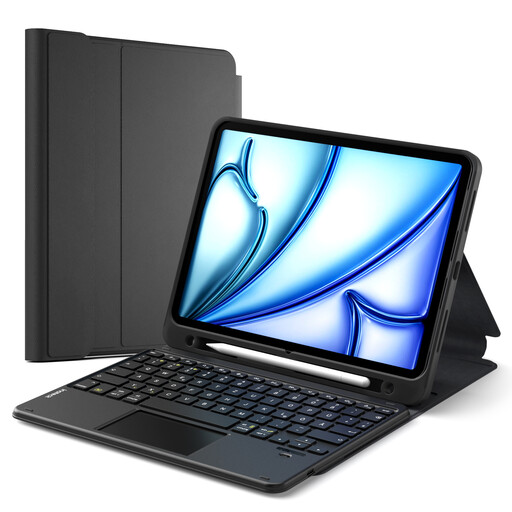
Inateck N0001 keyboard case with touchpad, QWERTZ
This case could be a good option if your iPad is one of the models specifically listed and you want to set up the screen and keyboard together.
The product name includes iPad 11 (A16 2025), iPad 10th generation, iPad Air 11" M4/M3/M2 (2026/2025/2024), Air 5/4 and Pro 11, among others. The details also specify a touchpad, pen holder and detachable keyboard.
Joybuy
 No image available
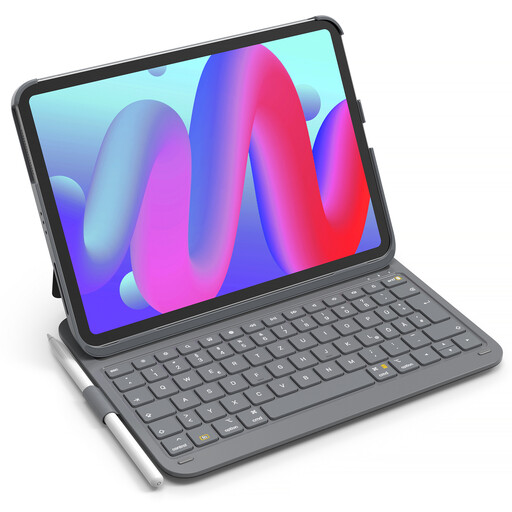
Inateck AirTap BK2007 iPad keyboard case, QWERTZ
This keyboard case could be a good option if you have an iPad listed in the product details and want to use the screen and keyboard together.
Listed models include iPad 11 (A16), iPad 10th generation, iPad Air 11" M4/M3/M2 (2026/2025/2024), Air 5/4 and Pro 11. The product details also specify QWERTZ and a pen holder.
Joybuy
Frequently asked questions
Does the keyboard need to be compatible with my flashcard app?
Check whether your device supports an external keyboard and whether you can use the fields and shortcuts you need in your app. A manufacturer’s claims about device and operating system compatibility don’t automatically confirm that every individual app will work.
Can I rely on Wi-Fi and a table on the train?
Not on every journey. Deutsche Bahn says fixed or fold-down tables are available at many ICE seats, while free Wi-Fi on DB regional trains is available on selected routes. If your study materials need an internet connection, check in advance whether you can make them available offline for your journey.
What should I check before my first journey?
Pair the keyboard with your device beforehand, then test the layout and typing in your flashcard app. For the Logitech Keys-To-Go 2, the manufacturer says a red status LED indicates critically low battery power; Logitech specifies two CR2032 coin-cell batteries and a T5 screwdriver for replacing them.
What are my rights if an online purchase in Germany is faulty?
Your statutory rights are against the seller and are separate from any voluntary guarantee. If a product is faulty, the first step may be to ask for it to be repaired or replaced. According to Verbraucherzentrale, online purchases generally come with a 14-day right to cancel; statutory conditions and exceptions apply.


