Keyboards at Joybuy
The Joybuy products below include wired and wireless keyboards, models with a number pad and more compact designs. Before buying, check that the layout, connection type and dimensions suit your workstation and cataloguing software.
 No image available
Inateck KB01003G Bluetooth keyboard, QWERTZ
The QWERTZ layout is suited to text entry. The listed multi-device connectivity may also be useful if you catalogue at different workstations.
Layout: QWERTZ. Connects to up to three devices via Bluetooth, according to the product description.
View at Joybuy
 No image available
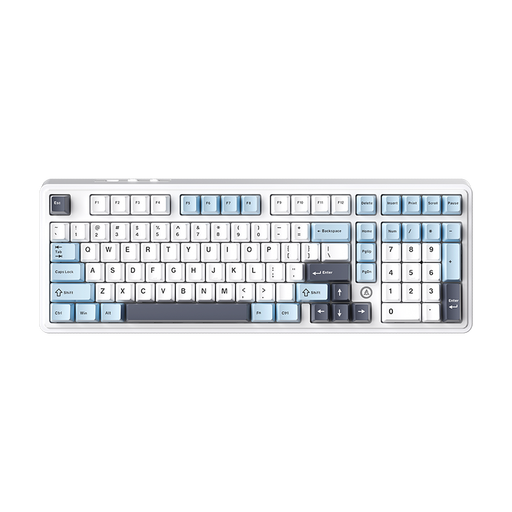
AJAZZ AK980 V2, Flying Fish Switch, Blue White Dark Blue
The number pad can be useful for recurring number entry. Check the listed QWERTY layout if you need a German QWERTZ keyboard.
97 keys and a number pad, according to the product description. Connection: Bluetooth, 2,4 GHz or wired. Layout: 98 % QWERTY, according to the product name. Battery capacity: 10000mAh, according to the product name.
View at Joybuy
 No image available
Logitech K120, wired, German QWERTZ
The full-size design and number pad suit frequent number entry. Measure your desk if you also need space for a mouse and paperwork.
104 keys and a number pad, according to the product description. Connection: USB; plug and play, according to the product description. Layout: German QWERTZ.
View at Joybuy
 No image available
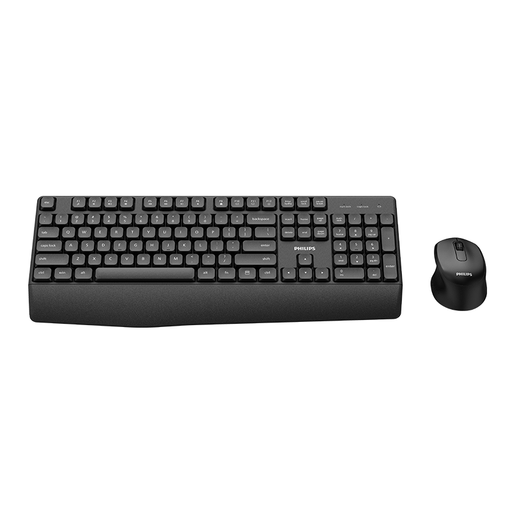
Philips 3000 SPT6348B/26, keyboard and mouse set, German version
This set combines keyboard and mouse use at one workstation. Bear in mind the space needed for the full-size keyboard and its number pad.
Includes a keyboard and mouse. Layout: German QWERTZ. Number pad included; shared wireless receiver, according to the product description.
View at Joybuy
 No image available
Logitech K280e, wired, German QWERTZ
The wrist rest is a feature you can consider alongside your preferred keyboard layout for longer cataloguing sessions.
Connection: USB. Layout: German QWERTZ. Large wrist rest, according to the product description.
View at Joybuy
Frequently asked questions
Can a keyboard detect duplicate game listings by itself?
No. Duplicate detection is handled by the software you use. In Excel, distinguish between temporarily hiding duplicate values and permanently removing them. Before deleting anything, check whether the rows are accidental duplicates or refer to different copies or editions. If you use other cataloguing software, check what features it offers.
How do I connect a wired keyboard for cataloguing?
For the Logitech K120, the manufacturer describes a USB connection that requires no additional setup. Check that your computer has a suitable port available; for other models, refer to the connection details for that product.
How should I dispose of an old keyboard?
In Germany, an old keyboard should not go in your household rubbish. The German Environment Agency recommends using local collection points or suitable take-back schemes. Where possible, remove any batteries and dispose of them separately.
What’s the difference between statutory rights and a guarantee if a product is faulty?
Statutory rights generally apply against the seller, while a manufacturer’s guarantee is a separate, voluntary service. The Verbraucherzentrale explains that, if a product is faulty, you should first request that the seller puts things right. Online purchases also generally come with a 14-day right to cancel, starting from the conclusion of the contract or receipt of the goods, depending on the circumstances. Conditions and exceptions apply.


