What to consider when choosing a keyboard
First, check that the keyboard has a German layout and the keys you use regularly. Then weigh up whether a dedicated number pad, more room for your mouse, customisable shortcuts or a split design matters most to you.
| What matters |
What to check before buying |
Who it matters most to |
| Writing in German |
Check the DE/QWERTZ layout, key mapping, key shape and connection type for the exact variant. |
When I write long instructions and captions in German, I want to be able to type the right characters directly. Around 33% of consumers prioritise a German layout and typing feel. |
| Shortcuts in page layout software |
Look up the shortcuts you use regularly in your chosen application, and check compatibility with your software and operating system. |
When I repeat the same steps to edit and arrange images, I want quick access to the right shortcuts. Around 27% of consumers prioritise their image and page layout workflow. |
| Room for your mouse |
Consider your desk width and mouse position, and make sure you can reach the navigation and function keys you need. |
When I often use my mouse to work with reference images and enter few numbers, I want more clear space next to my keyboard. Around 20% of consumers prioritise room for their mouse and image work. |
| Hand position |
Check the split key layout, wrist rest, connection type and space required on your desk. |
When I write at my desk for long periods, I want to see whether a different key layout suits my hand position. Around 20% of consumers prioritise keyboard design for longer writing sessions. |
Joybuy keyboards for German booklet text
This Joybuy selection includes keyboards with a German QWERTZ layout for writing booklet text. Compare the connection type, design and features listed in the product name to find the right one for the way you work.
 No image available
CHERRY MX 2.0S mechanical gaming keyboard, German QWERTZ
The German QWERTZ layout and full-size design suit writing workflows where a dedicated number pad is important.
Wired; CHERRY MX2A Red mechanical switches; full-size layout; RGB backlighting.
View at Joybuy
 No image available
Logitech K120, wired, German QWERTZ
The German layout and full-size design are useful for booklet text that involves entering numbers regularly.
USB plug and play; full-size design with number pad; described in the product name as spill-resistant, with a curved space bar.
View at Joybuy
 No image available
Logitech MX Mechanical, German QWERTZ
The wireless design may suit you if you want to connect via Bluetooth or Logi Bolt while you work.
Tactile Quiet mechanical switches; Bluetooth and Logi Bolt; Smart Backlighting.
View at Joybuy
 No image available
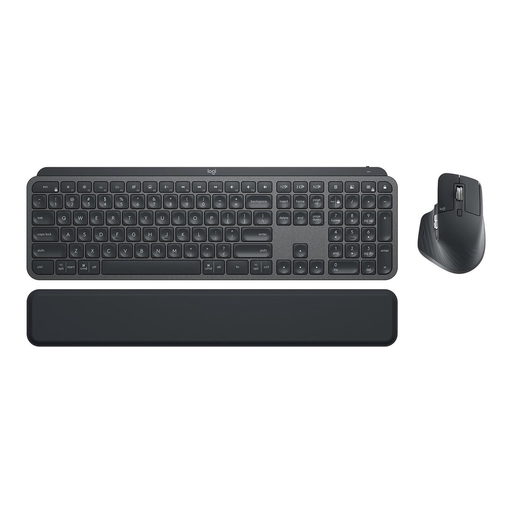
Logitech MX Keys Combo for Business Gen 2, German QWERTZ
This set includes a keyboard and mouse, making it a useful option if you want to choose both as part of the same setup.
Includes MX Keys and MX Master 3S; Logi Bolt; backlighting; multi-device support.
View at Joybuy
 No image available
Logitech K280e, wired, German QWERTZ
This wired keyboard with a German layout is an option if you’re looking for a keyboard to use at your desk.
View at Joybuy
Frequently asked questions
Can a keyboard insert reference images into a booklet by itself?
No. You insert and arrange images in the application you use. InDesign lets you search for keyboard shortcuts; check the image features and shortcuts in your own software.
What should I check when setting up a customisable keyboard?
First, decide which shortcuts you use regularly in your chosen programme. Then check that your operating system, connection type and, if needed, customisation software are compatible with the specific keyboard variant.
How can I check that a keyboard has the right German layout?
Check the product listing specifically for the DE/QWERTZ layout and the model variant. The model name alone does not tell you which country layout it has.
Is a compact keyboard or one with a number pad better for a booklet?
A compact keyboard can leave more room for your mouse, while a number pad can be useful if you enter numbers frequently. The DGUV lists compact keyboards without a number pad as a possible choice if you only need to enter a few numbers or primarily use a mouse.
What are my rights if a keyboard bought online is unsuitable or faulty?
According to the Verbraucherzentrale, consumers buying online generally have a 14-day right to cancel; you must notify the seller that you wish to cancel. Your statutory rights against the seller are separate from any voluntary manufacturer’s guarantee.


