Choose a keyboard based on the longest task involved in working on your handbook. For extended writing sessions, a typing feel that suits you and a comfortable hand position matter; when reviewing changes, the navigation and function keys you need should be easy to reach. A compact model saves space, while a split layout may take some getting used to. Tracked changes are handled by your word-processing software, not the keyboard.
Which keyboard is right for you?
For people who write a lot at a desk
If you’re writing longer sections of the handbook, you can take the typing feel, key shape and your posture into account when choosing a keyboard. The Federal Institute for Occupational Safety and Health notes that maintaining a static posture for long periods can lead to potentially unfavourable postures.
For meticulous editors
If you often jump between sections of text and review changes, pay particular attention to easily accessible navigation and function keys, as well as the key mapping in your word-processing programme. Microsoft Support notes that keyboard shortcuts can vary depending on the layout.
For writers short on space or working across multiple devices
A shorter layout may be useful if your writing space is limited; a wireless keyboard with device switching is worth considering if you actually work across several devices. These features address different needs.
What should you look for when buying?
First, think about what has the biggest impact on your work on the handbook: extended writing sessions, navigating the text, limited space or switching between devices.
| Consideration |
What to look for |
Who is it important for? |
| Comfort during extended writing sessions |
Check the key shape and design; if you choose a split layout, allow for a possible adjustment period. |
If I spend a long time working on the draft, I want to type on keys that feel comfortable and suit my posture. Around 36% of consumers put typing comfort first. |
| Navigation while editing |
Check the position of the arrow, navigation and function keys, as well as the key mapping in your word-processing programme. Microsoft Support explains that keyboard shortcuts can depend on the layout. |
If I want to review changes carefully and move between sections of text, I need the right keys in familiar places. Around 29% of consumers prioritise navigation while editing. |
| Space and number pad |
Consider whether you need a number pad for frequent data entry; the CHERRY STREAM KEYBOARD TKL and Dell KB216 differ in this respect. |
If my desk space is limited, I want to save room; if the handbook contains lots of numbers, a number pad may matter more. Around 21% of consumers prioritise space requirements and the number pad. |
| Connectivity and switching between devices |
Check that the connection type, operating system and specific layout variant meet your needs; for the Keychron K3 Max, make sure you select the specific DE-ISO version. |
If I really do work on the draft across several devices, I want to be able to use the keyboard with them easily. Around 14% of consumers prioritise switching between devices. |
Which buying mistakes should you avoid?
-
Confusing the keyboard with tracked changes
Tracking and reviewing changes is a feature of your word-processing software. Extra keys alone won’t turn it on.
Choose a keyboard based on how you type and use it. Separately, familiarise yourself with the review and tracking features in your application.
-
Choosing a compact layout and missing the number pad
The CHERRY STREAM KEYBOARD TKL has no number pad; the Dell KB216 is a full-size model with a number pad.
Before buying, think about how often you’ll enter telephone numbers, figures or tables in the handbook, and check the key layout of the specific version.
-
Assuming ISO automatically means a German layout
The Keychron K3 Max is available with different ISO layouts and switch options. The name alone therefore doesn’t tell you which specific German layout you’ve selected.
Before buying, check explicitly that the version is listed as DE-ISO or German (QWERTZ).
-
Confusing the manufacturer’s warranty with your statutory rights
If a product is faulty, your statutory consumer rights generally apply against the seller. They are separate from any additional warranty offered, as explained by the Verbraucherzentrale.
Keep a record of the seller and your proof of purchase, and check the terms of any additional warranty separately.
Which brands are worth considering?
CHERRY
The STREAM KEYBOARD is a wired, full-size model; the STREAM KEYBOARD TKL has no number pad and therefore takes up less desk space.
- CHERRY lists SX scissor technology for both models.
- The manufacturer’s claims about typing feel are not independent test results. The TKL version has no number pad.
Logitech
The MX Keys S is a low-profile wireless keyboard with customisable keys; the ERGO K860 has a split layout. The models suit different ways of working.
- Their designs offer different features to consider, depending on whether you need to switch between devices or prefer a particular key layout.
- Claims about the ERGO K860’s ergonomics come from the manufacturer. A review by F.A.Z. Kaufkompass criticises this model for, among other things, lacking backlighting and having a gap between the wrist rest and keyboard that is difficult to clean.
Perixx
The wired PERIBOARD-512 B has a split keyboard and a wrist rest; a German QWERTZ version is listed.
- Its design offers a different key layout for writers who want to try a split keyboard.
- The manufacturer notes that it may take time to get used to. Claims about preventing discomfort are not an individual medical guarantee.
Dell
The KB216 version reviewed is a wired, full-size keyboard with a German QWERTZ layout, USB-A and a number pad.
- Dell describes this version as having low-profile Chiclet keys.
- According to Dell, the version reviewed has no backlighting. A wrist rest is available separately and is not automatically included.
Keychron
The K3 Max is a compact mechanical keyboard with a 75% layout, available with different ISO layouts and switch options.
- It’s worth considering if you specifically want a compact mechanical layout and configurable keys.
- Select DE-ISO specifically. The 75% layout is not full-size.
Joybuy keyboards for your handbook
The Joybuy models below include wireless and foldable layouts, a wired full-size keyboard, and split and mechanical designs. For each model, check that the layout, key arrangement and connection suit your writing space.
 No image available
Inateck Bluetooth Keyboard KB01003G
A wireless option if you use a QWERTZ keyboard and want to switch between devices.
QWERTZ layout; Bluetooth connection with up to three devices, according to the product information.
Joybuy
 No image available
Inateck Foldable Mini Keyboard N0153BK
Its foldable design and built-in touchpad make this a good option if you’re looking for a compact keyboard to take with you.
QWERTZ layout; three Bluetooth channels and integrated touchpad, according to the product information.
Joybuy
 No image available
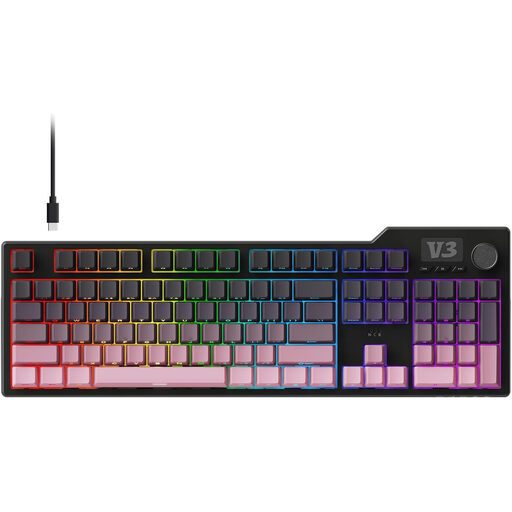
AJAZZ AK35I V3 Wired Full-Size Gasket Mechanical Keyboard
A wired, full-size design with a number pad, for frequent number entry at a fixed writing space.
Mechanical keyboard; 104 keys, according to the product information.
Joybuy
 No image available
Logitech ERGO K860, QWERTZ
A split design for writers who want to try a different key layout; allow for a possible adjustment period.
QWERTZ layout, according to the product information.
Joybuy
 No image available
Logitech MX Mechanical Wireless, German QWERTZ
A wireless mechanical keyboard if you want to switch between devices and need a German layout.
German QWERTZ, according to the product information.
Joybuy
Frequently asked questions
Do I need a special keyboard for tracked changes?
No. Tracking and reviewing changes are handled by the word-processing software you use. In Word, keyboard shortcuts can help; Microsoft Support notes that the shortcuts listed may vary depending on your keyboard layout. Check the command in your version of Word and with your layout.
What should I check first when connecting a keyboard?
Check your computer’s connection ports and the exact product version. The Dell KB216 uses USB-A in the version described; the connection and ISO layout of the Keychron K3 Max depend on the version you choose. Don’t select DE-ISO based on the model name alone.
Does a split keyboard need special cleaning?
Follow the instructions for the specific model. A review by F.A.Z. Kaufkompass notes that the gap between the wrist rest and keyboard on the Logitech ERGO K860 is difficult to clean; take this area into account when caring for the keyboard.
What are my rights in Germany if a product is faulty or I buy online?
If a product is faulty, your statutory consumer rights generally apply against the seller and are separate from a manufacturer’s warranty. Many distance-selling contracts with consumers also generally include a 14-day right to cancel. The conditions and exceptions for your specific purchase should be checked; the Verbraucherzentrale explains the difference.
Does German occupational health and safety law require a particular keyboard for this personal writing project?
ASR A6 does not provide grounds for such a requirement for a personal writing project outside a workplace or teleworking environment. If the writing is part of an established employee workstation, its specific classification must be assessed separately.


