If you often switch between custom fields, first check whether your indexing software supports the keyboard shortcuts you need. Only then is it worth considering a programmable keyboard. A traditional full-size keyboard with a number pad can be useful for entering lots of numbers and making corrections, while a split layout is another option for longer writing sessions – ideally, try one out first.
Which keyboards suit different users?
For indexers who use lots of custom fields
If you often switch between fields, custom key mappings or macros can make repetitive steps easier to access. Keychron lists VIA key mappings for the DE-ISO version of the V6 Max; check whether a command works in your indexing software.
For indexers entering lots of dates and corrections
When entering names, dates and places, having number and navigation keys close to hand can be important. CHERRY lists the KC 6000 SLIM as a German full-size keyboard, while FamilySearch describes names, dates and places as typical details recorded during indexing.
For indexers who work in long sessions
If a comfortable hand position matters to you during longer sessions, a split keyboard offers an alternative layout to consider. Logitech describes the ERGO K860 as a split model, while Perixx notes that the PERIBOARD-512 B takes some getting used to.
What should you consider when choosing?
Programmable full-size keyboard
A good fit if: Your indexing software supports the keyboard shortcuts you need and you want to assign your own keys to repetitive steps.
Things to consider: Setup takes time. Macros don’t create fields in your software or replace checking your entries.
Traditional full-size keyboard
A good fit if: You enter numbers and text and make corrections without custom macros, and prefer a number pad and familiar layout.
Things to consider: Extra keys aren’t necessarily programmable. Check which features the specific model actually offers.
Split keyboard
A good fit if: You’d like to try a different hand position during longer indexing sessions.
Things to consider: A split layout may take some getting used to and need extra desk space. Perixx specifically notes that the PERIBOARD-512 B takes time to get used to.
| What you need |
What to look for |
Who is this important for? |
| Switching between fields repeatedly |
Test the commands in your indexing software and check the operating system and configuration software requirements. |
If you often go to the same fields, you may want to trigger repetitive steps using the keyboard. Around 31% of consumers rank easy access to the right fields as their top priority. |
| Navigation and numbers |
Check your own form to see whether you need a number pad, arrow keys, Tab and function keys. |
If you enter lots of dates or correct entries, having number and navigation keys close to hand could make all the difference. Around 31% of consumers prioritise these keys. |
| German characters |
Confirm the exact DE or QWERTZ version and test some typical names and place names. |
When entering German names and letter text, you’ll want a familiar key layout that matches the version you order. Around 23% of consumers focus mainly on text entry and layout. |
| Hand position |
If possible, try the layout out and measure the space you’ll need for the keyboard and letter template. |
If you’re indexing for long periods, a different hand position may be an important factor in your choice. Around 15% of consumers rank this as their top priority. |
Buying mistakes you can avoid
-
Confusing macros with a feature in your indexing software
A programmable key or repeated action won’t automatically create custom fields in the form you’re using. Whether you can control the steps you need with the keyboard depends on the software.
Before buying, run through a typical indexing task in the software you use and note down the keyboard shortcuts you need.
-
Assuming the model name tells you which German layout it has
A product range may include versions with different country-specific layouts. The documented German version of the CHERRY KC 6000 SLIM is not the same as a version with a US layout.
Before ordering, check the product number and the key layout listed for the specific version.
-
Expecting a split keyboard to feel familiar straight away
Perixx notes that the PERIBOARD-512 B takes some getting used to. It’s also a wide model, so make sure you have room for both the keyboard and your letter template.
If possible, try the layout before a longer indexing session and check that you have the right connection available.
Brands to consider
Keychron
The V6 Max is a full-size keyboard worth considering if you want programmable key mappings for repetitive tasks.
- Keychron lists macros and hot-swappable switches for this model; the DE-ISO version is the one to consider for a German layout.
- Check whether your indexing software supports the commands you need and make sure you select the right version.
Logitech
The MX Keys S is worth considering for software-based Smart Actions, while the ERGO K860 has a split layout.
- Logitech describes Smart Actions in Logi Options+ as a way to trigger repetitive tasks.
- Check the software and operating system requirements. Logitech advises against storing confidential information in Smart Actions. According to F.A.Z. Kaufkompass, the ERGO K860 can’t be used with a cable; this note applies to this model.
CHERRY
The KC 6000 SLIM is a slim, wired full-size option for traditional typing, with no macro setup required.
- CHERRY lists scissor switches and a German version for the KC 6000 SLIM.
- The extra keys don’t let you assign custom indexing functions. Check the layout and product number for your chosen version before buying.
Perixx
The PERIBOARD-512 B is a wired split-layout alternative with a number pad.
- Perixx lists German QWERTZ, USB-A and dimensions of 485 × 236 × 44 mm.
- The manufacturer notes that it takes some getting used to. Allow for the space it needs, and don’t treat claims about reducing strain as proof of individual effectiveness.
Keyboards for indexing family letters
The models below cover German QWERTZ layouts, full-size keyboards with a number pad, split layouts and keyboards with customisable shortcuts.
 No image available
Logitech K120, German QWERTZ
A traditional full-size keyboard with a number pad for German text, numbers and corrections, with no need to set up custom macros.
The product details list 104 keys, low-profile keys, function keys and USB plug-and-play.
View at Joybuy
 No image available
Logitech ERGO K860, QWERTZ
A split layout for anyone who wants to try a different keyboard arrangement during longer writing sessions.
This wireless model offers Bluetooth, a USB receiver and a QWERTZ layout, according to the product details. F.A.Z. Kaufkompass lists the lack of wired operation as a limitation.
View at Joybuy
 No image available
AJAZZ AK35I V4, German QWERTZ
With a number pad and navigation keys, this full-size keyboard is an option for entering lots of numbers and text.
The product details list 104 keys, plus Bluetooth, 2.4 GHz wireless and USB-C. Check which connection suits your workspace.
View at Joybuy
 No image available
Logitech MX Mechanical, German QWERTZ
A wireless keyboard for typing in German, with customisable shortcuts listed in the product details.
Features include Bluetooth, a Logi Bolt receiver and the option to customise shortcuts through Logi Options+. Check in advance that the software and commands you need are compatible with your indexing programme.
View at Joybuy
 No image available
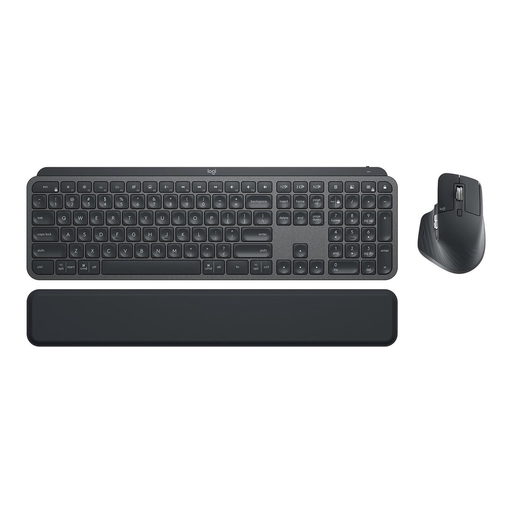
Logitech MX Keys Combo for Business Gen 2, German QWERTZ
This set is a good option if you want to use a keyboard and mouse together for typing and navigating at your desk.
The product details list a full-size QWERTZ keyboard, an MX Master 3S mouse, and Logi Bolt and Bluetooth connections.
View at Joybuy
Frequently asked questions
Can a programmable keyboard create my custom indexing fields?
No. Key mappings and repeated actions won’t automatically create fields in your indexing software. First check whether you can use the existing fields and commands with your keyboard.
How can I set up repetitive steps without saving letter contents as a macro?
Test switching between fields or using a shortcut with non-sensitive sample data, then check the result in the form. Logitech specifically advises against storing sensitive information in Smart Actions.
What if the keyboard is faulty or the layout isn’t right after buying online?
For online consumer purchases in Germany, you generally have a 14-day right to cancel. The Verbraucherzentrale explains the time limit in relation to the conclusion of the contract or receipt of the goods. Statutory rights if goods are faulty are separate from this; a voluntary guarantee is something else again. Check the terms of your specific purchase.
Does the GDPR apply when indexing family letters for personal use?
Article 2(2)(c) of the GDPR excludes processing by individuals for purely personal or family activities. Whether this still applies if you later publish the material or do the work for someone else depends on the specific circumstances; your choice of keyboard won’t determine the answer.


