Forum developers who use lots of shortcuts
If you write code and want to assign specific characters or commands, check the exact DE-ISO variant and which customisation options it actually supports.


Start by choosing a layout that lets you enter code characters, shortcuts and German forum posts confidently. Then consider how long you’ll be typing, your workspace and whether you need to switch between devices when choosing a form factor and connection. A compact, customisable mechanical keyboard, a slim standard keyboard and a split model suit different ways of working, each with its own learning curve and connection considerations. No keyboard makes a website responsive: you’ll need to check how it looks at different screen sizes separately in your development environment.
If you write code and want to assign specific characters or commands, check the exact DE-ISO variant and which customisation options it actually supports.
If you write forum posts, help text or moderation content as well as code, you can weigh up the typing feel and hand position that best suit your workspace. The Federal Institute for Occupational Safety and Health highlights the importance of choosing and using work equipment safely when working flexibly across different locations.
If you switch between devices or operating systems, check that the connection type and features for switching devices work with your setup.
First check that the layout works for your code characters and German text. Then weigh up the form factor, workspace and connection type.
A good fit if: you often use code characters or custom keyboard shortcuts and want to customise the layout. Keychron lists a 75% layout and QMK/VIA for the V1 DE-ISO variant.
Consider: The V1 is wired, while the V1 Max adds wireless connectivity. Check the exact model and layout variant.
A good fit if: you write a lot of text as well as code and prefer a slim design. CHERRY lists scissor switches and a number pad for the KC 6000 SLIM; Logitech describes programmable actions for the MX Keys S.
Consider: The KC 6000 SLIM is listed with USB-A and no backlighting; the MX Keys S has specific software requirements for its extra features.
A good fit if: you’d like to try a different hand position. The Logitech ERGO K860 has a split, curved key layout, while the two halves of the ErgoDox EZ can be positioned separately.
Consider: Allow space for it and time to get used to the different key layout. A manufacturer’s description of a design does not guarantee a particular effect for you.
| Consideration | What to check before buying | Who it matters most to |
|---|---|---|
| Layout and entering code | DE-ISO or another specific variant; the keys available and the layout software actually supported. | If I use code characters and shortcuts often, I want to be able to reach them confidently on my chosen layout. Around 36% of consumers put code layout first. |
| Hand position during long sessions | Fixed or separately positionable design; space required and time to get used to it. | During long sessions, I pay attention to how my hands rest at my workstation and whether there’s enough space. Around 29% of consumers prioritise a different hand position. |
| Typing feel and form factor | Switch type and exact variant; number pad and connection type, if they matter for your workspace. | If I write code and longer forum posts at the same workstation, I look for a typing feel that suits both. Around 21% of consumers focus on form factor and typing feel. |
| Connection and switching devices | Bluetooth, receiver or wired connection; operating system and any software requirements. | If I work on several computers in turn, I need a connection and device-switching features that suit my setup. Around 14% of consumers prioritise switching between devices. |
The CHERRY KC 6000 SLIM is also available as a DE variant; the listing described on Joybuy specifically states that it has a US layout.
Before buying, compare the model number and layout of the variant you’ve selected, not just the product name. An unsuitable layout could mean extra steps if you need to exchange or return it.
A smaller layout and customisable key assignments meet different needs. Keys in different positions or within different reach may take time to get used to.
First check which commands you use most and the exact key layout, then decide which size suits your workspace.
If important keys are harder to reach, getting used to the keyboard can take time.
Split keyboards have different layouts. F.A.Z. Kaufkompass notes that the ERGO K860 has no backlighting and cannot be used with a cable.
Choose based on your hand position, workspace and connection needs. Don’t assume that a manufacturer’s claims guarantee a particular effect for you.
Your Europe, the European Union’s consumer portal, distinguishes statutory consumer rights from an additional voluntary guarantee.
If you’re offered extra cover, check who provides it and what it covers or excludes before paying for it.
Paid-for extra cover may be offered alongside your statutory rights for faulty goods; compare what additional protection it provides.
The V1 DE-ISO is a compact, wired option with a customisable layout; the V1 Max adds wireless connectivity.
The KC 6000 SLIM is designed for buyers looking for a slim standard keyboard with scissor switches and a wired connection.
The slim MX Keys S and the differently shaped, split ERGO K860 cater to different form-factor and workflow needs.
The ErgoDox EZ is an option for buyers looking for separately positionable keyboard halves and a highly customisable layout.
This selection is suited to entering code and text in German. It includes compact designs with different layouts, switch types and connection options. Check the details of the exact variant to make sure it suits your workspace.
 No image available
An option if you’re looking for a German layout and a compact TKL design for coding and typing.
QWERTZ DE; TKL format; black.
 No image available
An option if you’re considering a compact ISO-DE layout and several connection options.
75%; ISO-DE; tri-mode: Bluetooth, 2.4G and USB-C; hot-swappable; RGB; V3 Pro Cream Blue switch.
 No image available
An option if you’re looking for a German ISO layout with a wired connection.
TKL; wired; ISO-DE QWERTZ; hot-swappable; RGB; V3 Pro Cream Yellow switch.
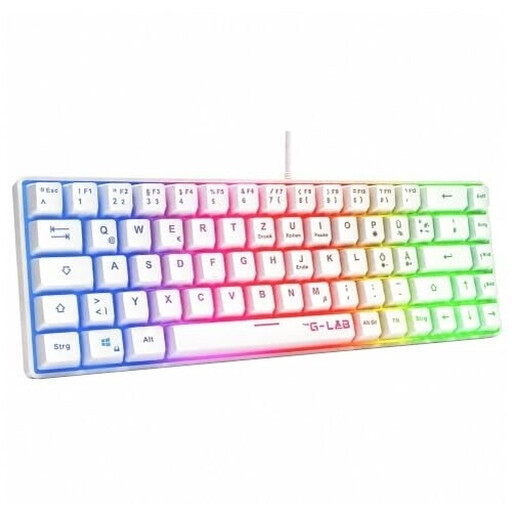 No image available
An option if you’re looking for a compact, wired membrane keyboard for typing in German.
QWERTZ (German); 60%; USB; rainbow backlighting; white.
 No image available
An option if you’re considering a compact German layout and a wireless keyboard.
65%; low-profile MX Speed switches; tri-mode: 2.4GHz, Bluetooth and USB-C; RGB; white.
No. A keyboard affects how you type and work; you’ll need to check how the site displays at different screen sizes separately in your development environment.
First, check the ports: CHERRY lists USB-A as a requirement for the KC 6000 SLIM. Logitech says the ERGO K860 connects via Bluetooth or the included USB receiver; extra features that use Logi Options+ have their own software requirements.
No. According to Your Europe, when you buy goods from a trader in the EU as a consumer, you have a legal guarantee of at least two years from the date you receive the goods; a voluntary manufacturer’s guarantee is an additional benefit. If you’re offered a guarantee, check who provides it and what terms apply.
According to Your Europe, you generally have 14 days from delivery to cancel a distance-selling contract with a trader. Exceptions and possible return costs may apply; the right to cancel is separate from your statutory rights for faulty goods.
The Federal Network Agency lists correct CE marking, product traceability and accurate manufacturer details among the points checked during market surveillance. Check these details on the specific model.