What to look for when buying
Flat standard keyboard
A good fit if: You use a fixed computer and want a familiar key layout with a low-profile design.
Consider: According to the manufacturer, the CHERRY KC 6000 SLIM is not backlit; the listed DE variant differs from the US/EU variant.
Keyboard with customisable features
A good fit if: You want to set up commands you use repeatedly and the software suits your workflow.
Consider: The software and operating system need to be compatible; on the Keychron V6 Max, the keycap variants differ in whether the backlighting shines through.
Split ergonomic keyboard
A good fit if: You want to prioritise hand position during longer typing sessions and try a split layout.
Consider: The layout may take some getting used to; for the Logitech model reviewed, the F.A.Z. also notes that it lacks backlighting and wired connectivity.
By a bright window, assess the key legends and surfaces in the lighting conditions you actually work in. The BAuA describes potential visibility issues caused by glare and reflected light, while Logitech presents backlighting as helpful in low light.
| Priority |
What to check when buying |
Who this matters most to |
| Readability in daylight |
Check the key legends and surfaces at your actual workstation; don’t assume that backlighting means a keyboard is proven to work well in daylight. |
If you work by a bright window, you’ll want to read the keys clearly despite the incoming light. Around 33% of consumers say daylight readability is their main concern. |
| Commands you use repeatedly |
Make a note of the commands you use most often and check that the software works with your system. |
If you often use the same commands in your level editor, customisable keys could suit your workflow. Around 25% of consumers give commands they use repeatedly top priority. |
| Typing comfort during longer sessions |
Try the split layout and check how much desk space it needs; make sure the wired connection and backlighting meet your needs. |
If you have long typing sessions, you’ll want to give more thought to hand position and may be willing to get used to a split design. Around 25% of consumers put typing comfort during longer sessions first. |
| Layout and connection |
Check whether the exact variant is DE-QWERTZ or DE-ISO; confirm the connection and model number. |
If you need a German key layout and a suitable connection, check the exact version before ordering. Around 17% of consumers prioritise layout and connection. |
Keyboards at Joybuy
The models below are listed with a German layout; several also offer programmable keys or customisable shortcuts.
 No image available
Razer Ornata V3 Tenkeyless, German layout
Could suit you if you want programmable keys and prefer a keyboard without a number pad.
Specifications include a USB connection, eight-zone lighting and a detachable magnetic wrist rest. According to the description, you can programme the keys and configure the lighting using Razer Synapse.
View at Joybuy
 No image available
Akko 5087S V1 TKL, ISO-DE-QWERTZ, Black & Gold
Could suit you if you want a German key layout and programmable macros.
Specifications include Akko V3 Pro Cream Yellow switches, hot-swap support and RGB lighting. The PBT double-shot keycaps have yellow legends on a dark background, according to the description.
View at Joybuy
 No image available
AJAZZ AK35I V4, German QWERTZ layout
Could suit you if you want a German layout and need to consider several connection options for your workstation.
Connections include Bluetooth, 2.4 GHz wireless and USB-C, alongside a full-size layout with 104 keys. Other features include a 1.14-inch TFT colour display and hot-swappable switches.
View at Joybuy
 No image available
Logitech MX Mechanical, German QWERTZ layout
Could suit you if you want a low-profile mechanical keyboard with customisable shortcuts and backlighting.
Specifications include quiet tactile switches and a choice of Bluetooth or Logi Bolt connectivity. According to the description, you can customise shortcuts and lighting using Logi Options+.
View at Joybuy
 No image available
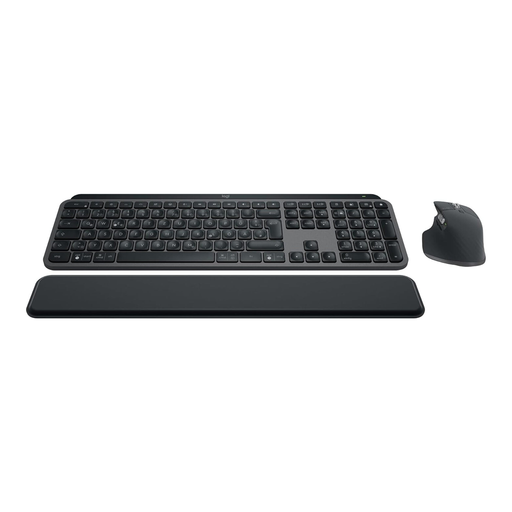
Logitech MX Keys S Combo, German QWERTZ layout, Graphite
Could suit you if you want a German full-size keyboard with customisable actions and a mouse in one set.
According to the product name, the set includes the MX Keys S and MX Master 3S. Features include Bluetooth, Logi Bolt and connectivity for up to three devices; you can customise Smart Actions and workflows using Logi Options+.
View at Joybuy
Frequently asked questions
Does backlighting help right by a bright window?
There’s no evidence that it offers an advantage in bright daylight. Logitech describes backlighting as helpful in low light; separately, the BAuA highlights potential visibility issues caused by reflections. So check the key legends and surfaces at your workstation.
How do I set up macros for my level editor?
First, make a note of the commands you actually use repeatedly in your editor. Logitech offers Smart Actions through Logi Options+ for the MX Keys S; Keychron offers VIA for key mapping and macros on the V6 Max. Before buying, check that the relevant software works with your system and workflow.
What should I bear in mind when choosing a split keyboard?
Allow time to get used to it and check that the split layout fits on your desk. Perixx notes that the PERIBOARD-512 B may take some getting used to; for the ERGO K860, the F.A.Z. also points out that the gap between the wrist rest and keyboard can be difficult to clean.
How can I tell whether a keyboard really has the right German layout?
Check the listed layout and the exact model number of the variant you’ve selected. For the CHERRY KC 6000 SLIM, JK-1600DE-2 is the DE variant, while JK-1600EU-2 has a US/EU layout. A similar model name alone isn’t enough to go on.
What rights apply when buying online as a private consumer in Germany?
For a qualifying distance contract, you generally have a 14-day right of withdrawal; exceptions and the start of the withdrawal period depend on the contract, as explained by the Verbraucherzentrale. If newly purchased goods are faulty, you can generally exercise your statutory rights against the seller within two years of receiving them. A voluntary guarantee is separate from these rights.


