For level prototyping at home, your layout should keep the arrow, function and combination keys you use regularly in the editor within easy reach. A compact keyboard is only practical if it doesn’t leave out any keys you need. A low-profile scissor-switch keyboard may suit a shared room, while a programmable mechanical model is useful for custom macros. If posture is your main concern, consider a split layout. Before you buy, check the exact DE-ISO version, switches, connections and software requirements.
Which keyboard suits which needs
Frequent use of the level editor
If you regularly switch between navigating scenes and editing, the arrow, function and combination keys should be within easy reach. Unity Technologies describes using the arrow keys for scene navigation, while Epic Games notes that some shortcuts can be customised.
Prototyping in a shared home office
If other people are working within earshot, weigh up typing noise and key layout against the functions you actually need. CHERRY describes the KC 6000 SLIM as a low-profile scissor-switch keyboard, while Razer offers different switch options for the BlackWidow V4, including clicky and quieter versions.
Long typing sessions with posture in mind
If you spend long periods working at a screen, choose a keyboard that suits your hand position and desk setup. The German Federal Institute for Occupational Safety and Health (BAuA) highlights the importance of posture when working at a computer, while Logitech describes the ERGO K860 as a split keyboard.
What to look for when buying
| Buying priority |
What to check before buying |
Who should pay particular attention? |
| Editor keys and layout |
Match your editor setup against the arrow, function and modifier keys, as well as the key labels on the DE-ISO version. |
If I switch frequently between navigation and editing, I want the keys I need to be within easy reach. Around 31% of consumers put editor keys and a suitable layout first. |
| Typing noise at home |
Check the exact switch type and, if possible, how it sounds in your working environment. Descriptions alone don’t provide a comparable volume measurement. |
If other people are working within earshot, I want to take typing noise into account without giving up the functions I need. Around 25% of consumers prioritise discreet typing noise. |
| Hand position during long sessions |
Check that the key layout, wrist support and space required suit your hands, desk and editor shortcuts. |
If I work at a screen for long periods, I want to choose a keyboard that suits my hand and arm position. Around 25% of consumers put posture first. |
| Custom key mapping and connection |
Check that the software you want to use works with your operating system, and that Bluetooth, a receiver or USB will work with your computer. |
If I want to customise recurring commands, I need key mapping that works with my editor and computer. Around 19% of consumers prioritise custom key mapping and suitable connection options. |
Pitfalls to watch out for
-
A German listing doesn’t necessarily mean DE-ISO
Manufacturers offer keyboards in different national layout versions. Different key labels or positions can feel unfamiliar in the editor.
Before ordering, compare the full variant name and the key labels shown with what you need.
-
‘Quiet mechanical’ isn’t a standardised volume measurement
The Razer BlackWidow V4 has different switch options: Green is described as clicky, while Yellow is described as quieter. This doesn’t give you a standardised measurement of the keyboard’s volume.
Check the exact switch type and, if possible, listen to how it sounds when typing.
-
Don’t choose a compact keyboard on size alone
Depending on your editor and layout, you may need extra key combinations to access frequently used keys that aren’t directly available.
First make a note of the editor actions you use most, then check whether the form factor suits them.
Brands to consider
Logitech
The MX Keys S and ERGO K860 cater to different preferences in key shape and layout.
- Logitech describes the MX Keys S as having low-profile, customisable keys, and the ERGO K860 as having a split layout.
- These features apply to the specific models and don’t necessarily apply to every Logitech keyboard.
Keychron
The V6 Max is a mechanical full-size option with a DE-ISO version and customisable key mapping.
- Keychron lists QMK/VIA, Bluetooth, 2.4 GHz and hot-swap switches for the V6 Max.
- Switches and keycaps vary by version, so you can’t infer a particular noise level from the model name alone.
CHERRY
The KC 6000 SLIM is a low-profile, wired scissor-switch keyboard, while the MX 2.0S is a separate mechanical range.
- CHERRY lists a full-size layout and USB-A for the KC 6000 SLIM. Switches for the MX 2.0S depend on the model.
- Features of the KC 6000 SLIM don’t automatically apply to the MX 2.0S, or vice versa.
Razer
The BlackWidow V4 is aimed at buyers who want to use a gaming keyboard with dedicated macro keys for prototyping too.
- Razer lists six macro keys and different switch options.
- Clicky and quieter versions aren’t interchangeable, and the manufacturer’s claims don’t prove a measured advantage for level design.
Joybuy keyboards for level prototyping
The Joybuy products below include wired and wireless keyboards, different layouts and programmable mechanical options for working in a level editor.
 No image available
Foldable Bluetooth keyboard with wireless mouse and scissor switches
If you work across several devices, this set is worth considering if you’re looking for a compact keyboard with scissor switches.
The product title lists three connection modes, switching between up to three devices, USB-C charging and compatibility with Windows, Android and iOS.
View at Joybuy
 No image available
CHERRY MX 2.0S, mechanical, full-size, German QWERTZ, MX2A Red
If you’re looking for a German full-size layout with linear mechanical switches, this model is one to consider.
The product details list 110 keys, German QWERTZ, CHERRY MX2A Red switches and a USB-A connection.
View at Joybuy
 No image available
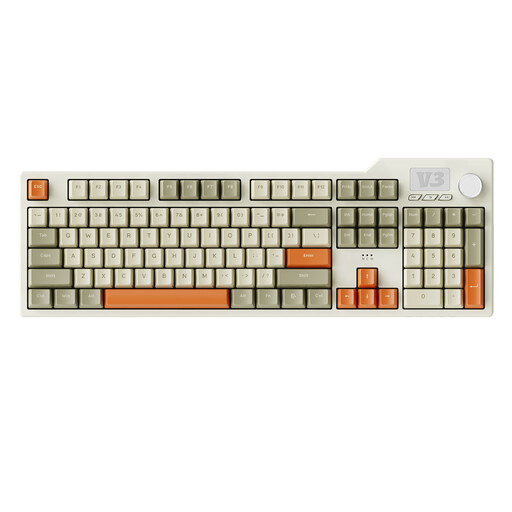
AJAZZ AK35I V3, wired, mechanical, 104 keys
If you want a full-size layout with a number pad and customisable macros, this is one mechanical option to consider.
The product details list 104 keys, programmable macros, hot-swap switches, five layers of dampening and USB. The description lists Windows and Mac as supported systems.
View at Joybuy
 No image available
Ticktype EVO75, ISO-DE, tri-mode, hot-swap, Creamy Rye switches
If you’re looking for a German layout with software for custom key mapping, this mechanical 75% model is one option to consider.
The product details list ISO-DE, hot-swap switches, Bluetooth, 2.4 GHz and USB-C, as well as software for macros and key mapping. Check that the software supports your operating system.
View at Joybuy
 No image available
Logitech K120, wired, German QWERTZ
If you’re looking for a German full-size layout with function keys and a number pad readily available, this wired model is one to consider.
The product details list German QWERTZ, 104 keys including function keys and a number pad, and USB plug-and-play.
View at Joybuy
Frequently asked questions
Do I need a gaming keyboard for scene navigation?
No. Unity Technologies documents the use of arrow keys for scene navigation, among other controls, while Epic Games describes keyboard and mouse controls and notes that some shortcuts can be customised. What matters is whether the keys you actually use are within easy reach.
How do I set up custom key mappings for the editor?
Start by checking the shortcuts in your editor. For the Keychron V6 Max, the manufacturer describes using VIA to map keys and macros. Check that the software and the specific keyboard version work with your operating system.


