For a well-structured library guide, choose a keyboard that suits your writing environment and preferred hand position. In a quiet space, keys described by the manufacturer as quiet may be worth considering. If you write for long periods, a split design could also be an option, provided you have enough room and are happy to take time to get used to it. Microsoft Support explains that Word creates an automatic table of contents from correctly formatted headings – a keyboard won’t create the document structure for you.
Which keyboards suit different writers?
Writers in a quiet library space
If you write longer passages in a quiet space, consider both key noise and typing feel. CHERRY describes the keys on its STREAM KEYBOARD as quiet. This is a manufacturer’s claim, not a noise measurement taken at your own workspace.
Writers who work for long periods
Consider whether the keyboard’s shape and positioning suit your preferred hand and arm position. Perixx notes that it may take time to get used to the split key layout of the PERIBOARD-512 B.
Writers working with complex outlines
If you often switch between text, navigation and heading levels, check which keys you need in the writing software you use. Microsoft Support explains heading structure and keyboard shortcuts in Word; Google Docs notes that some shortcuts may vary depending on your language or keyboard layout.
What should you look for when choosing?
Start by deciding what matters at your workspace, then check the layout, software controls and connection against the computer you plan to use.
| Priority |
What to check before buying |
Who is it important to? |
| Noise and typing feel |
Check the specific key or switch type; if possible, try the keyboard in a comparable environment. |
If I write for long periods in a quiet space, I want to type without unnecessarily disturbing others. Around 40% of consumers may consider noise and typing feel their top buying priority. |
| Hand position during long writing sessions |
Consider the shape and the space available at your desk; allow time to get used to a split keyboard. |
For long sessions, I want a shape that suits my hand and arm position and fits the space I have. Around 30% of consumers may put hand position first. |
| Working with headings |
Check the commands you need in the writing software and layout you actually use; in Word, tables of contents rely on heading styles. |
If I work with lots of outline levels, I want to be able to use styles and navigation reliably in my software. Around 20% of consumers may consider working with nested headings their top priority. |
| Connection and operation |
Check compatibility with the computer you plan to use; if the keyboard has programmable keys, make sure you’re allowed to use the required software there. |
If I work on a particular library computer, I want to make sure the connection and any required setup are compatible with it. Around 10% of consumers may consider connection and operation their top buying priority. |
Common keyboard-buying misconceptions
-
Macro keys create your outline automatically
In Word, an automatic table of contents is generated from correctly formatted headings – not simply from text that looks like a heading or from using a particular keyboard.
First, set up heading styles in your writing software. Then check whether customisable keys could make repetitive tasks easier.
Incorrectly formatted headings can mean extra time spent making corrections.
-
An ergonomic design means instant comfort or guaranteed prevention
Split keyboards differ from conventional designs and may take time to get used to. A product’s name alone is no indication of the health benefits it may have for you.
Check the shape and positioning against your own workspace, and read the returns policy before deciding.
-
You can choose a mechanical or wireless keyboard based on the product range alone
Switches, layouts and connections can vary between models. Programmable keys are only useful if you can use the required software on the computer you plan to work with.
Check the full model specification, keyboard layout and connection against your workspace. If quiet operation matters, try the specific model’s keys.
Key keyboard brands at a glance
CHERRY
The STREAM KEYBOARD is a slim, wired office keyboard designed for a dedicated workspace.
- CHERRY lists SX scissor keys and office keys, and describes the typing action as quiet.
- The manufacturer’s description of the noise level is not an independent measurement in a library setting.
Logitech
Logitech says the MX Keys S has backlit, customisable keys. The ERGO K860 is designed for writers looking for a split layout.
- The MX Keys S’s customisation options are a manufacturer’s claim. An independent review by F.A.Z. Kaufkompass rated the typing feel of the ERGO K860 positively.
- According to this review, the ERGO K860 has neither backlit keys nor wired operation. These findings do not apply to all Logitech keyboards.
Perixx
The PERIBOARD-512 B combines a split key layout with a USB-A cable. A QWERTZ version is available on the German product page.
- Perixx lists an integrated wrist rest.
- The manufacturer notes that it may take time to get used to the keyboard. This does not prove that it helps prevent health problems.
Keychron
The K8 Pro may suit writers looking for a mechanical keyboard with a configurable layout.
- Keychron lists VIA support and a DE-ISO option.
- The range includes different layout, switch and keycap options. Check the specifications of the exact version you’re considering.
Joybuy keyboards for your workspace
This selection includes wired and wireless QWERTZ keyboards, as well as split and compact models for different workspaces.
 No image available
Wireless keyboard with LCD display, rotary dial and QWERTZ layout
For writers who want to connect the same keyboard to several devices.
According to the product details: Bluetooth for up to four devices, a 2.4 GHz receiver, USB-C and backlighting. The battery capacity is listed as 2000 mAh; the display shows details including the connection mode and battery level.
View at Joybuy
 No image available
Keyboard and mouse set with detachable wrist rest, QWERTZ
For longer writing sessions when you want a full QWERTZ layout and quiet keys.
The keyboard has a number pad and connects via a wireless 2.4 GHz USB receiver. According to the product description, the set is compatible with Windows and Mac.
View at Joybuy
 No image available
Redragon RS68, mechanical keyboard, 65%, 68 keys
For a workspace with limited room where a compact keyboard is a good fit.
The product title lists Bluetooth, 2.4 GHz and wired operation, as well as hot-swappable switches. The keyboard is described as having a detachable wrist rest.
View at Joybuy
 No image available
Logitech ERGO K860, QWERTZ
For writers looking for a split key layout and an integrated wrist rest.
The product details list Bluetooth, a USB receiver and three tilt options. An independent review by F.A.Z. Kaufkompass notes that it has no backlit keys and no wired operation. The review also describes the gap between the wrist rest and keyboard as difficult to clean.
View at Joybuy
 No image available
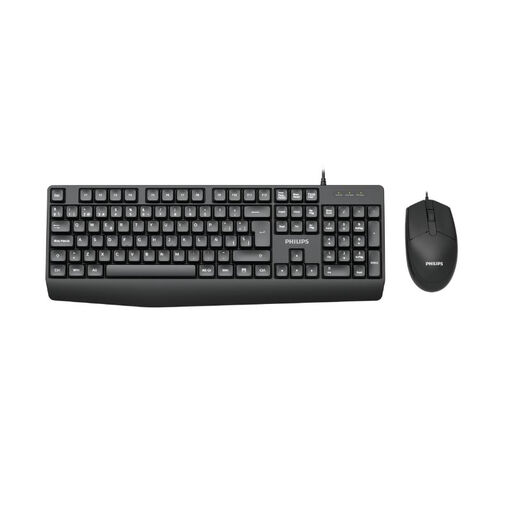
PHILIPS SPT6237B/26, keyboard and mouse set, German version
For a dedicated workspace where you need a wired connection and a German layout.
According to the product description, the keyboard and mouse connect together via USB-A. The keyboard has quiet keys, a QWERTZ layout and a number pad.
View at Joybuy
Frequently asked questions
Do I need a programmable keyboard for nested headings?
No. In Word, an automatically updated table of contents and its levels rely on correctly applied heading styles. Programmable keys may make some tasks easier, but check the shortcuts for your version of Word and your layout. Microsoft Support’s shortcut list is based on the US layout.
What should I try first after connecting the keyboard?
In your writing software, test the navigation keys you need and apply heading styles in a test document. Google Docs notes that some keyboard shortcuts may not work with every language or keyboard layout.
How should I look after my keyboard at work?
Follow the cleaning instructions for your specific model. An independent review by F.A.Z. Kaufkompass described the gap between the wrist rest and keyboard on the ERGO K860 as difficult to clean. Bear this in mind if your workspace needs frequent cleaning.
What rights apply when buying a keyboard remotely in Germany?
For relevant distance-selling contracts, the German federal portal states that consumers have a 14-day right to cancel. Statutory warranty rights for faulty goods are separate and apply against the seller. If a library is buying as an organisation, it should check separately whether the requirements for consumer rights are met.


