For a guide with nested headings, choose a keyboard whose layout and features suit your writing software and the commands you need. As Microsoft Support explains, document structure in programmes such as Word is created using heading styles and multilevel lists. For long writing sessions, key layout and hand position matter too. If space is limited, a compact layout may be a good choice, provided you don’t often need a number pad.
Which keyboard considerations matter to you?
Writers who work with document structure
If you often apply and move between heading levels, the formatting and navigation commands you need should be easy to access in your writing software. Microsoft Support explains how multilevel lists work with built-in heading styles.
Frequent typists
When you’re writing longer passages at a fixed workstation, key layout and hand position are important things to consider before extra features sway your decision. BG BAU notes that compact keyboards without a number pad can be an option if you only enter numbers occasionally.
Writers with limited desk space
If you want to leave room beside your keyboard for a mouse, notes or reference materials, and rarely enter numbers, a layout without a number pad could work well. BG BAU notes that compact keyboards of this kind can be useful when mouse use is a priority.
What to look for when buying
When writing a guide with several heading levels, your choice will mainly depend on the commands you use in your writing software, how you type at your workstation, and whether you need to save space or switch easily between devices.
Compact keyboard
A good fit if: you mainly edit text, rarely enter numbers and need space for a mouse or documents.
Consider: whether you’ll miss the number pad and whether the specific layout suits your writing software.
Programmable keys
A good fit if: you want to assign frequently used commands to keys for your own editing workflow.
Consider: setup requires compatible software or firmware. Test the commands in the writing programme you use.
Split keyboard
A good fit if: you want to try a different key layout to suit your hand position during long writing sessions.
Consider: getting used to the layout and finding room for the keyboard may matter more than extra features.
| Priority |
What to check when buying |
Who is it important to? |
| Editing headings and text |
How easy it is to reach the keys you need; shortcuts and styles in your writing software |
I want to format heading levels quickly and access commands I use often. Around 36% of consumers put working with document structure first. |
| Hand position during long writing sessions |
Try the key layout; assess your hand and arm position at your own desk |
During longer writing sessions, I want to check whether the key layout suits my hand position. Around 29% of consumers prioritise this. |
| Space and key feel |
Whether you need a number pad; key feel and room for a mouse or documents |
I need room for a mouse or notes and only rarely type numbers. Around 21% of consumers prioritise space and key feel. |
| Layout and switching between devices |
The specific keyboard layout; connection type and operating system support |
When writing in German and switching between computers, I want to choose a suitable layout and connection. Around 14% of consumers give this priority. |
How to avoid buying mistakes
-
Assuming a product listed on a German website has a German keyboard layout
The CHERRY STREAM KEYBOARD TKL listed at Joybuy is explicitly specified as having a US layout. The model name alone therefore doesn’t tell you which layout the specific version has.
Check the layout and product details for the version you’ve chosen before expecting a German QWERTZ layout.
-
Assuming an extra macro key will format headings correctly automatically
Your writing programme’s styles create the document structure. Programmable keys can trigger configured steps, but they don’t replace these features. Keyboard shortcuts can also vary depending on the language or layout, as explained in Google Docs Help.
First, try the styles and shortcuts in the programme you use. Then decide whether custom key assignments would help with recurring tasks.
Allow time to set up and test your own key assignments in your writing programme.
-
Assuming a split layout is guaranteed to be comfortable
Split and straight keyboards differ in their layout and the space they take up. A particular design doesn’t prove that it will suit your hand position.
Check key reach and hand position at your own workstation, and bear in mind that the layout may feel unfamiliar at first.
Brands to consider
CHERRY
The STREAM KEYBOARD TKL is a compact, wired option for writing if you rarely need a number pad.
- CHERRY says the main key section is the same as on the full-size version; the TKL model does away with the number pad. CHERRY also specifies SX scissor-switch technology.
- “Whisper-quiet” is the manufacturer’s description. The version listed at Joybuy is specified as having a US layout, so check the layout of the exact model you’re considering.
Logitech
The MX Keys S offers customisable workflows, while the ERGO K860 has a different, split-keyboard design.
- Logitech specifies Smart Actions for the MX Keys S and a split key layout for the ERGO K860.
- The F.A.Z. Kaufkompass notes that the ERGO K860 has no key backlighting and can’t be used in wired mode. Manufacturers’ claims about reducing physical strain can’t be applied to all keyboards as a general rule.
Keychron
The K3 Max is a compact mechanical keyboard for anyone looking for configurable keys.
- Keychron specifies a 75% layout, QMK/VIA support and a choice of ISO layouts, including German.
- The layout and switches depend on the version you order, so check the exact model and its layout.
Perixx
The PERIBOARD-413 is a compact, wired split alternative available with a German layout.
- Perixx specifies USB-A, membrane keys and an integrated palm rest.
- Claims about preventing pain are made by the manufacturer and aren’t proven results for individual users. Check whether the layout and the space it takes up suit your workstation.
Keyboards at Joybuy
This selection at Joybuy includes keyboards for compact workspaces, German-language text, switching between devices, and using a keyboard and mouse together. Check the layout, connections and compatibility with your computer for each model.
 No image available
Redragon RS68, 65%, 68 keys
The compact layout and range of connection options may suit you if you want to save space or choose between connection types.
The product name specifies a 65% layout with 68 keys, mechanical switches, a detachable wrist rest, and Bluetooth, 2.4 GHz wireless and wired connectivity. Check which connection suits your computer and whether the key layout is right for you.
View at Joybuy
 No image available
AJAZZ AK35I V4, German QWERTZ layout
This version may suit you if you want a number pad as well as navigation and function keys when writing in German.
The product description specifies a full-size layout with a number pad, navigation keys and function keys. Connection options include Bluetooth, 2.4 GHz wireless and a USB-C cable; check that your operating system supports it.
View at Joybuy
 No image available
Inateck KB01105, keyboard with touchpad
The built-in touchpad may come in handy if you want to use the keyboard with a tablet or computer and control everything from one device.
The product description specifies a German QWERTZ layout, Bluetooth connections to up to three devices, and compatibility with iPad, Android and Windows. It also lists a thickness of 5 mm and a weight of 228 g. Check compatibility with your specific device; if the input doesn’t match, you may need to select the German QWERTZ setting on the device itself.
View at Joybuy
 No image available
Logitech MX Mechanical, German QWERTZ layout
This mechanical keyboard may suit you if you’re looking for a German layout and several connection options for work.
The product description specifies Tactile Quiet switches, Bluetooth and Logi Bolt, as well as smart backlighting. It also lists support for up to three devices and customisation options through Logi Options+. Check that the software and connection are compatible with your computer.
View at Joybuy
 No image available
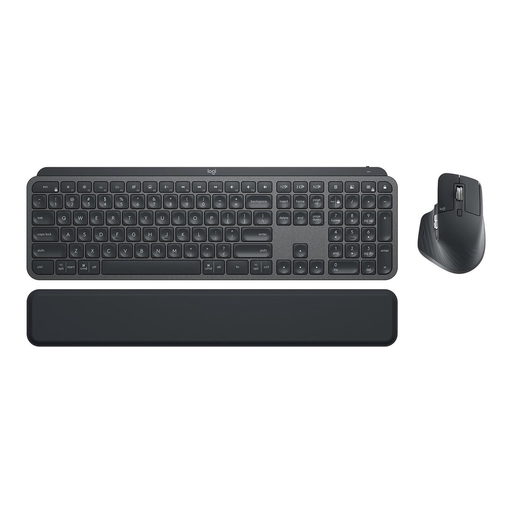
Logitech MX Keys Combo for Business Gen 2, QWERTZ
This set may suit you if you want to use a keyboard and mouse together and both are right for your workstation.
The product name lists the MX Keys and MX Master 3S as included. It also specifies a German QWERTZ layout, Logi Bolt, backlit keys and use with multiple devices. Check that you need both items in the set and that the connection works with your computer.
View at Joybuy
Frequently asked questions
Do I need a programmable keyboard for nested headings?
No, a programmable keyboard isn’t essential. In Word, you can link built-in heading styles to a multilevel list, as Microsoft Support explains. Google Docs Help documents keyboard shortcuts for heading styles and notes that not all shortcuts work with every language or keyboard layout. Programmable keys can trigger recurring steps you’ve set up.
What should I consider when choosing a keyboard for a fixed workstation?
Position the keyboard so that your hand and arm position, as well as the space for your mouse, suit your workstation. BG BAU recommends leaving room in front of the keyboard to rest your hands. For workstations used professionally with display screens, the German Federal Institute for Occupational Safety and Health’s ASR A6 sets out requirements under the Workplace Ordinance. Its scope doesn’t apply automatically to every desk used at home.
Which costs and rights should I distinguish after buying?
When you buy from a trader as a consumer, statutory consumer rights are separate from a voluntary guarantee or protection plan. The European Union’s consumer information specifies a minimum two-year legal guarantee from the date you receive the goods. If you’re buying for a business or studio, check the contract terms separately rather than assuming consumer rights apply.
How do I dispose of an old keyboard in Germany?
A discarded electrical keyboard should be taken to a separate collection point for waste electrical equipment, such as a local council collection site or an authorised take-back point. The German Federal Ministry for the Environment also advises removing any old batteries that can be taken out and putting them in a separate battery collection. Retailers’ take-back obligations depend on the relevant legal requirements.


