For long drafts and frequent revisions, start by choosing a suitable German layout, easily accessible editing keys and a comfortable typing feel. If you work in a shared space, the noise level matters too. Track Changes itself is set up in your word-processing software, not through a special keyboard feature. Multi-device connections and split layouts may suit the way you work, but they don’t replace checking software compatibility, connections and your workspace.
Which keyboard is right for you?
People who type a lot in shared offices
If you write longer passages in a shared space, look for a typing action that suits the environment and is as quiet as possible. CHERRY describes the STREAM KEYBOARD WIRELESS as quiet, although noise levels depend on the specific model and how it is used.
Frequent editors
If you often switch between passages, comments and revisions, check that the navigation keys and keyboard shortcuts you need are available in your word-processing software. Microsoft Support describes Track Changes in Word as an application feature.
Writers with specific space or posture preferences
If you prefer a different key spacing or hand position, compare compact and split layouts. For extended use of a laptop in a fixed location, the Federal Institute for Occupational Safety and Health recommends using separate input devices.
What to look for when buying
First, check that the layout and editing keys work with your word-processing software. Then weigh up typing feel, noise, size and connectivity according to your workspace.
| Buying priority |
What to look for |
Who it matters most to |
| Long, quiet typing sessions |
Check for a German layout and a typing feel that suits you; in a shared space, consider how noisy the keys are too. |
If I write lots of paragraphs, I want to choose a typing action and noise level that suit the room. Around 36% of consumers put long, quiet typing sessions first. |
| Revisions and navigation |
Check that the arrow, Delete, Home and End keys are easy to reach, and that the keyboard is compatible with your application and operating system. |
If I often switch between passages and revisions, I want to access the commands I need quickly. Around 29% of consumers prioritise frequent revisions and navigation. |
| Hand position during long sessions |
Split layouts change the position of the keys, so consider the space they take up and the time you may need to get used to them. |
If I prefer a different hand position during longer writing sessions, the layout of my desk needs to work too. Around 21% of consumers put hand position first. |
| Space and connectivity |
A compact layout may omit the separate number pad. Also check whether wireless, Bluetooth or a cable will work with your device. |
If space is limited or I need a particular connection, I want to choose the right size and connectivity. Around 14% of consumers prioritise space or connectivity. |
A programmable key can trigger commands you use often, but it won’t switch on Track Changes independently of your word-processing software. Microsoft Support explains how to enable it in Word under ‘Review’; for other applications, check their own features.
Common misconceptions when buying a keyboard
-
Assuming Track Changes is a keyboard feature
Track Changes is controlled in Word through the application. Extra or programmable keys don’t replace this feature or the need to set it up.
First, confirm which word-processing software you use and which commands you use most often. Then decide whether you want to customise any key assignments.
-
Assuming a model family name tells you which layout you’ll get
A product range may include different ISO layouts and switch options. The family name alone therefore doesn’t tell you which specific version is on offer.
Check the full model name, layout and switch option in the specific product listing.
-
Assuming wireless and wired models are interchangeable
According to the manufacturer, the CHERRY STREAM KEYBOARD WIRELESS uses a 2.4 GHz wireless connection. In its review of the Logitech ERGO K860, F.A.Z. Kaufkompass noted that it doesn’t support a wired connection.
Check that the connection type and ports work with your computer, particularly if you need a wired keyboard.
Wireless models may need a compatible receiver or batteries. Check what the specific version requires.
-
Assuming a split layout is guaranteed to treat a condition
A split keyboard changes the way you type and may take time to get used to. A manufacturer’s statement or product review isn’t evidence of a medical benefit for any individual.
Consider your screen, desk and other input devices alongside the keyboard. Allow time to get familiar with a different key layout.
Key brands to consider
CHERRY
The STREAM KEYBOARD WIRELESS is described by its manufacturer as a wireless office keyboard. The mechanical KW 300 MX is a different model and shouldn’t be confused with it.
- CHERRY lists SX scissor keys and 2.4 GHz wireless connectivity for the STREAM KEYBOARD WIRELESS.
- These details don’t automatically apply to other CHERRY models or versions.
- heise online describes the separate KW 300 MX as relatively quiet.
- heise online notes that the KW 300 MX doesn’t have 2.4 GHz wireless connectivity.
Logitech
The MX Keys S is designed for customisable office workflows; the ERGO K860 has a split layout for writers who prefer this key arrangement.
- Logitech lists programmable keys and Smart Actions in Logi Options+ for the MX Keys S.
- Check that the software and your word-processing application support the commands you want to use.
- F.A.Z. Kaufkompass covers the ERGO K860 in its review of ergonomic keyboards dated 3 November 2026.
- The review notes that the ERGO K860 has no backlighting and doesn’t support a wired connection.
Keychron
The K3-Max-ISO collection is aimed at writers looking for a compact, customisable mechanical keyboard in a specific ISO version.
- Keychron lists a 75% layout, QMK/VIA customisation and a German ISO version for the collection.
- The family name doesn’t specify the exact layout and switch option; the described format doesn’t include a separate number pad.
Perixx
According to Perixx, the PERIBOARD-512 B is a split keyboard with a number pad and USB-A cable.
- The wired version may suit you if you prefer a split layout and a number pad.
- Perixx notes that it takes time to get used to the keyboard; the manufacturer’s claims don’t prove an individual physical benefit.
Joybuy products for longer writing sessions
The Joybuy picks below are keyboards for writing and editing workspaces. Layout, key format and connectivity vary by version, so check each product carefully before buying.
 No image available
Akko 5087S V1 TKL, ISO-DE QWERTZ, black and gold
The ISO-DE QWERTZ layout may suit German-language typing if you prefer a compact mechanical keyboard.
The product name lists Akko V3 Pro Cream Yellow switches, hot-swappable switches and RGB lighting. Check that the TKL format suits the space you have available.
Joybuy
 No image available
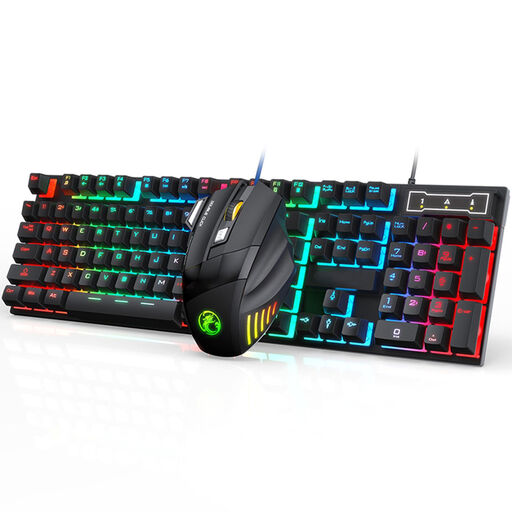
Wired gaming set with keyboard and mouse
This set may suit you if you’re looking for a keyboard and mouse together for a wired desk setup.
The product name lists seven-colour RGB lighting and a mouse with 2400 DPI. Before buying, check that the version and lighting suit your needs.
Joybuy
 No image available
Wired USB keyboard with 104 keys
This version may be suitable for longer writing sessions if you’re looking for a wired keyboard with a full set of keys.
The product name lists USB and 104 keys. Check that your device has the right connection.
Joybuy
 No image available
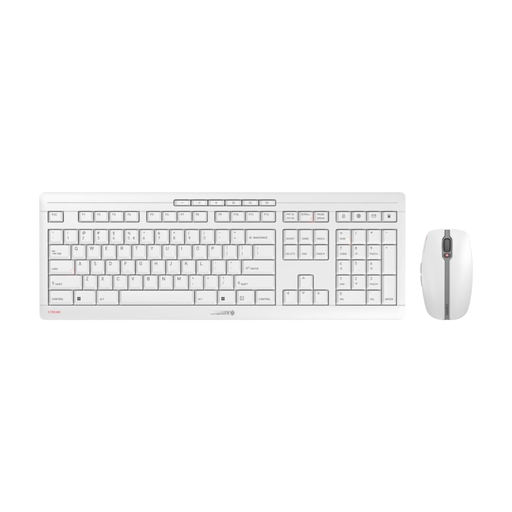
CHERRY Stream Desktop Recharge, wireless keyboard and mouse set
This set may suit you if you’re looking for a wireless keyboard and mouse for a shared workspace.
The product name lists an EU layout (QWERTY), 2.4 GHz wireless connectivity and USB-C charging. Check the key legends and layout of the specific version.
Joybuy
 No image available
Ticktype EVO75 Tri-Mode Wireless Mechanical Keyboard, ISO-DE
The ISO-DE layout may suit German-language typing if you’re looking for a mechanical keyboard with customisable keys.
The product name lists tri-mode wireless connectivity and VIA compatibility. Check which connection and key assignments you want to use with your devices.
Joybuy
Frequently asked questions
Do I need a special keyboard to track changes?
No. To use the Word method described by Microsoft Support, switch on the feature in Word under ‘Review’. For other programmes, check the commands available in the software; programmable keys alone don’t provide Track Changes.
Can I use Track Changes in Word for the web?
Microsoft Support describes reviewing and commenting features in Word for the web, but notes that it has fewer features than the desktop application. So check that the Word version you use supports the revision steps you need.
What should I consider when setting up my keyboard and workspace?
Position your keyboard, screen and work surface so they work well together. For extended use of a laptop in a near-permanent location, the Federal Institute for Occupational Safety and Health recommends using separate input devices. Also follow the instructions for your specific model when cleaning it and setting up its software.
What are my rights if the keyboard develops a fault?
If you buy from a business, EU consumer information states that you have a legal guarantee of at least two years from the date you receive the goods. This is separate from any additional manufacturer’s warranty. The rules explained there don’t apply in the same way to purchases from private individuals.
Can I put an old keyboard in household waste in Germany?
No. The German Environment Agency explains that electrical and electronic waste must be collected separately, and lists recycling centres as a way to return it. Where possible, removable batteries should be taken out and disposed of separately at battery collection points. Retailers’ take-back obligations apply in certain circumstances under Germany’s Electrical and Electronic Equipment Act.


