What to look for when buying
First, decide which German layout you need. Then consider whether hand position, editor shortcuts or typing noise matters most for your workflow and workspace.
| Consideration |
What to check before buying |
Who it matters most to |
| Hand position during long writing sessions |
Space for the keyboard and your hands, tilt options, and whether the halves are fixed or can be positioned independently. |
When I’m writing for long stretches at a fixed desk, I want to find a comfortable hand position and support. Around 36% of consumers give hand position top priority. |
| German keyboard layout |
The explicitly listed DE or QWERTZ version and the key legends on the version you choose. |
When I’m writing names, dialect words and quotations, I don’t want to keep compensating for an unfamiliar layout. Around 29% of consumers prioritise a German typing layout. |
| Navigation and shortcuts in the editor |
Whether the commands you need work in your editor and the configuration software supports your operating system. |
When switching between a manuscript and source material, I want frequently used commands to be easy to reach, provided my editor supports them. For around 21% of consumers, navigation and shortcuts come first. |
| Typing noise |
The specific switch type and how loud it is under your own usage conditions. |
If I share my workspace, I want the keyboard to disturb others as little as possible. Around 14% of consumers prioritise a quiet keyboard. |
Keyboards at Joybuy
This selection covers keyboards with a German QWERTZ or ISO-DE layout for writing, with some models also offering macro or key customisation. It does not include physically split keyboards.
 No image available
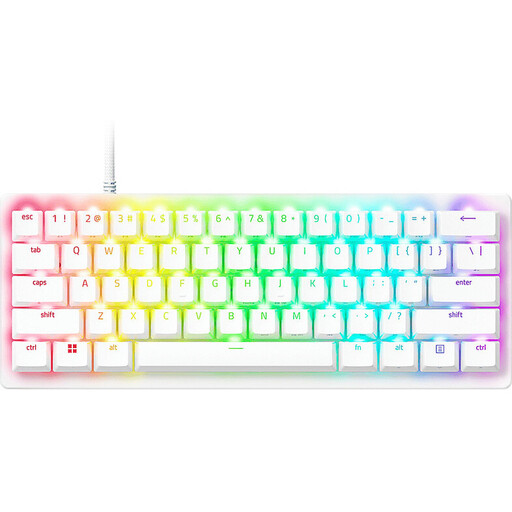
Razer Huntsman V3 Pro Mini, 60%, German QWERTZ, White
For writers looking for a German QWERTZ layout and customisable key assignments.
Product details list Analog Optical, Rapid Trigger and an adjustable actuation range of 0.1–4.0 mm. Programmable key assignments and a USB connection are also listed.
View at Joybuy
 No image available
Akko 3084B Plus, 75%, ISO-DE, Black & Gold
The ISO-DE layout is relevant for writers looking for a keyboard explicitly listed with a German layout.
Product details list tri-mode connectivity via Bluetooth, 2.4G or USB-C, hot-swap functionality and macro support. The listed switch type is V3 Pro Cream Blue.
View at Joybuy
 No image available
Akko 5087S V1 TKL, wired, ISO-DE QWERTZ, Black & Gold
The explicitly listed ISO-DE QWERTZ layout is relevant for German-language manuscripts.
Product details list V3 Pro Cream Yellow switches, hot-swap functionality and RGB backlighting. As a TKL model, it is described as tenkeyless.
View at Joybuy
 No image available
CHERRY MX 2.0S, full-size, German QWERTZ, Black
The full-size layout with German QWERTZ is an option for writers who want to use a complete keyboard.
Product details list a wired USB-A connection, adjustable feet, full RGB backlighting and CHERRY MX2A Red switches.
View at Joybuy
 No image available
CHERRY MX-LP 2.1, 65%, German QWERTZ, White
The compact 65% design and German QWERTZ layout are the listed features of this version.
Product details list low-profile MX Speed switches and tri-mode connectivity via 2.4GHz, Bluetooth or USB-C.
View at Joybuy
Frequently asked questions
Do I need a physically split keyboard for an editor with two panes?
No. The layout of the editor windows alone does not require a two-piece keyboard. Choose this design only if you want separate positioning and are happy to spend extra time setting it up; programmable keys on other keyboard styles can also be useful for frequently used commands.
What should I bear in mind when positioning a split keyboard?
Allow space for both halves and position them so the home row sits comfortably under your hands. The ErgoDox EZ guide recommends placing the halves about shoulder-width apart; this is a setup recommendation specific to that manufacturer, not a requirement for every model.
What are my rights if I return an item or it develops a fault after an online purchase?
For a typical online purchase, the Verbraucherzentrale describes a 14-day right to cancel. You must notify the seller that you are cancelling; simply returning the item is not enough. If goods are faulty, your statutory rights are against the seller and are separate from any voluntary manufacturer’s warranty.
What should I look for in a keyboard for the German market?
Check the details for the specific version rather than assuming compliance from the model name. In its market surveillance guidance, the Bundesnetzagentur lists the CE marking and accurate product and manufacturer details among the points to check; this does not confirm that an individual model is compliant.
Do German rules for workplace display screen equipment automatically apply to my personal writing project?
No. ASR A6 does not automatically apply to a personal writing project carried out outside a workplace or home workstation. The Bundesanstalt für Arbeitsschutz und Arbeitsmedizin explicitly says that use in private settings outside such workplaces is beyond its scope. Ergonomic guidance is therefore not a general purchasing requirement for people writing privately.


