If you enter numbers frequently, a number pad is useful; if space is limited, a compact keyboard without one may be a better fit. Also check how loud the keys are, the German layout, the connection and the formula editor you use. The keyboard alone won’t create mathematical notation.
Which keyboard is right for you?
People who write lots of formulae
If you regularly enter mathematical notation, check how the keyboard layout works with the formula editor you use. The Document Foundation explains that LibreOffice Math also lets you enter formulae directly using its own input language.
Those who need a quiet workspace
If you’re working alongside other people, look for keys that are as quiet as possible. CHERRY and Logitech describe some of their models as quiet; these claims apply to the specific products mentioned.
People sharing space or devices
If your paper, mouse and keyboard all need to fit on the same surface, the keyboard’s design and the space available matter. If you regularly switch between several devices, you could also consider a keyboard with device switching; Logitech lists this feature on certain models.
What should you look for when buying?
First decide what matters most for your work: entering formulae, keeping noise down, entering numbers or making the most of your desk space.
| What matters |
What to look for |
Who is it important to? |
| Formulae and special characters |
Try entering the characters you typically use in your chosen formula editor, and check that the physical layout matches the one selected in your settings. |
If I enter fractions, powers or special characters, I want to try the process with my software; around 29% of consumers prioritise entering formulae. |
| Quiet typing |
Check what the manufacturer says about key noise and, if possible, try the keyboard in the setting where you’ll actually use it. |
If people are working right next to me, I want to disturb them as little as possible while I type; around 23% of consumers consider quiet operation their top priority. |
| Entering numbers |
Consider how often you actually need a number pad and whether there’s enough room for one. |
If I regularly enter long strings of numbers, I want to be able to use a number pad; around 18% of consumers prioritise number entry. |
| Space and switching between devices |
Measure the space available alongside your worksheet and mouse, and check the connection works with the devices you actually use. |
If my paper and mouse need the same space, or I switch between devices, I want to set up my workspace accordingly; around 18% of consumers prioritise space or device switching. |
| Individual hand position |
If possible, try a different key arrangement for yourself and take its space requirements into account. |
If I’m considering a split keyboard, I want to check whether it suits the way I type; around 12% of consumers prioritise an individual hand position. |
Common buying mistakes
-
Choosing a number pad without allowing for the space it takes up
CHERRY offers the STREAM KEYBOARD as well as a TKL version without a number pad. At a shared desk, the extra keys can compete for space with your paper and mouse.
Set up your worksheet and mouse as you would when working, then decide whether you’ll use the number pad regularly.
-
Assuming a split layout will feel familiar straight away or act as a treatment
Perixx notes that the PERIBOARD-512 B takes time to get used to and gives its dimensions as 485 × 236 mm. The design alone is no proof of a health benefit for any individual.
Try the key arrangement and check in advance that the keyboard will fit on your shared work surface.
-
Expecting the keyboard alone to handle formula entry
Mathematical notation also depends on the software you use. LibreOffice Math, for example, offers its own input language.
Create a typical worksheet in the software you plan to use before choosing a layout.
Key brands at a glance
CHERRY
Worth considering for its wired STREAM models and low-profile KC 6000 SLIM.
- CHERRY describes the keys on its STREAM models as quiet.
- The TKL version has no number pad; the KC 6000 SLIM is a full-size model.
Logitech
Worth considering for the Signature Slim K950 and compact Pebble Keys 2 K380s.
- Logitech says both of these models let you switch between three devices.
- Logitech describes the keys on the Pebble Keys 2 K380s as quiet. Whether its compact key shape is right for longer typing sessions is a personal choice.
Perixx
Worth considering for the wired, split PERIBOARD-512 B with a German layout and number pad.
- According to the product details, this model has an integrated wrist rest.
- Perixx notes that it takes time to get used to; at 485 × 236 mm, the model needs a relatively large amount of desk space.
Keyboards at Joybuy
The Joybuy models below suit different needs at a shared desk, including a German QWERTZ layout, multi-device connections, and compact and full-size designs.
 No image available
Inateck KB01003G Bluetooth keyboard
A good fit if you’re looking for a compact keyboard with a German QWERTZ layout and device switching.
78 keys; according to the product description, you can switch between up to three devices. The stated case width is 285 mm.
Joybuy
 No image available
Logitech 920-012404 Ergonomic Wave
Could be a good fit if you want a full-size German layout and membrane keys described as quiet in the product details.
Bluetooth; the stated footprint is 375,97 × 218,91 mm. Make sure you have room for its full-size design at your shared desk.
Joybuy
 No image available
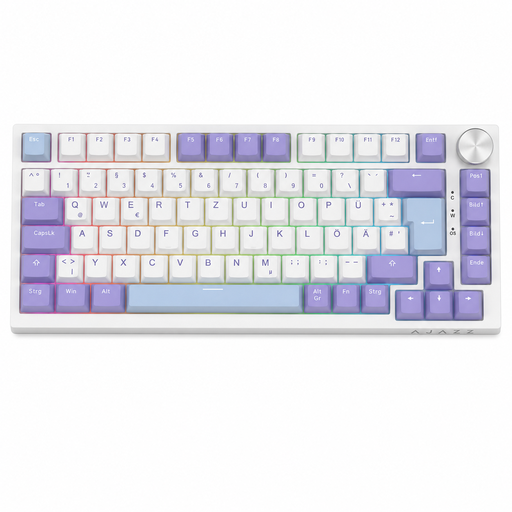
AJAZZ AK820
Its compact, wired design could suit a workspace where room is limited.
Mechanical keyboard with a German QWERTZ layout, 82 keys and a USB-C connection.
Joybuy
 No image available
Logitech MX Mechanical
Could be a good fit if you need a German QWERTZ layout and the ability to switch between several devices.
Bluetooth and Logi Bolt; according to the product description, it connects to up to three devices. The mechanical switches are described as quiet.
Joybuy
 No image available
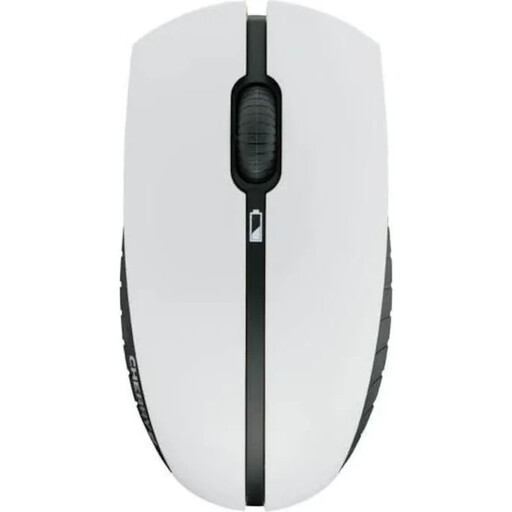
CHERRY B.UNLIMITED 3.0
Could suit a permanent workspace if you’re looking for a German layout and scissor keys described as quiet in the product details.
Full-size keyboard and mouse set; 2.4 GHz wireless connection and rechargeable batteries according to the product description.
Joybuy
Frequently asked questions
Do I need a special maths keyboard for mathematical symbols?
Not necessarily: LibreOffice Math offers operators and symbols, and can turn typed formula commands into formatted formulae. Try the process in the programme you use to create your worksheets.
What should I check when connecting to a shared computer?
Check the connection and the physical layout of the specific model. The PERIBOARD-512 B, for example, uses a USB-A cable; with a multi-device keyboard, you’ll need to pair it with the devices you plan to use. You can also change the selected keyboard layout in Windows.
How should I clean a keyboard used at a shared desk?
Follow the care instructions from the relevant manufacturer. Logitech recommends switching off or unplugging its peripherals before cleaning and making sure no liquid gets inside. This advice doesn’t automatically apply to other brands.
What are my rights if the keyboard is faulty?
If you buy as a consumer in the EU, you have statutory rights against the seller. Your Europe states that you’re entitled to a legal guarantee of at least two years from the date you receive the goods; this is separate from any additional manufacturer’s warranty.


