What to consider when choosing
Compact wired TKL keyboard
A good fit if: you mostly work with text, have limited space and have a suitable USB port available.
The trade-off: There's no number pad, and the cable limits where you can position it.
Full-size wired keyboard
A good fit if: you regularly enter numbers as well as meeting minutes and have room for a number pad.
The trade-off: It takes up more desk space than a TKL keyboard.
Wireless keyboard for switching between devices
A good fit if: you switch between approved computers or want to use your keyboard without a permanently attached cable.
The trade-off: Check whether Bluetooth or a wireless receiver is permitted at your workstation, and what power supply the specific version needs.
Split keyboard
A good fit if: you want to try a hand position tailored to you during longer typing sessions.
The trade-off: Its design needs space and may take time to get used to. It should suit everyone using the desk.
For shared workstations, the German Social Accident Insurance (DGUV) recommends setting clear rules so the space is left clean. The figures in the table refer to consumers choosing a keyboard for taking meeting minutes at a shared desk.
| Consideration |
What to look for when buying |
Who is this particularly important for? |
| Quiet typing |
Check the key mechanism and feel of the specific version; don't treat manufacturers' claims as comparable noise measurements. |
When I take minutes alongside other people, I want to keep disruption to a minimum without relying solely on marketing claims. Around 28% of consumers prioritise a keyboard with a quieter keystroke. |
| Shared use and cleaning |
Agree whether the device will be shared or personal, and who will clean it in line with workplace guidelines. |
At a shared desk, I want to know who uses the keyboard and how the workspace should be left clean. Around 22% of consumers put agreed arrangements for shared use and cleaning first. |
| Space and key layout |
Check the desk space, whether you need a number pad and the specific version's German key layout. |
If space is limited at my desk, I want to know whether I really need a number pad and whether the key layout is right. Around 22% of consumers prioritise space requirements and layout. |
| Hand position during long typing sessions |
Consider the split keyboard, wrist rest, space requirements and potential adjustment period in relation to your working setup. |
During longer typing sessions, I want to choose a design that suits my hand position without treating a keyboard as a form of treatment. Around 17% of consumers put a hand position that suits them first. |
| Connection and switching between devices |
Check which USB ports or approved wireless connections are available, as well as the operating system and power supply requirements. |
If I switch between approved computers, I want to be able to use a connection that's permitted at my workstation. Around 11% of consumers prioritise connections and switching between devices. |
Keyboards for taking minutes at Joybuy
This selection includes compact wired, wireless and split keyboards. At a shared desk, pay particular attention to the layout, connection, number pad and design.
 No image available
CHERRY XTRFY K4V2 TKL, QWERTZ, MX2A RED
A compact wired option if you need a German QWERTZ layout and can do without a number pad.
Features listed in the product name: mechanical keyboard, linear MX2A RED switches, RGB lighting and black finish.
View at Joybuy
 No image available
Logitech ERGO K860, QWERTZ
The split keyboard and wrist rest may suit you if you want to try a different hand position and have enough space.
QWERTZ layout, Bluetooth and USB receiver; the product name lists Windows and Mac as compatible systems.
View at Joybuy
 No image available
AJAZZ AK35I V4, QWERTZ, Tri-Mode
If you want to switch between approved devices, check that the connection options offered can be used at your workstation.
Bluetooth, 2.4 GHz and USB-C; the product name also lists a 10000mAh battery and a 1.14"-TFT colour display.
View at Joybuy
 No image available
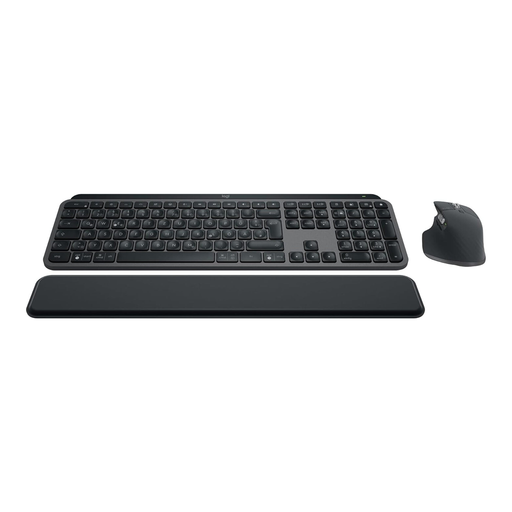
Logitech MX Keys S Combo with MX Master 3S, QWERTZ
This wireless keyboard and mouse combination is an option if you need both devices and the connection is approved at your workstation.
Features listed in the product name: German QWERTZ layout, backlighting, Bluetooth and Logi Bolt.
View at Joybuy
 No image available
CHERRY STREAM KEYBOARD TKL, English (US), USB
The compact wired TKL design may suit you if you can do without a number pad. The listed layout is English (US) with a Euro symbol, not German QWERTZ.
Features listed in the product name: CHERRY SX scissor-switch technology and six multimedia keys.
View at Joybuy
Frequently asked questions
Do I need a number pad for taking meeting minutes?
If you mostly edit text and enter few numbers, a TKL keyboard can save space. CHERRY describes the STREAM KEYBOARD TKL as having the same main key section as the larger STREAM version, but without a number pad.
What should I check before connecting a keyboard to a shared computer?
Check the available USB port or whether Bluetooth and wireless receivers are permitted, as well as the correct layout and operating system version. Perixx lists USB-A for the PERIBOARD-512 B; Rapoo lists Bluetooth and a 2.4 GHz receiver for the E9700M.
How do I keep a shared keyboard clean?
Check at work who is responsible for cleaning and which method is recommended for the specific device. The German Social Accident Insurance (DGUV) recommends having rules in place to ensure shared workstations are left clean; this does not mean that everything must be disinfected after every use.
What are my rights if an online purchase is faulty?
For a consumer purchase, the statutory warranty generally applies against the seller and is separate from any voluntary guarantee. Online purchases usually come with a 14-day right to cancel; the consumer advice centre notes that there are exceptions and that the relevant circumstances of the purchase matter.
Does German workplace law require a particular keyboard brand or a split model?
The cited ASR A6 does not require a particular brand or a split keyboard in general. The relevant health and safety requirements apply to display-screen workstations in workplaces. The Federal Institute for Occupational Safety and Health explains that the ASR sets out how to meet these requirements, while other solutions offering equivalent protection are also possible. The equipment must suit the specific workstation.


