
Lieferung heute & morgen

Qualitätsgarantie

Willkommens-Angebote freischalten: KOSTENLOSE Lieferung | Bis zu 80 % RABATT | Kostenlose 30-Tage-JoyPlus-Testphase
App herunterladen
Choosing the right keyboard and mouse can significantly impact your daily computer work. But the market for PC accessories is overwhelming and filled with marketing promises that often create more confusion than clarity. Many users invest in devices that don't meet their needs or develop functional defects after a short time. This guide will help you navigate the common pitfalls and make an informed decision.
As your Joybuy Product Recommendation Officer, I'll filter the relevant information for you and highlight the technical features that truly matter.
Before we dive into the key parameters, let's look at three common marketing traps that often lead to poor purchasing decisions.
To find the right device, focus on the following three core aspects that match your individual needs.
The type of connection is a fundamental decision that depends on your workspace and devices.
The typing feel and longevity of a keyboard are largely determined by its switch technology.
For users who spend many hours a day at the computer, ergonomics is a crucial factor in preventing discomfort.
Here are some recommendations tailored to specific use cases that avoid the pitfalls mentioned.
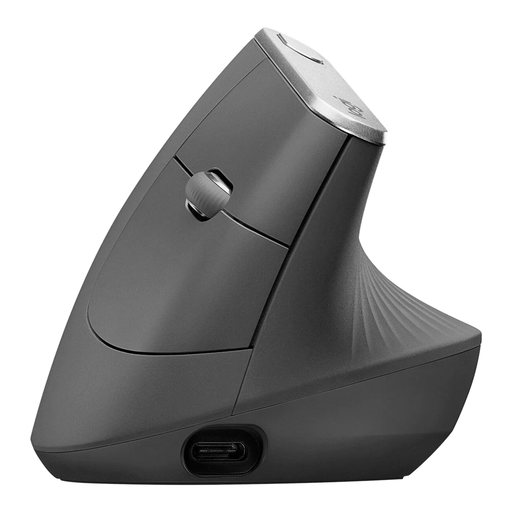
Why This Fits Their Persona: Ideal for people who spend many hours at their desk daily and prioritise a healthy posture. The mouse is designed to reduce muscle strain.
This model fulfils the vague "ergonomics" promise with a concrete, study-based design: The 57° angle promotes a natural handshake position.
Promotes a natural hand posture to reduce strain. Flexible connectivity via Bluetooth or a USB receiver for up to three devices.

Why This Fits Their Persona: Perfect for users in a home office or shared office environments who need quiet, reliable equipment without cable clutter.
This keyboard-mouse combo avoids the trap of loud keyboards and unstable wireless connections with its SilentTouch technology and a stable 2.4 GHz connection.
According to Logitech, over 90% quieter clicking and typing sounds. Long battery life and a spill-resistant design for enhanced durability.

Why This Fits Their Persona: Designed for competitive gamers for whom reaction speed, precision, and a lag-free connection are critical for success.
Instead of just advertising a high DPI value, this mouse delivers measurable performance data: a 4000 Hz polling rate for minimal latency and a high-quality PAW-3398 sensor.
Extremely fast and stable wireless connection that rivals its wired counterparts. Lightweight design (68g) and 10 programmable buttons.
We have compiled a complete, up-to-date list of products that fully meet these strict selection criteria and safety regulations.
Although both are wireless, the main difference lies in the connection technology. A typical wireless mouse uses a dedicated 2.4 GHz USB receiver (dongle) that establishes a very stable, low-latency connection. A Bluetooth mouse connects directly to the computer's or laptop's built-in Bluetooth module, which saves a USB port and makes it easier to switch between multiple devices.
A mechanical keyboard is designed for a significantly longer lifespan. Its switches are often certified for 50 to 100 million keystrokes. Membrane keyboards, found in most standard office sets, typically have a lifespan of 5 to 10 million keystrokes. For heavy typists and gamers, investing in a mechanical model is therefore often more sustainable in the long run.
Not necessarily. While a gaming mouse offers advantages like high precision and programmable buttons that can also be useful in the office (e.g., for program shortcuts), they are often optimised for fast, short movements rather than hours of ergonomic comfort. For long workdays, a high-quality ergonomic mouse or a silent mouse designed for the office is usually the more suitable choice.