
Lieferung heute & morgen

Qualitätsgarantie

Willkommens-Angebote freischalten: KOSTENLOSE Lieferung | Bis zu 80 % RABATT | Kostenlose 30-Tage-JoyPlus-Testphase
App herunterladen
A new keyboard and mouse set can significantly boost productivity in the workplace. However, the selection is vast, and not every product advertised as "ergonomic" or "quiet" lives up to its promise. Many users quickly become frustrated with input lag, loud clicking noises in the office, or unexpected running costs from frequent battery changes.
This guide will help you identify the crucial features and avoid marketing traps. We focus on the technical fundamentals that truly enable reliable and comfortable work, whether in the office or at home.
Before we dive into recommended features, it's important to understand the typical problems that often only surface after the purchase:
quiet keyboard and mouse set can still produce distractingly loud keystrokes or clicks in practice. This is a particular problem in open-plan offices or quiet work environments.rechargeable set, is often the more practical long-term solution.To avoid a bad purchase, you should check three core aspects. These are the primary determinants of a set's suitability for your daily work routine.
The choice of connection technology is fundamental.
The keyboard is your primary work tool. Its construction is critical for comfort and efficiency.
An ergonomic set for office use helps prevent fatigue.
rechargeable, ideally via a modern USB-C port. This saves you from constantly buying batteries. For battery-powered models, a long battery life (several months or even years) is an important quality indicator.Here are some recommendations tailored to different user profiles and their specific requirements.
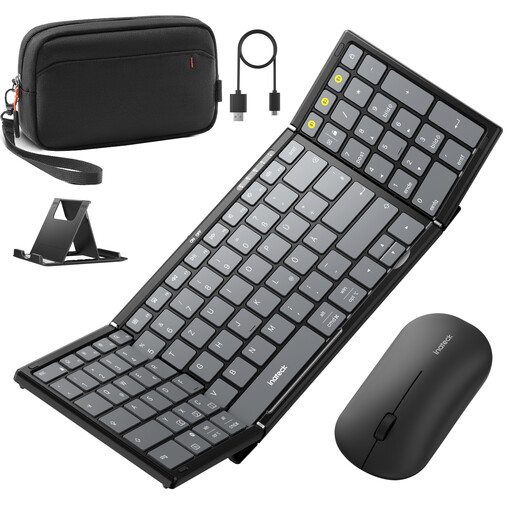
Why This Fits Their Persona: This set is designed for users who frequently switch between the office, home, and on-the-go. The foldable keyboard and compact mouse, along with accessories, can be stored in the included carrying case. The multi-device capability allows for seamless switching between a laptop, tablet, and smartphone.
It solves the problem of unstable connections with flexible tri-mode connectivity (Bluetooth 5.3 and 2.4G RF), ensuring a reliable link in various environments.
Despite its compact, foldable design, the keyboard offers a full layout with a numeric keypad. The included carrying case and adjustable stand complete the mobile package.

Why This Fits Their Persona: This set is aimed at heavy typists who value durability, a quiet typing feel, and sustainability. It is designed for continuous use in a professional environment where reliability and comfort are paramount.
It bypasses the battery trap with rechargeable NiMH batteries and a USB-C charging function. The CHERRY SX scissor technology ensures whisper-quiet typing, solving the problem of loud keystrokes.
The combination of precise SX scissor technology, a sturdy construction with a metal plate, and the ability to continue working while charging makes this set a dependable workhorse.

Why This Fits Their Persona: Ideal for users seeking a reliable and, above all, quiet solution for the home office without a large budget. The set offers all the essential functions in a straightforward package.
It directly addresses the problem of noisy peripherals. According to Logitech, SilentTouch technology reduces noise by over 90%. The stable 2.4 GHz connection also minimizes the risk of dropouts.
The main advantage is its extremely quiet operation at an accessible price point. The long battery life of up to 36 months for the keyboard and 18 months for the mouse ensures low-maintenance operation.
We have compiled a complete, up-to-date list of products that fully meet these strict selection criteria and UK regulations.
A 2.4 GHz RF set uses a dedicated USB receiver (dongle) that creates a direct and typically very stable connection between the devices and the computer. Setup is usually "Plug & Play." A Bluetooth set connects wirelessly without an additional dongle, which keeps a USB port free. It is more flexible for use with multiple devices like tablets or smartphones but can be more susceptible to interference in environments with many wireless signals.
The battery life of a rechargeable keyboard and mouse set varies greatly depending on the model and usage. Many modern sets offer a runtime of several weeks or even months on a single charge. A key advantage is that many models can be used while charging via a USB cable, so there is no interruption to your work.
Most modern keyboard-mouse combos, both wired and wireless, are "Plug & Play" capable. This means that after connecting the cable or USB receiver, they are automatically recognized by common operating systems like Windows or macOS and work without installing additional software. However, optional manufacturer software may be required for advanced features like key programming.