
Lieferung heute & morgen

Qualitätsgarantie

Willkommens-Angebote freischalten: KOSTENLOSE Lieferung | Bis zu 80 % RABATT | Kostenlose 30-Tage-JoyPlus-Testphase
App herunterladen
A new keyboard-mouse combo can significantly boost productivity in the home office or at work and help create a clutter-free desk. However, the market is flooded with products whose marketing promises often fall short in practice. Many users invest in a desktop set, only to discover a few months later that hidden costs, technical limitations, or poor ergonomics complicate their daily workflow. Before you make a decision, it's crucial to understand the typical pitfalls.
The 3 Most Common Traps When Buying a Keyboard-Mouse Combo:
To avoid a purchase mistake, you should check three core technical features. These are the primary determinants of your new set's functionality, durability, and comfort.
The type of wireless connection is crucial for compatibility and flexibility.
The power source directly impacts operating costs and user convenience.
For professional office use, scissor-switch technology has proven its worth. These keys, similar to those on high-end laptops, offer a precise, quiet keystroke and a low profile. They are an excellent compromise between loud mechanical keys and often-imprecise membrane keyboards.
Also, ensure the keyboard features the standard QWERTY layout for your region to avoid compatibility issues and typos. An ergonomic mouse that fits comfortably in your hand completes the package and helps prevent fatigue.
Instead of making a one-size-fits-all recommendation, we have identified products that meet specific needs and expertly avoid the pitfalls mentioned.
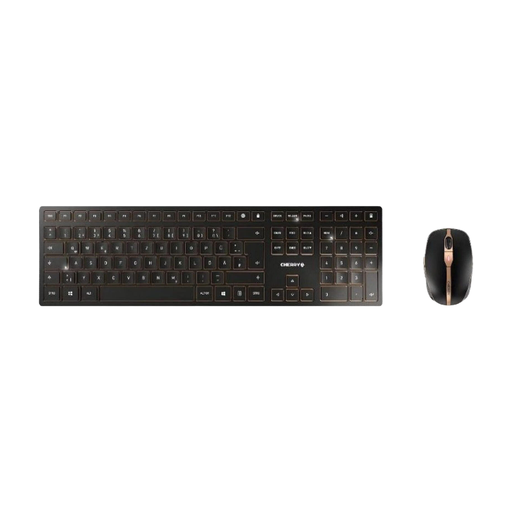
Why it's a great fit: It combines high functionality with an ultra-slim, premium design. Ideal for users who appreciate a modern and clutter-free desk without compromising on technology.
Offers flexible Bluetooth connectivity for devices without a USB-A port and is rechargeable via USB cable, which eliminates ongoing battery costs.
Dual-mode wireless technology (Bluetooth 4.0 and 2.4 GHz RF) for maximum flexibility; rechargeable batteries and precise scissor-switch keys.

Why it's a great fit: This Logitech keyboard and mouse combo is designed for users whose top priority is a quiet work environment, whether in an open-plan office or a home office.
Solves the problem of vague "quiet" promises with its specific SilentTouch technology, which reduces typing and clicking noises by over 90% according to the manufacturer.
SilentTouch technology for near-silent operation; stable 2.4 GHz connection and a long battery life.
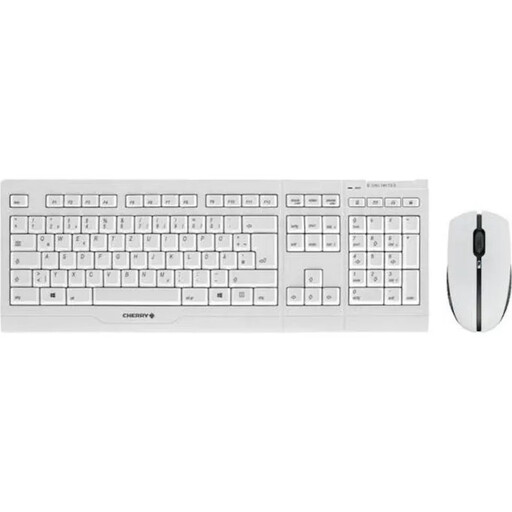
Why it's a great fit: A robust and reliable workhorse for users who value durability and uninterrupted use over the latest design trends.
Completely bypasses the "disposable battery trap" with NiMH batteries that can be charged during operation. No downtime due to dead batteries.
Uninterrupted work thanks to its charge-while-in-use functionality; durable scissor-switch technology and abrasion-resistant key legends.
We have compiled a complete, up-to-date list of products that fully meet these strict selection criteria and all relevant safety regulations.
1. How long does the battery last in a rechargeable keyboard-mouse combo? Battery life varies significantly depending on the model and usage intensity, ranging from several weeks to a few months. A key advantage of many modern sets is the ability to continue using the devices while they are charging (often via USB-C). This ensures you experience no downtime.
2. Can I connect a Bluetooth keyboard to multiple devices? Yes, many models with Bluetooth technology support multi-device pairing. This allows you to seamlessly switch between your PC, a laptop, and a tablet at the touch of a button. Check the product description for features like "Multi-Device Switch" or the number of pairable devices listed.
3. Is a wireless keyboard-mouse combo suitable for gaming? While most of the sets featured here are optimized as an office keyboard for productivity, a stable 2.4 GHz RF connection generally offers low enough latency for casual gamers. However, for competitive gaming, specialized gaming peripherals with higher polling rates and mechanical switches are often the better choice.