Who is this selection for?

Developers carrying out navigation tests

You build forms, dialogues and polls, and repeatedly check whether every step can be reached and used without a mouse. For this work, a familiar key layout and clear testing processes matter more than extra gaming features.

Project team members who write a lot

You spend long periods writing content, comments or technical documentation and want to try a different keyboard and hand position. Remember to consider the layout and connection options available on your work computer, too.

Developers with custom shortcuts

You use recurring editor commands and are considering programmable keys. Website tests should still use familiar keyboard navigation that is easy to follow and doesn’t depend on personal shortcuts.

What should you consider when choosing?

Standard or wired office keyboard

A good fit if: you use familiar navigation and function keys for repeated tests and prefer a simple USB connection.

Trade-off: a cable limits where you can position it, while a full-size keyboard takes up more desk space.

Ergonomic keyboard with a split key field

A good fit if: you want to try a different hand position during long writing sessions.

Trade-off: the new key layout may take some getting used to; it doesn’t guarantee any particular health benefit for you.

Customisable split keyboard

A good fit if: you want to use your own key combinations, layers or macros regularly for development work.

Trade-off: depending on the model, dedicated arrow, function or number-pad keys may be missing; check the specific configuration.

What you’re looking for What to check before buying Who is this important to?
Testing a website without a mouse Check that the navigation, input and function keys you need are easy to reach on the layout. If I repeatedly test participation processes using standard keyboard commands, I need a familiar key layout. Around 33% of consumers prioritise navigation testing.
Comfort during long writing sessions Compare the shape, palm rest and space required without assuming a particular benefit. If I write long texts, I want to judge whether a different keyboard and hand position suits the way I work. Around 27% of consumers prioritise writing comfort.
Layout and custom key combinations Check the language variant, operating system and which dedicated keys are included. For German text and recurring editor commands, I need a suitable key layout and the option to use my own shortcuts. Around 20% of consumers prioritise layout and shortcuts.
Connecting to a work computer Check that the connection type for the specific model matches your USB-A port or adapter, Bluetooth support and available connections. If I want to set up the keyboard without additional wireless pairing, it needs to match my computer’s connections. Around 20% of consumers prioritise a straightforward connection.

Common misconceptions

  • Assuming a special keyboard proves a website is accessible

    An unreachable button, a keyboard trap or an invisible focus indicator is caused by how the website has been built, not by the keyboard. The W3C Web Accessibility Initiative sets out keyboard accessibility, the ability to leave components and visible focus as separate requirements.

    Work through the complete participation processes using standard keyboard commands, and fix any barriers directly on the website.

    Overlooked barriers to use can mean extra development and testing time.

  • Assuming split models have dedicated navigation and function keys

    For the Dygma Raise 2, F.A.Z. Kaufkompass notes that dedicated arrow, function and number-pad keys are missing. This can affect workflows that use these keys regularly.

    Compare the keys you actually need with the layout of the specific configuration.

    Customisable layers may take extra time to get used to.

  • Assuming wired and wireless versions are interchangeable without checking connections

    The models considered here use different connections, including USB-A, Bluetooth and USB receivers.

    Check your work computer’s ports and wireless capabilities, as well as the connection type and items included with the specific offer.

    Depending on the connection you choose, you may need an adapter or replacement batteries.

Relevant brands at a glance

Logitech

The ERGO K860 is designed for people who want a split, full-size keyboard with a number pad and wireless connectivity.

  • According to Logitech, the ERGO K860 connects via Bluetooth or the included USB receiver and can switch between up to three devices.
  • F.A.Z. Kaufkompass notes that this model doesn’t support wired use and has no backlit keys. This doesn’t apply to all Logitech keyboards.

CHERRY

The KC 4500 ERGO is a wired, full-size ergonomic keyboard; CHERRY offers a German layout variant.

  • CHERRY lists a USB-A cable, a palm rest and optional software for configuring keys.
  • The manufacturer lists Windows and USB-A as system requirements. Check that these are compatible with your computer.

Perixx

The PERIBOARD-512 B is a wired keyboard with a split key field and a choice of German QWERTZ layout.

  • Perixx lists USB-A, a number pad and a palm rest.
  • The manufacturer notes that it may take time to get used to the split key field. Claims about preventing health problems are not an independent assessment of effectiveness.

Dygma

The Raise 2 is designed for people who want a fully split keyboard and custom key layouts.

  • Dygma lists programmable layers, macros and configurable extras.
  • According to F.A.Z. Kaufkompass, dedicated arrow, function and number-pad keys are missing. Also check the language layout and features included in the configuration you choose.

Keyboards at Joybuy

This selection includes keyboards for typing in German, repeated keyboard navigation and longer writing sessions, with both wired and wireless options.

Logitech ERGO K860, wireless ergonomic keyboard with German QWERTZ layout

Logitech ERGO K860 – Wireless Ergonomic Keyboard, QWERTZ

For longer writing sessions and repeated navigation tests using a German key layout.

Split key field and palm rest; Bluetooth or USB receiver; German QWERTZ layout; Windows/Mac.

View at Joybuy

AJAZZ AK35I V4, mechanical keyboard with German QWERTZ layout

AJAZZ AK35I V4 – Wireless Mechanical Keyboard, German QWERTZ

For German text and navigation tests if you’re looking for a mechanical keyboard with several connection options.

Bluetooth, 2.4G or USB-C; 10000mAh battery; 1.14" TFT colour screen; hot-swappable; for Win/Mac.

View at Joybuy
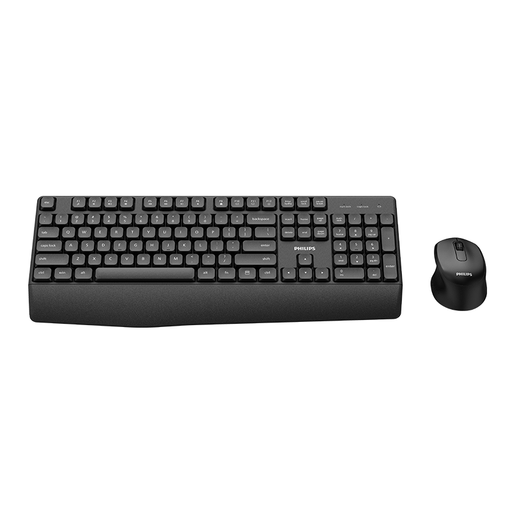
PHILIPS Wireless Keyboard Mouse Combo 3000 Series, German layout, model SPT6348B/26

PHILIPS Wireless Keyboard Mouse Combo, 3000 Series, SPT6348B/26

For typing in German and navigation if you’re considering a keyboard and mouse bundle.

German version; wireless keyboard and mouse combo.

View at Joybuy

Logitech MX Mechanical, wireless backlit keyboard with German QWERTZ layout

Logitech MX Mechanical Wireless Illuminated Performance Keyboard, German QWERTZ

For typing in German if you’re looking for a mechanical keyboard with wireless connectivity and adjustable backlighting.

Tactile Quiet Mechanical Switches; Bluetooth or Logi Bolt; Smart Backlighting; German QWERTZ layout.

View at Joybuy

Logitech Wired Keyboard K280e, wired with German QWERTZ layout

Logitech Wired Keyboard K280e, German QWERTZ

For repeated tests using a familiar German key layout and a wired connection.

Wired office keyboard; German QWERTZ layout.

View at Joybuy

Frequently asked questions

Does an ergonomic keyboard make a participation website accessible?

No. What matters is how the website is built: features must be operable through a keyboard interface, focus must not become trapped, and sighted keyboard users must be able to see where the focus is. In particular, test forms and dialogues without a mouse; buying a keyboard is no substitute for testing the website.

Do the same regulations automatically apply to every public participation website in Germany?

No. For websites run by federal public bodies, BITV 2.0 sets out requirements with reference to EN 301 549. The states and local authorities have their own regulations. The obligations that apply to a specific project depend in particular on who operates it; WCAG 2.2 is not, by itself, the binding version of German law.

What should I set up after connecting the keyboard for mouse-free testing?

First, check that the operating system and language layout are set correctly. Then use the keyboard to work through the website’s interactive elements, checking that focus moves in a logical order, remains visible and can be moved out of dialogues. Your own macros should offer an additional way to work, not the only way to test.

What ongoing costs and entitlements should I consider when buying?

Wireless models may need batteries, and some configurations may require additional equipment, so check what’s included. Your statutory rights against the seller and a voluntary manufacturer’s warranty are separate entitlements. Logitech specifies AAA batteries for the ERGO K860; accessories for the Raise 2 are sold separately.