
Lieferung heute & morgen

Qualitätsgarantie

Willkommens-Angebote freischalten: KOSTENLOSE Lieferung | Bis zu 80 % RABATT | Kostenlose 30-Tage-JoyPlus-Testphase
App herunterladen
A new keyboard and mouse set can make daily computer work significantly more comfortable and efficient. However, the market is flooded with tempting promises that don't always deliver. As your Joybuy Product Recommendation Officer, I'm here to help you spot the common pitfalls and make an informed decision that's perfectly tailored to your real-world needs.
Many buyers invest in products that quickly lead to disappointment. The most common issues include:
wireless keyboard mouse set promises a tidy desk, but often hides poor battery life that requires constant recharging or expensive battery replacements. Productivity suffers when devices die in the middle of an important task.ergonomic keyboard is meant to prevent discomfort, but an ill-fitting shape can do the opposite. Many models marketed as ergonomic follow a one-size-fits-all approach that doesn't suit every hand size or posture, potentially leading to strain over time.gaming keyboard's performance. More important are the quality of the switches, response time, and connection stability, which often take a backseat to flashy lighting effects.To avoid a bad buy, you should focus on objective features that directly impact user comfort and longevity.
The choice of connection technology depends on your workspace and your requirements.
RF keyboard): Uses a dedicated USB receiver for a stable and responsive wireless connection. The latency is typically very low, which also makes this technology suitable for gaming.Bluetooth mouse or keyboard is ideal for mobile users but can occasionally be more susceptible to interference.The typing feel and noise level are largely determined by the key technology.
Cherry keyboard with SX technology. They provide a short, precise, and quiet keystroke and are considered durable. Such a quiet keyboard is ideal for office environments.mechanical keyboard). This provides very precise, tactile feedback and high durability. There are various switch types (e.g., linear, tactile, clicky) tailored to the different preferences of gamers and heavy typists.A standard QWERTY PC keyboard layout is the norm. However, for users who type for many hours a day, a specialised ergonomic shape can be highly beneficial. Split or curved keyframes promote a more natural wrist posture and can help reduce strain. Look for adjustable tilt legs to customise the angle to your preference.
Based on these objective criteria, we have identified some products that represent a suitable solution for specific user groups.
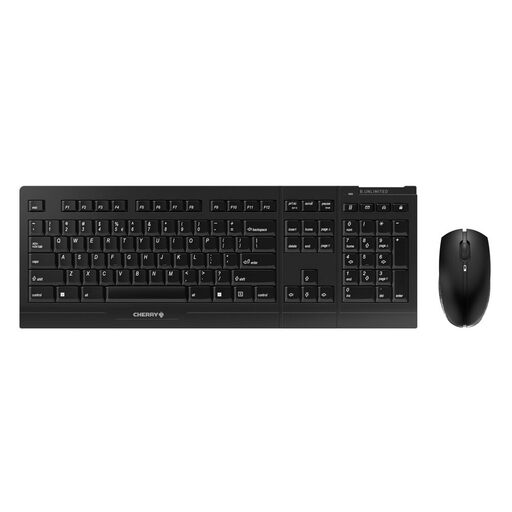
Why This Fits Their Persona: This set is designed for continuous professional use. It combines a reliable wireless connection with durable, rechargeable batteries and quiet keys, making it ideal for focused work in the office or at home.
It solves the "wireless trap" by using high-quality NiMH batteries and allowing you to charge the keyboard and mouse via the included USB cable during operation. There are no forced work interruptions.
Durable CHERRY SX scissor technology for a precise and quiet keystroke. Stable 2.4 GHz wireless connection with AES-128 encryption for data security.
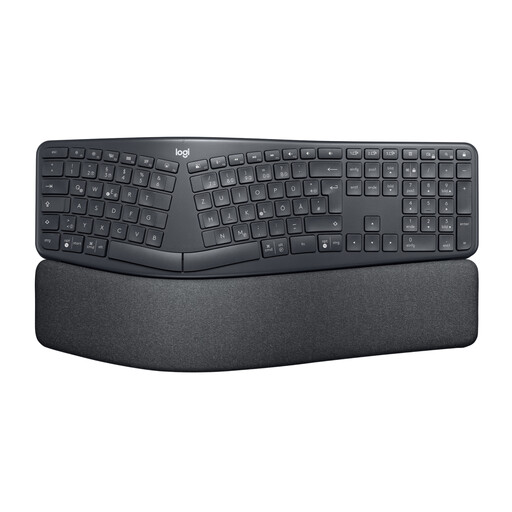
Why This Fits Their Persona: This keyboard is specifically designed for users who type for many hours daily and prioritise a healthy posture. It aims to reduce muscle strain in the wrists and forearms.
It avoids the "one-size-fits-all ergonomics" trap with a science-backed, split and curved keyframe, plus adjustable tilt legs (0°, -4°, -7°) that allow customisation for individual sitting or standing positions.
The curved, split keyframe promotes a natural hand and wrist posture. The integrated, cushioned palm rest provides additional support and minimises strain.
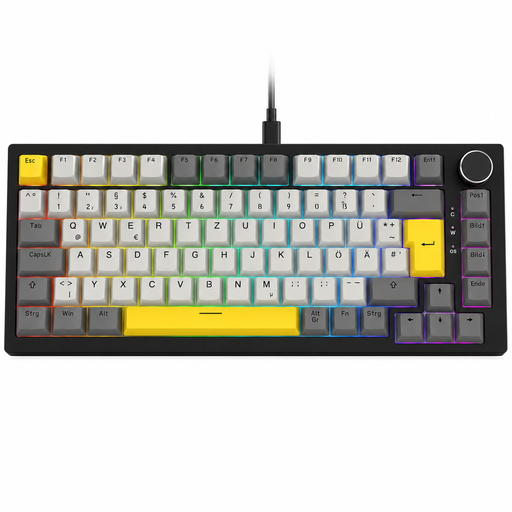
Why This Fits Their Persona: This keyboard is aimed at gamers who value responsiveness, customisability, and a precise typing feel. The compact 75% layout leaves more room for mouse movement without sacrificing essential keys.
It bypasses the "RGB-over-performance" trap by focusing on core features: a stable wired connection for minimal latency, a dampened gasket-mount structure, and the ability to exchange the mechanical switches (hot-swap).
Hot-swappable mechanical switches allow for easy customisation of the typing feel without soldering. The wired USB-C connection ensures reliable, latency-free input.
We have compiled a complete, up-to-date list of products that fully meet these strict selection criteria.
With a wireless keyboard mouse set, two factors are crucial: battery life and connection type. Look for models with rechargeable batteries and the ability to use the devices while charging. A 2.4 GHz RF connection is generally more stable and responsive than Bluetooth, making it preferable for most use cases, including gaming.
The main difference lies in the key technology. Regular (membrane) keyboards use a rubber sheet under the keys, which results in a softer but less precise feel. A mechanical keyboard has an individual switch for each key. This provides clear tactile feedback, higher precision, and a significantly longer lifespan. They are popular with gamers and heavy typists.
An ergonomic keyboard can be a great help for people who suffer from strain or pain in their wrists. However, the often unfamiliar layout requires an adjustment period. Not every user will benefit equally. If you have no discomfort and are comfortable with a standard layout, a switch is not essential. Models with slight ergonomic adjustments, such as an integrated palm rest, can be a good compromise.