You don’t need a specialist keyboard for multi-level headings: in Word and LibreOffice, you set up the document outline using styles, as explained by Microsoft Support and LibreOffice Help. Choose a keyboard based on its layout, key arrangement and your workspace. A compact wired keyboard saves space, a split layout may take some getting used to, and a multi-device keyboard needs suitable connections and a power source.
Which keyboard is right for you?
Writers who work with document outlines
If you’re structuring sections and subsections in a club information pack, the key considerations are choosing the right keyboard layout and being able to use styles easily. Microsoft Support explains how to use multi-level lists with built-in heading styles in Word, while LibreOffice Help explains how to assign paragraph styles to outline levels.
People who spend a lot of time writing at a desk
For longer writing sessions, you can choose a key arrangement and posture that suit your needs. The German Social Accident Insurance (DGUV) notes that intensive computer work can be associated with discomfort in the hands, arms, shoulders or neck. However, no particular keyboard model is guaranteed to prevent or treat such discomfort.
Writers with limited space or several devices
A compact TKL model may omit the number pad, while a multi-device keyboard is designed for switching between compatible devices. According to CHERRY, the CHERRY STREAM KEYBOARD TKL has the same main key section as the larger STREAM version; HP says the 975 supports two Bluetooth connections and one connection via a USB-A dongle.
What should you consider when choosing?
First decide whether you want to save space at a permanent desk, use a split layout or switch between devices. Then you can check that the layout and connection suit the way you actually work.
| What matters |
What to check before buying |
Who is it important to? |
| Document structure and keyboard layout |
Check that the keyboard has a German layout and is compatible with the operating system and styles in your word-processing software. |
When working with several heading levels, I want to use the right keys and styles with confidence; around 36% of consumers prioritise document structure and keyboard layout. |
| Comfort when writing longer texts |
Weigh up a split or conventional layout, the space available and whether you can try it out. |
For longer writing sessions, I consider whether the key arrangement suits me, and allow time to get used to a split layout; about 29% of consumers prioritise writing comfort. |
| Space at a permanent desk |
Check whether you need a number pad, which USB port is available and which layout the specific version has. |
If desk space is limited and I rarely enter numbers, a model without a number pad could be a good fit; around 21% of consumers focus on how much space a keyboard takes up. |
| Switching between devices |
Check compatible operating systems, Bluetooth support, the receiver and what’s included with the specific version. |
If I’m working on the information pack across several compatible devices, switching between connections matters to me; around 14% of consumers prioritise using multiple devices. |
Avoid common buying mistakes
-
Don’t confuse special keys with automatic document outlining
Heading levels and numbering are set up in your document software, not through a special keyboard function.
Start by checking the styles and outline levels in your application. Choose programmable keys only if you actually want to use the extra functions.
-
Don’t choose a TKL keyboard just because it’s compact
According to CHERRY, the CHERRY STREAM KEYBOARD TKL omits the number pad but retains the main key section of the larger STREAM version. This can make frequent number entry less convenient.
Think about how often you enter numbers, and check the language layout of the specific version.
If you regularly use a number pad, entering numbers without one may take more effort.
-
Don’t assume a split layout will feel familiar straight away or provide treatment
Perixx notes that the PERIBOARD-512 B takes time to get used to. A split keyboard is therefore not automatically a familiar alternative, nor is it guaranteed to have a particular effect on your health.
Check that the layout feels right for you and that the keyboard’s size and connection suit your workspace. If you already have symptoms, don’t treat product claims as medical guarantees.
Allow time to get used to the different key arrangement.
-
Don’t assume similar model names or bundles mean identical keyboards
A keyboard and mouse combo, or a TKL version with a US layout, is not necessarily the same as a separately selected keyboard with a German layout.
Check the full model name, language layout and every included device against the specific product description.
Brands to consider
CHERRY
CHERRY offers wired versions of the STREAM KEYBOARD and STREAM KEYBOARD TKL for a permanent desk setup.
- CHERRY says the TKL model has the same main key section as the larger STREAM version, but without a number pad.
- The missing number pad may be inconvenient if you enter numbers frequently. Claims about particularly quiet typing come from the manufacturer.
Logitech
The MX Keys S is designed for customisable wireless typing, while the ERGO K860 has a split, curved keyboard layout.
- Logitech lists backlighting and programmable actions as features of the MX Keys S.
- Programmable actions depend on having the right software. Claims about ergonomic benefits come from the manufacturer and don’t prove an individual effect.
Perixx
The PERIBOARD-512 B is a wired alternative with a split keyboard and an option with a German QWERTZ layout.
- Perixx lists a 1.8 m USB-A cable.
- The manufacturer advises allowing time to get used to the split layout if you’re using one for the first time.
HP
The HP 975 Dual-Mode is designed for writers who want to use a wireless keyboard with several compatible devices.
- HP lists two Bluetooth connections and an additional connection via a USB-A dongle.
- Check the connection and layout options, as well as how often the rechargeable battery needs charging.
Joybuy products for writing
Here you’ll find wireless keyboards and keyboard and mouse sets with a QWERTZ layout for German-language typing, including options for using several devices.
 No image available
Inateck KB01003G Bluetooth keyboard, QWERTZ
This model may suit you if you type in German and want a QWERTZ keyboard that can connect to several Bluetooth devices.
The product title lists connections to three Bluetooth devices and enlarged keycaps.
View at Joybuy
 No image available
Foldable Bluetooth keyboard with mouse, 3 connection modes
This option may suit you if you’re looking for a foldable keyboard for several devices and would like a mouse included.
The product title lists quiet scissor keys, support for up to three devices, three connection modes and USB-C charging. It’s sold with a wireless mouse.
View at Joybuy
 No image available
QWERTZ wireless keyboard with LCD display and rotary dial
If you’re looking for a QWERTZ keyboard with several connection options, this could be one to consider for your desk.
The product title lists four Bluetooth connections, 2.4 GHz, USB-C, a 2000 mAh battery and backlighting.
View at Joybuy
 No image available
Wireless QWERTZ keyboard and mouse set with number pad
If you enter numbers regularly and are looking for a keyboard and mouse together, the product title says this set has a full-size layout with a number pad.
The title lists a 2.4 GHz USB receiver, a detachable wrist rest and compatibility with Windows and Mac.
View at Joybuy
 No image available
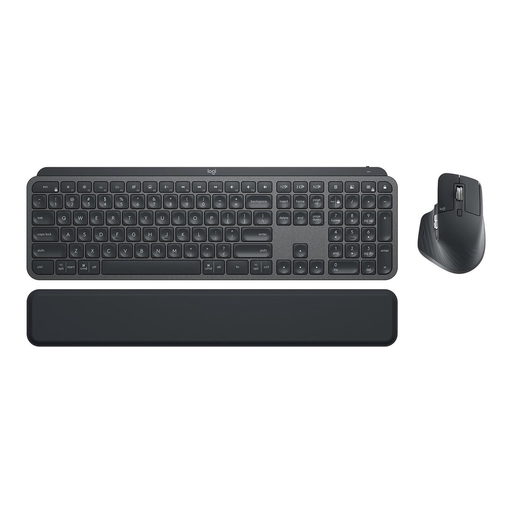
Logitech MX Keys Combo for Business Gen 2, QWERTZ
This set could be a good option if you’re looking for a wireless keyboard with a German QWERTZ layout and a mouse.
The product title lists MX Keys and MX Master 3S, Logi Bolt, backlighting and multi-device use.
View at Joybuy
Frequently asked questions
Do I need a specialist keyboard for numbered subheadings?
No, you set up the document structure in your word-processing software. Microsoft Support explains how to combine built-in heading styles with multi-level lists in Word; in LibreOffice, you assign paragraph styles to outline levels. Check that you can use the keys and styles you need comfortably in your software.
What should I check before connecting a wireless keyboard?
Check that the connection options and operating systems for the specific version are compatible with your devices. HP lists two Bluetooth connections and an additional one via a USB-A dongle for the 975; other wireless keyboards won’t necessarily have the same features.
Is a split keyboard easy to use straight away?
It depends on how familiar you are with the different key arrangement. Perixx advises that it takes time to get used to the PERIBOARD-512 B, so check before buying that the layout and space requirements suit your desk.
What should I know about faults or returns after buying online?
For a private purchase from a business seller, statutory rights relating to faulty goods are separate from a voluntary guarantee, as explained by the Verbraucherzentrale (German consumer advice centre). Online purchases generally come with a 14-day right to cancel, subject to exceptions. If you’re buying on behalf of a club, you can’t necessarily assume you’ll have the same consumer rights.
How should I dispose of an old keyboard?
In Germany, an old keyboard must not go in household waste. The Federal Environment Agency lists local collection points as a generally free return option; batteries and rechargeable batteries must be disposed of through separate collection schemes.


