What should you look for when buying?
First, decide which test environment you need. Then compare the available desk space and connections at your workstation with what’s included in the specific model variant.
The W3C Web Accessibility Initiative describes keyboard operability and visible focus as requirements that can be tested. NV Access lists NVDA as a screen reader for Windows.
| What matters |
What to check before buying |
Who is this important to? |
| Suitable test environment |
Check the operating system, the browsers you plan to use and which assistive tools can be installed; for NVDA, you’ll need a Windows environment. |
If I want to check focus, keyboard operation and, where relevant, a screen reader, the software environment needs to match my test plan. Around 36% of consumers prioritise having the right test environment. |
| Desk space and connections |
Match the video output to your monitor’s input and check that there are enough accessible USB ports for the shared devices. |
At a space-limited shared desk, I want to connect the existing screen and test keyboard without needing unexpected adapters or rearranging everything. Around 29% of consumers focus on space and connections. |
| Separate user access |
Check who will manage accounts, who can install software and where test results will be saved. |
If several people use the same computer, I want files, settings and access rights to be clearly separated. Around 21% of consumers put separate access for multiple users first. |
| What’s included |
Use the full model number to check whether the operating system, monitor, keyboard, cables and, where relevant, mount are included. |
If I don’t yet have everything I need for a shared test station, I want to know in advance which other devices I’ll need. Around 14% of consumers focus on what’s included and potential additional costs. |
Joybuy product selection
This selection includes compact Windows mini PCs and Mac mini models for testing in the respective operating system environments listed.
 No image available
SOYO Y5Pro Mini PC, Intel Core i5 8250U/8350U, 8 GB DDR4, 256 GB SATA SSD
For a compact Windows 11 test station; check that the specific variant is compatible with the browsers and assistive tools you plan to use.
Listed in the product title: Intel Core i5 8250U/8350U, 8 GB DDR4, 256 GB SATA SSD, Bluetooth 5.2 and Wi-Fi 5.
View at Joybuy
 No image available
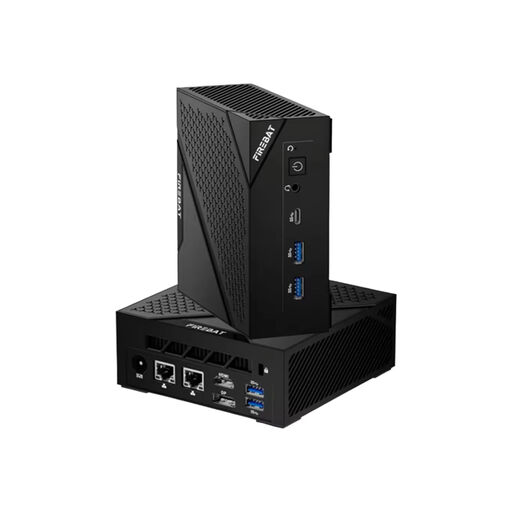
FIREBAT AM02 Mini PC, AMD Ryzen 5 6600H, 16 GB RAM, 512 GB SSD
For a compact test station running Windows 11; check that the configuration on offer suits your specific test environment.
Listed in the product title: 16 GB LPDDR5, 512 GB SSD, HDMI, Wi-Fi 6 and Bluetooth 5.2.
View at Joybuy
 No image available
Apple Mac mini M6, 12-Core CPU, 12-Core GPU, 16 GB Unified Memory, 256 GB SSD
For tests that require macOS. NV Access lists NVDA for Windows, so this model is not a substitute for a Windows/NVDA test station.
Listed in the product title: Thunderbolt 4, HDMI, 2.5GbE, Wi-Fi 7 and Bluetooth 6. According to the product details, the keyboard and mouse are sold separately.
View at Joybuy
 No image available
Apple Mac mini M6, 12-Core CPU, 12-Core GPU, 16 GB Unified Memory, 512 GB SSD
For tests that require macOS. NV Access lists NVDA for Windows, so this model is not a substitute for a Windows/NVDA test station.
Listed in the product title: Thunderbolt 4, HDMI, 2.5GbE, Wi-Fi 7 and Bluetooth 6. According to the product details, the keyboard and mouse are sold separately.
View at Joybuy
 No image available
Apple Mac mini M6, 12-Core CPU, 12-Core GPU, 24 GB Unified Memory, 512 GB SSD
For tests that require macOS. NV Access lists NVDA for Windows, so this model is not a substitute for a Windows/NVDA test station.
Listed in the product title: Thunderbolt 4, HDMI, 2.5GbE, Wi-Fi 7 and Bluetooth 6. According to the product details, the keyboard and mouse are sold separately.
View at Joybuy
Frequently asked questions
How do I start a manual keyboard navigation test?
First, use the pages you want to test without a mouse: move between elements with Tab and Shift+Tab, check the focus order and visible focus, and see whether you can use the keyboard to leave focused areas. The W3C Web Accessibility Initiative describes these as requirements that can be tested; buying a PC doesn’t prove that the content you test is accessible.
How do I set up a PC for several testers?
Germany’s Federal Office for Information Security recommends separate, password-protected user accounts with appropriate permissions on shared devices. Also agree who can install test software and where shared results will be saved; this recommendation is not a general legal requirement for buying a PC.
What extra devices should I allow for when buying?
Check the full model number to see whether a monitor, keyboard, cables and operating system are included. If you’re buying a kit without an operating system pre-installed, remember to allow for setting one up. If your workstation is already equipped, you may be able to reuse the accessories you have.
Does the German Accessibility Strengthening Act apply to every desktop PC and every website tested on it?
No, you can’t assume that a shared workstation means the Act applies. Section 1 of the BFSG covers, among other things, certain hardware systems for consumer general-purpose computers placed on the market after 28 June 2025, including the operating systems intended for them. Whether a specific product is covered depends on the product and the legal requirements; the Act does not automatically apply to every website. For products in scope, the BFSGV also sets out requirements for information about accessibility features and interoperability with assistive technologies.
What statutory rights do I have if a product has a defect?
Claims for a defect are subject to the applicable statutory requirements. Section 438 of the German Civil Code (BGB) sets a limitation period of two years from delivery of the item in the usual case; a voluntary manufacturer’s warranty is separate from this.


