What should you look for when choosing?
Start by setting up heading styles in your word processor. Then compare the layout, connectivity and features that suit your workspace and the tasks you do regularly.
| Buying priority |
What to check before buying |
Who is this important to? |
| Headings and commands |
Support for styles in your software; how easy customisable keys are to reach and whether they’re compatible. |
If I often edit chapters and subchapters, I want formatting and frequently used commands to be easy to access. Around 33% of consumers prioritise these tasks. |
| Hand position and typing feel |
How the keyboard fits into your workspace; whether a split keyboard may take time to get used to. |
During long writing sessions, I want a keyboard layout that suits my hand position, without assuming it will have a particular effect. Around 27% of consumers put this comfort factor first. |
| Noise and German layout |
The specific country layout of the version you’re buying; treat noise claims as manufacturers’ descriptions. |
If I regularly write German text and share my workspace, the right key labels and a quiet keystroke matter. Around 20% of consumers put these priorities first. |
| Desk space |
Compare the dimensions with the space available; consider whether you need a number pad. |
If I need room for a mouse and papers alongside my draft, a more compact design could work, provided I don’t need a number pad. Around 13% of consumers have this space requirement. |
| Switching between devices |
The connection types you need and device compatibility; power requirements and, if applicable, configuration software. |
If I work on my guide using several devices, I want to switch between them without relying on unsuitable connection options. Around 7% of consumers prioritise switching between devices. |
Keyboards at Joybuy
This selection includes keyboards for writing in German, permanent workspaces and switching between compatible devices. Before buying, check that the layout, connectivity and features of the specific version suit your word processor and computer.
 No image available
Inateck KB01003G Bluetooth keyboard, QWERTZ
This wireless keyboard is worth considering if you write in German and want to switch between several compatible devices.
QWERTZ layout; connects to up to three Bluetooth devices according to the product description.
Joybuy
 No image available
Wireless QWERTZ keyboard with LCD display and dial
This keyboard could suit writers who work across several devices, provided it supports the connections you need.
QWERTZ layout; the product name lists Bluetooth, 2,4 GHz and USB-C, plus a 2000 mAh battery.
Joybuy
 No image available
QWERTZ keyboard and mouse set with number pad
This set is one option for a permanent workspace where you need a number pad and a mouse.
QWERTZ layout; the product name lists a full-size design with number pad, 2,4-GHz USB connection and detachable wrist rest.
Joybuy
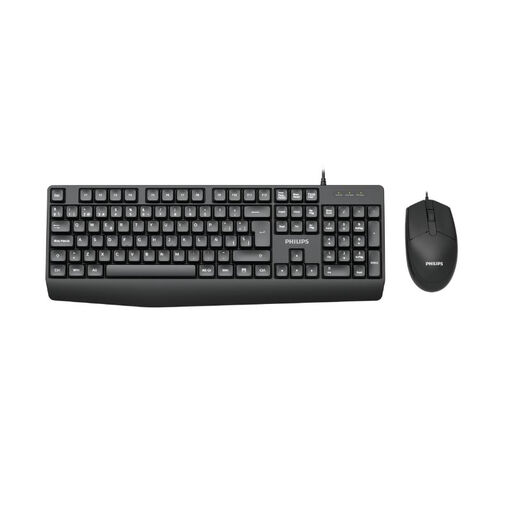 No image available
Philips 2000 Series SPT6237B/26 keyboard and mouse set
This wired set could suit a permanent workspace where you need both a keyboard and a mouse.
German version; wired according to the product name.
Joybuy
 No image available
Logitech MX Mechanical, German QWERTZ, Graphite
This model is one option for writers who want a German layout and wireless connectivity.
Mechanical tactile quiet switches; Bluetooth and Logi Bolt; smart backlighting according to the product name.
Joybuy
Frequently asked questions
Do I need a specialist keyboard for nested headings?
No. In Word, numbered heading levels are created using built-in heading styles and a multilevel list. A keyboard with easy-to-reach or customisable commands can make things more convenient, but it won’t create the document structure for you.
How can I find headings more quickly when editing?
Apply heading styles to headings in the body of your Word document so that they appear in the Navigation pane. Microsoft Support notes that headings in tables, text boxes, headers and footers won’t appear there.
What should I check before connecting or setting up a keyboard?
Check that the connection type and your computer’s operating system are compatible with the specific keyboard version. If you want to remap keys, check which software you’ll need and test the commands in your word processor. Microsoft Support notes that Word keyboard shortcuts for the US layout may not map fully to other layouts.
What should I know about batteries and cleaning?
A wired keyboard doesn’t need its own batteries to operate. For wireless models, check the battery type or charging method. The German Environment Agency recommends taking used batteries and rechargeable batteries to an appropriate collection point rather than putting them in household rubbish. Follow the instructions for your specific model when cleaning it.
What are my rights when buying a keyboard online for personal use in Germany?
According to the Federal Ministry of Justice and Consumer Protection, consumers buying at a distance generally have a 14-day right to cancel. For a purchase of goods, the period starts on the day after the complete delivery. This is separate from the statutory guarantee for faulty goods: the Verbraucherzentrale explains that, in general, the retailer is responsible for goods being free from defects at the time of delivery for two years. Health and safety requirements apply to workplace display screen equipment within their relevant scope; this does not mean there is a blanket requirement to use a particular keyboard model.


