Keyboards for editing newsletters
This selection includes compact, portable keyboards for editing newsletters on the go, including Bluetooth models for multiple devices and foldable options.
 Image unavailable
Inateck KB01003G Bluetooth Keyboard, QWERTZ
The QWERTZ layout and Bluetooth connection for up to three devices suit situations where you switch between compatible devices as you write.
The product title mentions enlarged keycaps and compatibility with iPad, Windows, Android and iOS. Check that your specific device is supported.
View at Joybuy
 Image unavailable
NAXSIR Foldable Wireless Bluetooth Keyboard
The foldable design is an option if you’re looking for a keyboard that’s easy to carry and want to use it with a mobile phone or tablet.
The product title mentions a rechargeable battery, magnetic stand, aluminium case and quiet keys. Before buying, check the layout and device compatibility of the variant on offer.
View at Joybuy
 Image unavailable
Foldable Bluetooth Keyboard with Wireless Mouse
The foldable design is described as suitable for mobile typing; the product title also mentions a wireless mouse.
The title lists quiet scissor keys, three connection modes, connections to up to three devices and USB-C charging. It names Windows, Android and iOS as compatible systems.
View at Joybuy
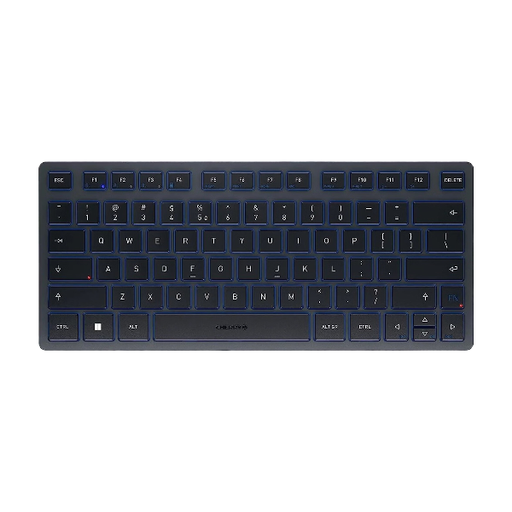 Image unavailable
CHERRY KW 7100 MINI BT, US International Layout (QWERTY), Slate Blue
This compact Bluetooth keyboard is designed for switching between compatible devices and can help you save space at the library desk.
CHERRY lists three Bluetooth channels and a carry case. This variant is listed with a US International QWERTY layout; check whether it suits the way you type.
View at Joybuy
 Image unavailable
Rapoo E9050L 75% Wireless Membrane Keyboard, US QWERTY, White
This compact wireless keyboard is an option if you’re working with limited desk space and want to switch between several devices.
The product title lists a 78-key layout, support for up to four devices and connections via 2.4 GHz, Bluetooth 5.0 and 4.0. Windows, Mac, Linux and Chrome are listed as compatible; the layout is US QWERTY.
View at Joybuy
Frequently asked questions
How do I set up a multi-device keyboard before a library study session?
Pair the keyboard with each device you plan to use beforehand, then test it in your newsletter software. For the Samsung Smart Keyboard Trio 500, Samsung Germany advises holding down the Bluetooth key F7, F8 or F9 for three seconds, then confirming the PIN shown on screen. These steps apply to this model.
What should I consider when it comes to power for longer sessions?
Check how the specific variant is powered before heading to the library. According to Logitech Support, the Pebble Keys 2 K380s uses two replaceable AAA batteries; Trust lists a rechargeable battery for the Lyra. The stated battery life depends on the conditions of use.
How do I clean a portable keyboard?
Follow the cleaning instructions for the specific model and switch off the keyboard or disconnect it from your device before cleaning. The design alone doesn’t confirm that it’s safe to use liquids or particular cleaning products.
What are the rules in Germany for faulty goods or online returns?
For a consumer purchase from a business seller, you’re generally entitled to a statutory guarantee of at least two years from the date you receive the goods; an additional manufacturer’s warranty doesn’t replace it. For a standard online distance sale, you generally have a 14-day right to cancel from the date of delivery. Your Europe highlights exceptions and possible return costs, so check the rules that apply to your specific situation.
What should I check for product compliance when buying a Bluetooth keyboard?
The Federal Network Agency includes Bluetooth products in its market surveillance and lists the CE marking, product identification, manufacturer details, German-language instructions and the declaration of conformity among the points to check. The CE marking is the manufacturer’s declaration; it doesn’t guarantee a particular typing noise level.


