Entering lots of expenses
If you regularly enter figures in a spreadsheet, consider whether a separate number pad is worth the extra desk space.


If you regularly enter lots of figures, a keyboard with a number pad is an obvious choice. If space is limited and you only enter numbers occasionally, a compact model without a number pad may suit your desk better. Also check the layout supplied, how it connects to your computer and what’s included in the box. Noise descriptions aren’t automatically comparable across different models.
If you regularly enter figures in a spreadsheet, consider whether a separate number pad is worth the extra desk space.
If your laptop, paperwork and keyboard all need to share the same surface, a compact model can free up space – provided you can manage without a separate number pad.
If there are other people in the room, it’s worth checking what the manufacturer says about the noise made by the specific version. Don’t assume that manufacturers’ descriptions amount to a standardised comparison test.
A good fit if: you regularly enter lots of individual amounts, have a suitable USB-A port and usually keep your keyboard in one place.
The trade-off: A full-size keyboard with a number pad takes up desk space, so check the dimensions of the specific version.
A good fit if: freeing up desk space is a priority and your computer supports Bluetooth.
The trade-off: There’s no separate number pad. The Logitech model tested didn’t include a Logi Bolt dongle. F.A.Z. Kaufkompass rated this model as quiet.
A good fit if: you often enter figures and don’t want a cable running across your desk.
The trade-off: The Dell KM555 is sold as a keyboard and mouse set. The claim that it has a quiet keystroke comes from the manufacturer, not a comparative noise test.
| What matters | What to check before buying | Who is it important to? |
|---|---|---|
| Entering figures | Check whether the specific keyboard has a number pad and, if applicable, a NUM indicator. CHERRY documents both for the KC 6000 SLIM in the DE version. | If you enter lots of individual amounts, a number pad may matter more than extra desk space. Around 25% of consumers put entering figures first. |
| Space required | Compare the model’s width with the space available next to your laptop. Logitech lists the POP Icon Keys as 324,51 mm long; CHERRY gives the KC 6000 SLIM’s length as 440 mm. | Every bit of free space counts on a small desk. Around 20% of consumers prioritise the space a keyboard takes up. |
| Typing noise | Look for reviews of the specific version. F.A.Z. Kaufkompass rated the POP Icon Keys as quiet; Dell’s claim about the KM555 is a manufacturer’s description. | If you share a room, you’ll want to disturb others as little as possible while typing. Around 20% of consumers focus on typing noise. |
| Ongoing costs | Consider how the keyboard is powered and check whether a set includes accessories you’ll actually use. Logitech documents replaceable AAA batteries for the POP Icon Keys; the KM555 is a keyboard and mouse set. | If you want to keep an eye on the initial and ongoing costs, power and what’s included both matter. Around 20% of consumers put the total cost first. |
| Connection and layout | Check that Bluetooth or the USB-A port you need is compatible with your computer, and confirm the key layout of the version supplied. | If you mainly need the right connection and a familiar layout, check these details first. Around 15% of consumers prioritise device compatibility. |
The CHERRY KC 6000 SLIM is documented as the DE version, model JK-1600DE-1. A Joybuy product description, however, lists variant JK-1600EU-2 with a US/EU layout. Sharing the same range name doesn’t mean the key layouts are identical.
Before buying, check the full model number and the key layout of the version on offer.
According to Logitech, the POP Icon Keys uses Bluetooth Low Energy. The model tested by F.A.Z. Kaufkompass didn’t include a Logi Bolt dongle.
Check that your computer supports Bluetooth and find out which receiver is actually included.
If your computer doesn’t support the connection you need, you may have to buy a compatible receiver separately.
The Dell KM555 is a set containing a keyboard and a mouse. If you already have a mouse or only need a keyboard, it includes different items from a standalone keyboard.
Compare the versions on offer by checking what’s included, then decide whether you’ll use both devices.
The mouse included in the set may be surplus to requirements if you already have a suitable one.
The KC 6000 SLIM in the documented DE version is a wired, full-size option for entering figures frequently.
The POP Icon Keys is a compact Bluetooth option if free desk space matters more to you than having a separate number pad.
The HP 125 G2 is a wired, full-size option with a QWERTZ layout.
The KM555 set, listed as a German version, combines a more compact keyboard with a number pad and a mouse.
This selection from Joybuy includes wired and wireless keyboards, with both number-pad models and compact options. Check the layout, connection and features of each specific model.
 Image unavailable
A compact option if you have limited desk space and want a QWERTZ layout.
Features listed in the product name: Bluetooth, ultra-slim design and QWERTZ layout. Compatibility information includes iPad, Windows, Android and iOS; check support for your specific device.
 Image unavailable
This full-size keyboard with a number pad is an option if you regularly enter figures and want a wired keyboard.
Features listed in the product name: USB plug and play, full-size design, spill-resistant construction and German QWERTZ layout.
 Image unavailable
An option with a number pad if you enter figures frequently and want a choice of connection types.
Features listed in the product name: mechanical keyboard, Bluetooth, 2.4G and USB-C, plus a German QWERTZ layout. The description also lists a 10.000-mAh battery and a 1,14-inch TFT colour screen.
 Image unavailable
A wireless option if you want a German layout and plan to use Bluetooth or a Logi Bolt receiver.
Features listed in the product name: mechanical keys described as “Tactile Quiet”, Bluetooth, Logi Bolt and smart backlighting. Check that the connection you want is compatible with your computer.
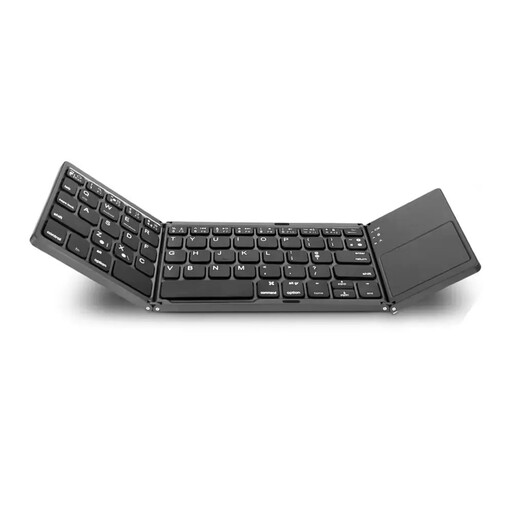 Image unavailable
A foldable option if you’re looking for a Bluetooth keyboard with a number pad and built-in touchpad.
Features listed in the product name: number pad, touchpad and Bluetooth. Before buying, check that the compatibility information includes your device.
No. It depends on how often you enter figures and how much desk space you want to free up. Full-size models such as the documented CHERRY KC 6000 SLIM have a number pad, while the compact Logitech POP Icon Keys doesn’t, according to F.A.Z. Kaufkompass.
Check that your computer supports the connection used by the specific keyboard. According to CHERRY, the KC 6000 SLIM needs USB-A. Logitech says the POP Icon Keys uses Bluetooth Low Energy, and the model tested was listed without a Logi Bolt dongle.
Don’t put waste electrical equipment in your household bin. The German Environment Agency recommends removing any removable batteries from the device before taking it for disposal, where possible, and recycling them separately at a battery collection point.
For a fault, the seller is generally your point of contact for your statutory consumer rights. These are separate from any voluntary manufacturer’s warranty. The Verbraucherzentrale explains that if a product is faulty, you can initially ask for it to be repaired or replaced.