Entering numbers frequently
If you enter or correct lots of numerical responses, an integrated number pad can keep the keys close to hand. Keychron and CHERRY offer examples of number-pad layouts in both denser and more traditional arrangements.


If you often enter numbers when cleaning data, an integrated number pad can be handy. If you mainly review, filter and correct data, a keyboard without a number pad can leave more room for your mouse. A separate number pad is a good option if you switch between these tasks, although it needs extra desk space when in use. Before buying, compare the actual width, the German layout, the keys you need and the connection that suits your computer.
If you enter or correct lots of numerical responses, an integrated number pad can keep the keys close to hand. Keychron and CHERRY offer examples of number-pad layouts in both denser and more traditional arrangements.
If you mainly review and filter responses, a keyboard without a number pad can leave more room beside it. The German Social Accident Insurance (DGUV) recommends a compact model without a number pad for people with limited shoulder clearance. CHERRY and Logitech also offer suitable designs.
If you only need a number pad for certain tasks, consider a compact keyboard with a separate number pad. Perixx offers this type of setup, so you can move the pad out of the way when you’re not using it.
Best for: You often enter sequences of numbers and want the number pad close to hand at all times.
Things to consider: The keys may be closer together than on a standard layout. Also check how much room you’ll have for your mouse.
Best for: You mainly read, filter and correct data, and need more room beside your keyboard.
Things to consider: There’s no integrated number pad for frequent number entry. Check that the navigation and function keys available suit the way you work.
Best for: You want to switch between having more room for your mouse and entering lots of numbers.
Things to consider: The separate pad needs extra desk space while you’re using it, and adds another item to your desk.
Best for: You prefer a familiar layout with an integrated number pad and have enough room after measuring your desk.
Things to consider: “Slim” doesn’t necessarily mean narrow. CHERRY says the KC 6000 SLIM is 440 mm long.
| Priority | What to check before buying | Who it matters most to |
|---|---|---|
| Number pad and desk width | Check the overall width, German layout, and position of the arrow and function keys. | If I often enter figures while cleaning data, I want to reach the number pad without changing my setup. Around 36% of consumers prioritise frequent number entry. |
| Room for a mouse and work materials | Compare the width of the specific model with the space available and the range of mouse movement you need. | If I mainly review and filter responses, I want enough room beside my keyboard for my mouse. Around 29% of consumers prioritise mouse space. |
| A number pad when you need one | Check the dimensions, what’s included and how much desk space the separate pad will need. | If my work switches between checking data and entering numbers, I want to set up the number pad only when I need it. Around 21% of consumers prioritise having a number pad available as needed. |
| Layout and connection | Check the DE-QWERTZ layout, the keyboard shortcuts you need, and which connection or wireless option works with your computer. | If I want to work with my usual keys and computer without any extra steps, the layout and connection need to be right. Around 14% of consumers prioritise ease of use and connection. |
The CHERRY KC 6000 SLIM is a full-size model and, according to CHERRY, is 440 mm long. The name alone doesn’t tell you whether it will fit your available space.
Measure the space you have, including the room you want to leave for your mouse.
The CHERRY KW 9200 MINI and Logitech MX Keys Mini for Business don’t have a number pad. Entering numbers frequently may therefore feel different from using a keyboard with an integrated pad.
Decide whether an integrated number pad, a separate one or no additional number pad is right for the way you work.
If you need a number pad, a separate one takes up extra desk space.
The layout, operating system keys and what’s included can vary between model versions. Perixx had announced the German QWERTZ version of the PERIDUO-606A for 18 November 2026.
Check the full model name, the specific key layout, connection and what’s included for the version you want to buy.
These examples cover different designs; the details apply only to the specific product lines mentioned.
The K4 Version 2 has a German 96% layout with an integrated number pad, and supports Bluetooth and USB-C wired use.
The KW 9200 MINI is a compact keyboard without a number pad, while the KC 6000 SLIM is a full-size wired keyboard.
The PERIDUO-606A set combines a compact split keyboard with a separate number pad and mouse.
The MX Keys Mini for Business is a compact version without a number pad; according to Logitech, the MX Keys for Business has an integrated number pad.
This selection features compact keyboards without an integrated number pad. Layout and connection vary by model.
 No image available
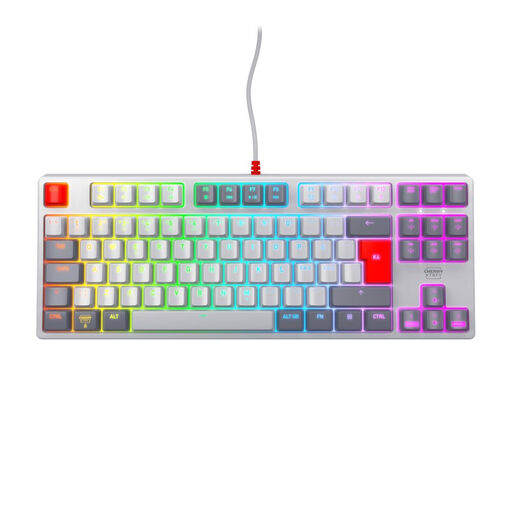
A tenkeyless design could suit you if you’re happy to go without an integrated number pad and want to leave room for your mouse.
Tenkeyless; German layout.
 No image available
The compact 65% design may suit a desk with limited space. Check that the key layout works for the way you use spreadsheets.
65%; German QWERTZ; Bluetooth, 2.4 GHz wireless and USB-C.
 No image available
This compact design without a number pad could leave more room for your mouse. The stated layout is UK English (QWERTY), not German QWERTZ.
 No image available
The TKL design has no number pad. Note that the stated layout is English (US) with a euro symbol, not German QWERTZ.
TKL; USB; six multimedia keys.
 No image available
The TKL design could suit you if you can manage without an integrated number pad. The stated Pan-Nordic QWERTY layout is not German QWERTZ.
TKL (80%); wired USB.
No. If you mainly review and filter responses and correct text, check that the arrow, Delete and function keys are easy to reach. If you often enter numbers, an integrated or separate number pad may be more convenient. Microsoft describes data filtering as a software feature, not a feature of a particular keyboard format.
Compare the commands you use most often with your application’s documentation, then test them once you’ve set everything up. Microsoft notes that its documented Excel shortcuts are based on the US keyboard layout, so keys may differ on other layouts.
Check that the specific keyboard supports your computer’s connection or wireless setup, and that its layout suits the way you work. According to CHERRY, the KC 6000 SLIM requires USB-A; the CHERRY KW 9200 MINI supports Bluetooth, 2.4 GHz wireless and wired use. For the PERIDUO-606A set, check which wireless receiver is required and whether you need batteries for the components.
Make room for the number pad when you plan to use it. With a compact keyboard and separate pad, you can move it aside for other tasks. Even so, it needs extra space on a small desk while you’re using it.