If you use NVDA with the desktop keyboard layout, a familiar full-size keyboard with a dedicated number pad is a sensible starting point. With the laptop layout, a separate number pad isn’t essential. Choose a keyboard based on what matters most to you: easy-to-see keys, a different hand position or saving space. Before you buy, check the operating system, keyboard layout and connection type.
Which keyboards suit different users?
NVDA users entering lots of details
If you use a screen reader to enter names, places and contact details repeatedly in Windows, check whether you use NVDA’s desktop or laptop keyboard layout. NV Access explains that the desktop layout assigns certain functions to the number pad, while the laptop layout can assign them to other keys.
Users with some remaining sight
If you use speech output and also look at the keys, font size and contrast are important considerations. RNIB distinguishes large print and high-contrast keys from tactile adaptations: larger characters aren’t automatically easy to feel.
Frequent typists who need more space or a different hand position
When entering longer descriptions, consider whether you’d prefer a familiar key layout, want to try a split keyboard or need to save desk space. The German Social Accident Insurance (DGUV) explains that computer workstations can be adapted to different needs. The right keyboard for you depends on how you work.
What to consider when choosing
First, check your screen reader’s keyboard layout. Then decide whether key visibility, hand position or desk space should determine the keyboard’s design.
| Priority |
What to check before buying |
Who it matters to |
| NVDA commands and number entry |
Check whether you use the desktop or laptop layout; check the number pad, Insert key, and the arrow and function keys you need. |
If I need familiar screen reader commands and enter numbers repeatedly, the keyboard layout is crucial. Around 36% of consumers put NVDA navigation and data entry first. |
| Keys that are easy to see or feel |
Assess font size, contrast, tactile markings and German layout separately. |
If I want to identify keys visually or by touch as well, I need the right kind of guidance. Around 21% of consumers prioritise keys that are easy to see or tactile key markers. |
| Hand position during longer typing sessions |
Check the split layout or low-profile keys on the specific model; test your usual screen reader shortcuts with it. |
If I enter a lot of text, I want a layout that lets me use my familiar commands comfortably. Around 29% of consumers focus first on hand position and typing feel. |
| Limited desk space or switching between devices |
Check the screen reader layout, German keyboard layout, operating systems and connection type for the specific version. |
If my desk is short on space or I switch between devices, a compact keyboard or a suitable connection is important. Around 14% of consumers prioritise saving space or switching between devices. |
Common buying mistakes
-
Choosing a compact keyboard without checking your NVDA layout
TKL keyboards don’t have a number pad, which NVDA uses for certain functions in the desktop layout. This can make familiar commands harder to access.
Check your current layout and the commands you need before choosing a compact keyboard. If necessary, try the laptop layout and allow time to get used to the change.
Switching may mean getting used to a new layout or changing your NVDA keyboard settings.
-
Assuming large print means tactile markings
Larger, high-contrast characters can make keys easier to identify visually, but they aren’t automatically tactile.
Assess font size and contrast separately from tactile markings. If you want to identify keys by touch, check for suitable markers or overlays for the specific keyboard.
Tactile aids may need to be bought separately.
-
Assuming a German listing means a German keyboard layout
The Joybuy product page for the CHERRY STREAM KEYBOARD TKL lists a US layout with a euro symbol.
Before buying, check the layout of the version on offer. A German shop listing alone doesn’t confirm that it has a QWERTZ layout.
Brands and suitable product ranges
CHERRY
The STREAM range includes low-profile full-size keyboards and a smaller TKL version without a number pad.
- CHERRY specifies SX scissor-switch technology for the STREAM KEYBOARD and STREAM KEYBOARD TKL.
- The TKL version has no number pad. The manufacturer’s claims about typing feel are no substitute for trying your own screen reader commands.
Logitech
The K120 is a full-size wired keyboard with a number pad.
- Logitech says the K120 connects via USB and is ready to use without any additional set-up.
- Still check that the specific version has the layout you need and works with your commands and directory software.
Perixx
The PERIBOARD-512 B combines a split keyboard with a number pad.
- The product details list USB-A and a German QWERTZ layout.
- The different key layout may take some getting used to. The manufacturer’s claims about health benefits don’t prove that you’ll experience them personally.
Logickeyboard
The Large-Print ranges are designed for people who want to identify keys visually as well.
- The manufacturer offers versions with different contrast levels for Windows and Mac.
- Large print isn’t the same as tactile marking. Check whether the specific version has the German QWERTZ layout you want.
Keychron
The K10 is described as a German ISO-DE full-size keyboard with a number pad.
- The documented version comes with keycaps for Windows and macOS and supports wired and Bluetooth use.
- Check that the key legends and set-up suit your devices and screen reader commands.
Keyboards at Joybuy
These keyboards are suitable for entering details in German and offer different options for number entry, hand position and switching between devices. Choose a version and connection options that suit your workspace.
 No image available
Inateck N0158BK foldable keyboard and mouse set
Could be suitable for entering numbers repeatedly and using with multiple devices.
The product description lists a foldable Bluetooth 5.3 keyboard with a number pad and QWERTZ layout, compatible with tablets, mobile phones, laptops and PCs running Windows, iOS and Android.
Joybuy
 No image available
Wireless QWERTZ keyboard and mouse set with number pad
A possible choice if you’re looking for a full-size keyboard with a number pad for entering details and a wrist rest for longer typing sessions.
The product description lists a 2.4 GHz USB connection, low-profile keys and compatibility with Windows and Mac. The wrist rest is detachable.
Joybuy
 No image available
Logitech ERGO K860 split QWERTZ keyboard
Could suit you if a split keyboard layout and wrist rest are important for longer typing sessions.
The product description lists a QWERTZ layout, Bluetooth and a USB receiver, and compatibility with Windows and Mac. Check that the split layout works with your familiar screen reader shortcuts.
Joybuy
 No image available
AJAZZ AK35I V4 mechanical QWERTZ keyboard
A possible option if you need a German layout and several connection types for your set-up.
The product description lists Bluetooth, 2.4 GHz and USB-C. Check which connection works best with your workspace and the devices you need to use.
Joybuy
 No image available
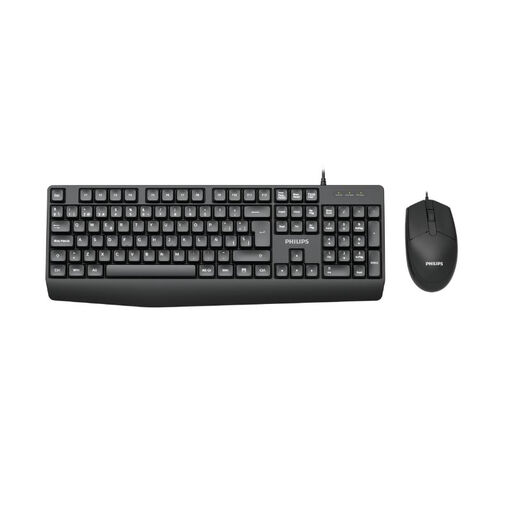
PHILIPS SPT6237B/26 wired set
Could be suitable for entering details in German if you’re looking for a wired keyboard and mouse.
The product description lists the German version. Check the exact key layout and connection type of the version on offer to make sure they suit your number entry and screen reader needs.
Joybuy
Frequently asked questions
Do I need a number pad to use NVDA?
No. NV Access describes a desktop keyboard layout that assigns certain functions to the number pad, and a laptop layout that assigns those functions to other keys. What matters is which layout you actually use.
What should I test first after connecting the keyboard?
Use your screen reader to test the shortcuts you need, including the modifier key, Tab, the arrow keys and, if applicable, the number pad. Logitech describes the K120 as a USB keyboard that needs no additional set-up; that alone doesn’t tell you how well it works with your directory software.
Who should I contact if there’s a fault?
For a consumer purchase in Germany, the seller is generally responsible for the statutory warranty. This is separate from a voluntary manufacturer’s warranty. The Verbraucherzentrale says that, as a general rule, newly purchased goods are covered for two years from delivery or receipt. The rights available depend on the circumstances of each case.
Does the BFSG require special labelling for every keyboard bought individually?
You can’t infer a blanket labelling requirement for every keyboard sold separately. The German Federal Ministry of Justice and the Federal Office of Justice list certain product categories in the BFSG, including hardware systems for general-purpose computers placed on the market after 28 June 2025. Whether the rules apply depends on the specific product and how it is sold. The German Federal Government’s Accessibility Centre also lists computers as a covered product category.


