Which keyboard is right for you?

Considerate typing at a shared desk

If you’re putting together a photo gallery within earshot of other people, size and typing noise may matter more than extra features. CHERRY describes the keystroke on the STREAM KEYBOARD TKL as quiet; this is not a comparative noise measurement.

A gallery with lots of repetitive tasks

If you often use the same commands while reviewing and organising images, check whether customisable keys will work with your image-editing software and the shared computer. Logitech and Keychron describe these features on certain models.

Long typing sessions

If you write lots of captions or metadata, consider the key layout and your hand position. A split keyboard can offer a different typing position, but may take some getting used to.

What should you look for when buying?

Compact wired keyboard

A good fit if: you use a fixed computer and want to leave room for your mouse beside the keyboard.

The trade-off: A TKL model has no number pad, and you’ll need a suitable cable port.

Wireless model with customisable keys

A good fit if: you switch between devices or want to assign keys to recurring tasks.

The trade-off: Customisation depends on having the right software and the necessary permissions on the shared computer.

Split keyboard

A good fit if: you’d like to try a different hand position during longer typing sessions.

The trade-off: The layout may take some getting used to; a product description does not prove any health benefits.

Compact mechanical keyboard

A good fit if: you want to customise the key layout and are able to configure it at your workstation.

The trade-off: Layouts and switches vary by model; check how the specific keyboard feels to type on.

What matters What to check before buying Who is it important to?
Typing noise Check the switch type and details for the specific model; try the typing sound and feel for yourself if possible. If you’re choosing a keyboard while sharing a desk and writing captions, you’ll want typing to be as unobtrusive as possible. Around 33% of consumers put quiet typing first.
Repeated commands Check the keyboard shortcuts for your image-editing software, customisable keys, supported operating system and permission to install software. If you often repeat the same steps while creating a gallery, suitable key assignments can save time. Around 27% of consumers prioritise repetitive inputs.
Space for your mouse and keyboard Check which number and function keys you need, along with the keyboard’s dimensions and the space left for your mouse. If you’re working on a shared desk, you’ll want to find a suitable place for both your keyboard and mouse. Around 20% of consumers put available space first.
Switching between devices Check how many devices you need to use, their operating systems and which wireless connections are permitted. If you edit your gallery on several computers or mobile devices, being able to switch between them can be useful. Around 13% of consumers prioritise this feature.
Hand position Try the keyboard, measure your desk space and consider the overall position of your screen and input device. If you write captions for long periods, the keyboard layout should suit your hand position. Around 7% of consumers give this the highest priority.

Pitfalls to avoid when buying a keyboard

  • A German-language shop doesn’t automatically mean a German keyboard layout

    A listing may show an English US layout with a euro sign. For German captions, the key labels and layout are what matter.

    Before buying, check the layout details for the specific model rather than assuming it has a DE-QWERTZ layout.

  • Don’t assume compact means suitable for every way of working

    A TKL model has no number pad, while a split keyboard changes the familiar typing layout.

    Choose based on the keys you actually need, your desk space and whether you can try out the hand position.

Key keyboard brands at a glance

CHERRY

The STREAM KEYBOARD TKL is a space-saving wired scissor-switch keyboard. The STREAM model with a number pad is another option.

  • CHERRY describes the keystroke on the TKL model as quiet.
  • The TKL model has no number pad. Check the layout of the specific listing.

Logitech

According to Logitech, the MX Keys S has customisable keys and backlighting. The Signature Slim K950 is designed for switching between devices and customising the F-keys.

  • These features are based on the manufacturer’s specifications and may be useful for repetitive inputs or working with multiple devices.
  • Customisation depends on your system and software permissions. Features listed for one model don’t automatically apply to the other.

Perixx

The PERIBOARD-413B is a wired option with a split keyboard layout.

  • The split layout offers a different typing position that you can try during longer typing sessions.
  • Consider the time it may take to get used to and the depth of desk space required. A product description does not prove any health benefits.

Keychron

The K3 Max is a compact mechanical keyboard with a customisable layout.

  • Keychron lists a 75% layout, several connection options and QMK/VIA for the K3 Max.
  • Layouts and switches vary by model. Check the specific DE-ISO version and how it feels to type on.

Dell

Dell lists the Pro Plus keyboard KB700 in a German QWERTZ version with a number pad.

  • Dell lists Bluetooth, wireless connectivity and quiet keys for this version.
  • The full-size layout takes up more width than a TKL model; these details don’t automatically apply to other Dell keyboards.

Keyboards for photo galleries at Joybuy

This selection includes compact or foldable keyboards, as well as models for switching between devices and customising inputs. For German captions, the layout of the specific model matters. Customisation features may require software and the relevant permissions.

Foldable Bluetooth keyboard with wireless mouse

Foldable Bluetooth keyboard with wireless mouse

The foldable design could be a good fit if you want to save space at a shared desk and pack the keyboard away compactly when you’ve finished typing.

Quiet scissor keys; Bluetooth, 2.4 GHz wireless and USB-C charging; connects to up to three devices. According to the product description, the keyboard unfolds for typing and then provides a full-size typing area. Compatible systems listed include Windows, Android and iOS.

View at Joybuy

Ticktype EVO75, mechanical keyboard with ISO-DE layout

Ticktype EVO75, ISO-DE, 75%

The compact ISO-DE layout may suit a smaller desk and German text input, provided you can customise the keys on the shared computer.

Tri-mode mechanical keyboard; hot-swappable and VIA-compatible. According to the product description, customising keys and macros requires driver software.

View at Joybuy

Logitech MX Mechanical with German QWERTZ layout

Logitech MX Mechanical, German QWERTZ layout

If you switch between several devices and want to customise repetitive inputs, check that you’re allowed to use the software at your workstation.

Tactile Quiet switches; Bluetooth and Logi Bolt; Easy-Switch for up to three devices. The product description lists customisable shortcuts through Logi Options+.

View at Joybuy

Rapoo E9050L 75, wireless membrane keyboard with US QWERTY layout

Rapoo E9050L 75, US QWERTY

This compact multi-device model could suit you if you need to save space and switch between devices. If you’re writing German captions, make sure you take the US layout into account.

78-key membrane keyboard; 2.4 GHz wireless and Bluetooth 5.0/4.0; connects to up to four devices. The product details specify a US QWERTY layout.

View at Joybuy
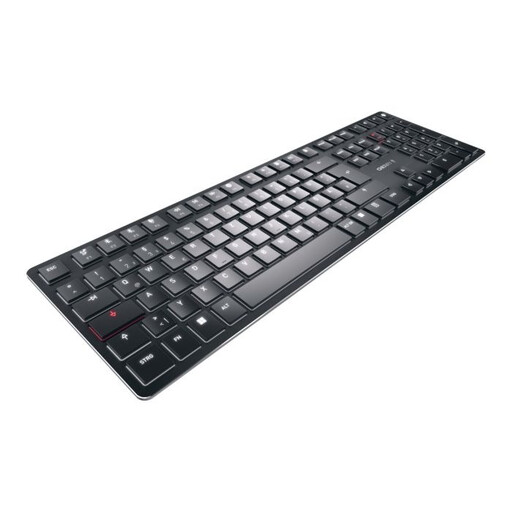
CHERRY KW X ULP, mechanical keyboard with US layout

CHERRY KW X ULP, US layout

Before buying, check that the English key labels and lack of a number pad suit your captions and workflow.

The product name describes a mechanical keyboard with tactile MX switches, multi-device functionality and white backlighting. The listed layout is English (US).

View at Joybuy

Frequently asked questions about keyboards for shared desks

Do I need special macro keys to organise a photo gallery?

Not necessarily. Start by checking the keyboard shortcuts in your image-editing software. Customisable keys are most useful if you repeat the relevant steps often and are allowed to configure them on the computer.

What should I bear in mind when connecting a keyboard at a shared desk?

For a wired keyboard, check that there’s a suitable port free. For a wireless model, check that wireless connections are allowed at your workstation. If you want to use customisation software, confirm that you’re allowed to install it before making this feature a reason to buy.

What should I consider for care and extended use?

Consider the overall position of your screen and input device, and follow the care and cleaning instructions for the model you buy. The German Federal Institute for Occupational Safety and Health (BAuA) sets out requirements for screen-based work within the scope of ASR A6.

Who can help if the keyboard develops a fault after purchase?

If a product is faulty, your statutory rights against the seller are separate from any voluntary manufacturer’s guarantee; the first step may be to ask the seller to put things right. The Verbraucherzentrale explains the difference in an article dated 28 September 2026. It also notes that online purchases generally come with a 14-day right to cancel (article dated 13 August 2026); conditions and exceptions depend on the circumstances.

Are there any specific requirements for a keyboard at a shared workstation?

If it’s a screen-based workstation for employees, the employer is responsible for ensuring it is set up safely and ergonomically. ASR A6, published by the German Federal Institute for Occupational Safety and Health in July 2024, sets out requirements under the Workplace Ordinance within its scope; it does not mean that one particular keyboard model is required for an unspecified gallery desk.