Which keyboards matter to different users

Photographers with lots of images

If you regularly review and organise photos, easily accessible keys or suitable shortcuts can make repetitive inputs easier. Adobe describes ratings, flags and colour labels as possible steps in Lightroom Classic; customisable inputs are also available on certain Logitech and Keychron models.

Creatives with limited desk space

If you often switch between your keyboard and mouse when selecting photos, a shorter keyboard can leave more room for your mouse. BG BAU recommends compact keyboards particularly when mouse use takes priority and you only need to enter numbers occasionally.

Frequent typists working from home

When writing longer image descriptions or gallery captions, the key layout may matter for your preferred hand position. Perixx offers a split keyboard, but the design alone doesn’t show that it will have a health benefit for any particular person.

What to look for when buying

What matters when buying What to look for Who it matters most to
Key layout and repetitive inputs Check the German layout, the keys you use most often, and the software requirements for macros or customisable functions. If I use ratings, flags or repetitive commands when selecting photos, I want to be able to reach the right keys quickly. Around 37% of consumers put shortcuts and inputs first.
Room for your mouse Compare the width of the specific keyboard with your desk, and check whether the number and navigation keys will be enough without a separate number pad. BG BAU highlights compact keyboards for people who mainly use a mouse and enter few numbers. If I select lots of photos with my mouse, I want to be able to position it comfortably next to the keyboard. Around 27% of consumers prioritise room for their mouse.
Hand position during longer typing sessions Check the layout and dimensions of a split keyboard, and whether you can try it before buying. The design alone doesn’t prove that it will have a health benefit for you personally. If I write longer gallery captions, I want to find a key layout that suits my preferred hand position. Around 18% of consumers prioritise hand position.
Connectivity and switching between devices For each computer, check the available ports, Bluetooth or wireless receiver, and support for any additional features you need. CHERRY lists several connection options for the KW 9200 MINI; that doesn’t automatically mean it’s compatible with every device. If I edit galleries on several compatible devices, I want to be able to switch connections without having to unplug and reconnect each time. Around 18% of consumers prioritise switching between devices.

Buying details that are easy to overlook

  • ‘Programmable’ doesn’t mean every extra feature works on every system

    Connecting the keyboard and having access to configuration software are two different requirements. Logitech describes Smart Actions through Logi Options+; according to Perixx, the downloadable configuration software for the PERIBOARD-335 is limited to Windows.

    Check the feature you want and its software requirements separately from basic keyboard connectivity.

  • Don’t choose a compact layout based on space savings alone

    A shorter keyboard can be practical when selecting photos involves lots of mouse use, but it won’t suit everyone if they often need number or navigation keys.

    Compare your regular inputs with the specific key layout before giving up an integrated number pad.

  • Similar model names can have different layouts or contents

    A German layout and another ISO layout aren’t automatically the same. A keyboard and mouse bundle is also a different offer from a keyboard sold on its own.

    Check the full model name, layout, switches and contents for the specific offer.

Useful brands to help you choose

Logitech

The MX Keys S is a slim, full-size keyboard with backlighting and customisable features, which Logitech describes through Logi Options+.

  • Could be worth considering for repetitive inputs and longer gallery captions, if the features you want are supported on your computer.
  • Its full-size layout takes up more desk space than a compact keyboard; check extra features separately from basic system support.

CHERRY

The KW 9200 MINI is a compact DE version. CHERRY lists Bluetooth, 2.4 GHz and wired connections.

  • Multiple connection options can be useful if you switch between compatible devices.
  • Check that the compact key layout suits the commands and number inputs you use most often.

Perixx

The PERIBOARD-335 is a wired, split mechanical keyboard for people who want to try a different hand position during longer typing sessions.

  • Perixx lists different switches and layouts, as well as the option to set up macros directly on the keyboard.
  • According to Perixx, the downloadable configuration software is limited to Windows. The split design alone doesn’t prove that it will have a health benefit.

Keychron

The K8 Pro is available in a German ISO version; the brand describes customisable keys and hot-swap options.

  • Could be of interest if you want to choose the layout and switch type to suit your needs.
  • Check the layout, switches, keycaps and hot-swap configuration of the specific version. Information about a UK version doesn’t automatically confirm the price or availability of the DE-ISO version.

Keyboards for selecting photos and writing gallery captions

These Joybuy products include compact keyboards and models with a German layout and customisable inputs. Before buying, check that the layout, connections and extra features suit the way you work.

Inateck KB01003G Bluetooth keyboard with QWERTZ layout

Inateck KB01003G Bluetooth keyboard, QWERTZ

The QWERTZ layout and listed shortcuts may be useful for German gallery captions and frequent inputs.

The product details list Bluetooth and switching between up to three devices. Check that the keyboard works with your devices and the features you need.

Joybuy
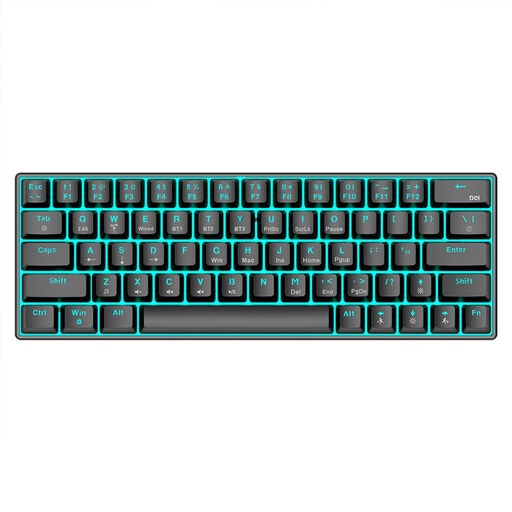
KINSI compact mechanical keyboard with 63 keys

KINSI compact mechanical keyboard, 63 keys

The 63-key layout may suit mouse-heavy work when space is limited; first check that the layout works for the inputs you use regularly.

Listed features include Bluetooth 5.0, 2.4 GHz wireless and USB wired operation. The product name also mentions RGB lighting.

Joybuy

Ticktype EVO75 with ISO-DE layout and customisable keys

Ticktype EVO75, ISO-DE, hot-swap

The ISO-DE layout is listed for German gallery captions; VIA compatibility may be useful for customising repetitive inputs.

The product details list three connection modes and hot-swap support. Check the software requirements for your devices.

Joybuy

AJAZZ AK35I V4 with German QWERTZ layout and number pad

AJAZZ AK35I V4, German QWERTZ layout

The full-size German QWERTZ layout with a separate number pad could suit you if you often enter text and numbers as well as selecting photos.

Listed features include 104 keys, Bluetooth, 2.4 GHz wireless and USB-C wired operation. Check which of these connections your computers support before buying.

Joybuy

Logitech MX Mechanical with German QWERTZ layout

Logitech MX Mechanical, German QWERTZ layout

The German layout and customisable shortcuts may be useful for longer typing sessions and repetitive tasks.

The product details list Bluetooth, Logi Bolt and switching between up to three devices. Check that Logi Options+ and the features you want are compatible with your system.

Joybuy

Frequently asked questions

Do I need a special keyboard for a photo gallery?

No, you don’t necessarily need a special photo gallery keyboard. Adobe describes ratings, flags and a workflow for web photo galleries in Lightroom Classic. Check the shortcuts for the software you actually use, then decide whether customisable keys would be useful for you.

How should I position my keyboard and mouse on my desk?

Position them to suit the hand movements you make most often. BG BAU recommends compact keyboards particularly for people who mainly use a mouse and enter few numbers; this guidance can’t guarantee a position that suits you personally.

What should I check before buying a wireless or wired keyboard?

For the specific version, compare the available connections, the port you need and what’s included. For wireless models, check whether your computer supports Bluetooth or the supplied receiver; for wired models, make sure you have a compatible port.

Can I return a keyboard ordered online?

For online consumer purchases in Germany, you generally have a 14-day right to cancel. According to the Verbraucherzentrale, the period usually starts when the contract is made or when the goods are received. Notify the seller that you wish to cancel and check the terms of your specific purchase.

What applies to wireless keyboards and disposing of an old device?

Wireless devices are covered by the EU legal framework for radio equipment. The European Commission describes the CE marking as the manufacturer’s declaration that relevant EU requirements have been met; it isn’t an independent quality mark. A discarded keyboard should be taken to an electrical and electronic equipment recycling point. Which retailers are required to accept it depends on the legal requirements; the Verbraucherzentrale also lists local collection points.