Instruction writers
If you write detailed, step-by-step setup instructions, a familiar layout with easy-to-reach keys can help keep your writing flowing. For German-language content, it’s worth checking the exact German keyboard layout.


For longer printer instructions, a familiar German keyboard layout is a practical starting point. It’s also worth looking for keys that are easy to reach during your writing and review process. A split layout may be worth considering for long writing sessions, while a compact, configurable keyboard could suit a smaller desk. Change tracking itself is a feature of your word-processing software: in Word, you review changes there and accept or reject them.
If you write detailed, step-by-step setup instructions, a familiar layout with easy-to-reach keys can help keep your writing flowing. For German-language content, it’s worth checking the exact German keyboard layout.
For longer writing sessions, consider not just the shape of the keyboard but how your whole desk is set up. A split layout is one design option that differs from a conventional key arrangement.
If you often switch between writing and making corrections and have limited space, pay particular attention to the layout of the navigation and function keys. A configurable key layout may be useful if you want to set up your own shortcuts.
A good fit if: you prefer a familiar keyboard and easily accessible navigation keys for writing lengthy instructions. CHERRY describes the KC 6000 SLIM as a full-size keyboard with scissor switches and six additional keys.
Consider: CHERRY says this model requires USB-A and doesn’t have a split key layout.
A good fit if: you’d like to compare a split key layout for longer writing sessions. Logitech describes the ERGO K860 as a split keyboard; Perixx lists a German QWERTZ layout for the PERIBOARD-512 B.
Consider: The different layout may take some getting used to. Perixx recommends allowing time to adjust; also check the space it needs and how it connects.
A good fit if: you have limited desk space and want to customise the keys. Keychron describes the K3 Pro as a 75% layout with VIA support; a DE-ISO version is available to select.
Consider: Check your chosen layout and switch option, and make sure the key arrangement suits the way you switch between writing and reviewing.
| Buying priority | What should you look for? | Who is it important for? |
|---|---|---|
| Familiar layout | Check the exact DE version and the position of the keys you use most often. | When I’m writing a series of steps, I want to use the familiar German layout rather than learn a different key arrangement first. Around 36% of consumers put a familiar layout first. |
| Comfort during long writing sessions | Compare the split design, wrist rest, dimensions and connection with your workspace. | When I’m writing longer texts, I want to choose a keyboard that suits my desk; the rest of my workspace setup matters too. Around 29% of consumers prioritise typing comfort during longer sessions. |
| Ease of use when reviewing | Check the position of the navigation and function keys; for configurable models, check the version you’ve selected too. | When I’m editing, I often switch between the text and corrections, so I want the keys I need to be easy to reach or customise. Around 21% of consumers put ease of use when reviewing first. |
| Connection and switching between devices | Check that USB-A, Bluetooth or a receiver is compatible with your computer and included with the specific model. | When I want to connect my keyboard to a particular computer or workspace, choosing the right connection is essential. Around 14% of consumers prioritise connectivity and device setup. |
The CHERRY KC 6000 SLIM has a country-specific product number. The Keychron K3 Pro is available in different ISO layouts, so the model name alone doesn’t tell you which version is in your basket.
Before buying, check the exact DE version you’ve selected and the operating system requirements. CHERRY lists JK-1600DE-2 as the German product number for the KC 6000 SLIM.
A split keyboard changes the key layout and may take some getting used to. For work involving screen-based tasks, the design of your entire workstation matters too.
Allow space and time to adjust. If you’re using it for work, consider your whole workstation setup as well; a keyboard alone can’t replace this assessment.
Microsoft Support explains that the ‘No Markup’ view only hides changes temporarily. It doesn’t accept or reject them.
Review the changes in the document and accept or reject them individually before sharing the updated instructions.
For this kind of work, a split keyboard and a more conventional model with a wrist rest are both worth considering.
The KC 6000 SLIM is a slim, full-size keyboard for a permanent writing space.
The PERIBOARD-512 B is a wired split keyboard with a German QWERTZ layout available to select.
The K3 Pro is a compact, configurable option if you want to customise your key layout.
This Joybuy selection includes keyboards with a German QWERTZ or ISO-DE layout, as well as models suited to different workspaces and ways of working.
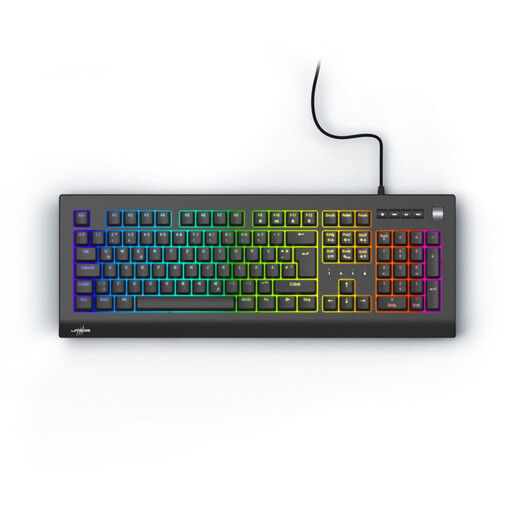 No image available
If you’re looking for a German keyboard layout for longer instruction documents, QWERTZ DE is a useful feature to look for.
The product name describes a mechanical keyboard with red switches.
 No image available
If you want a German layout and customisable keys, this model may be worth considering. Check whether its compact layout suits the way you work through corrections.
The product name lists tri-mode wireless, VIA compatibility and hot-swap. Check the details for the specific version.
 No image available
If you want a familiar German layout for longer texts, the product name specifies German QWERTZ.
The product name lists a wired keyboard, USB Plug & Play, full size and Windows compatibility.
 No image available
If you’d like to compare a split key layout for longer writing sessions, this model is one option; it doesn’t guarantee a particular benefit for you.
The product name lists Bluetooth, a USB receiver and compatibility with Windows and Mac.
 No image available
If you want to compare a QWERTZ layout and different connection options for German-language instructions, see how this model fits your workspace.
The product name lists Bluetooth, 2.4G and USB-C connection options, as well as compatibility with Windows and Mac.
No. Word provides change tracking and the commands to accept or reject changes. Choose a keyboard that suits the way you use these features; you decide what to do with each change in the document.
Check the operating system, available connection and exact layout version. CHERRY lists Windows and USB-A for the KC 6000 SLIM; Logitech specifies Bluetooth Low Energy or the included Logi Bolt receiver for the Signature K650.
Follow the care instructions for the specific model. Bitkom advises against using harsh substances and recommends keeping liquids out of the keyboard.
For new goods, the retailer is generally responsible for defects that were present when the goods were handed over. The Verbraucherzentrale explains that this period is two years and distinguishes statutory consumer rights from a voluntary guarantee. For purchase contracts from 31 July 2026, it also lists additional rules if you choose a repair.
ASR A6 sets out requirements for screen-based workstations in workplaces and for teleworking workplaces within its scope. The Federal Institute for Occupational Safety and Health says it doesn’t apply automatically to every private desk. For a work workstation, you should assess the whole setup, not just one keyboard model.